Specifying Common Settings
4-93
4
Customizing Settings - Common Settings
Limiting Functions
If a problem frequently occurs when using the Finisher modes, such as Offset
Collate and Staple, you can temporarily limit the use of these finishing modes by
setting Limited Functions Mode to 'On'.
In addition, when the Service Call Message screen appears indicating a finishing
mode malfunction, you can clear the Service Call Message screen by setting
Limited Functions Mode to 'On'. However, after the Limited Functions Mode is
deactivated, the Service Call Message screen may appear again, unless the cause
of the malfunction is cleared. (See "Service Call Message," on p. 9-83.)
IMPORTANT
[Limited Functions Mode] is displayed only if an optional finisher is attached.
NOTE
The default setting is 'Off'.
1
Press (Additional Functions) ➞ [Common Settings].
If necessary, see the screen shot in step 1 of "Initial Function at Power ON," on p.
4-24.
2
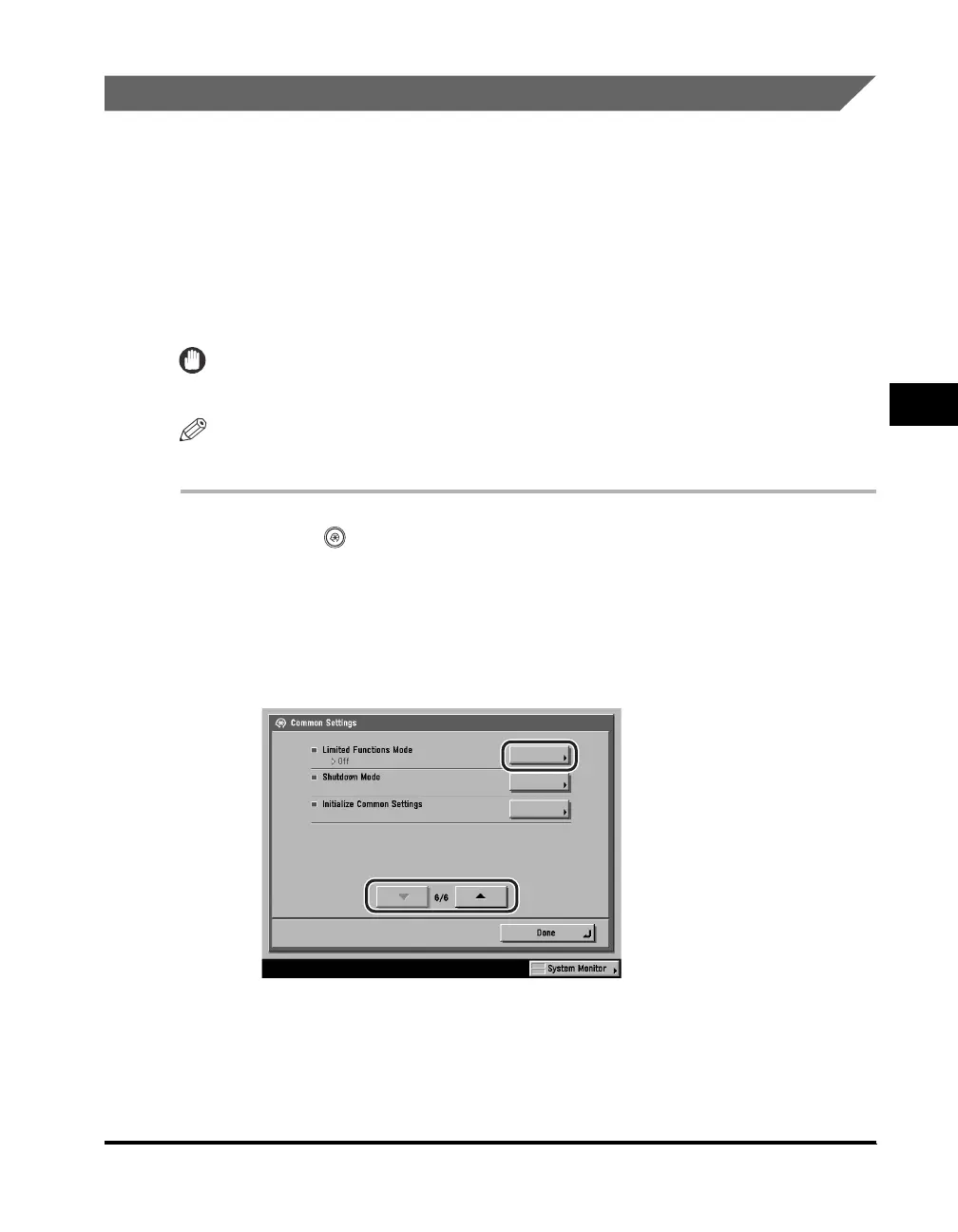
Press [▼] or [▲] until [Limited Functions Mode] appears ➞
press [Limited Functions Mode].





 To Next Page