m
Ejection Guide
Supports output paper.
n
Top Cover
Open this cover to install the Printhead and remove any jammed paper from inside the printer, as needed.
(See "Top Cover (Inside).") ➔P.58
o
Width Guide
When loading the sheets , move the guide to match the paper size.
p
Stand (Optional)
A stand that holds the printer. Equipped with casters to facilitate moving it. (See "Stand.")
➔User's Guide
Note
• The Stand is normally offered as an optional accessory, but it may be provided as a standard accessory in some
sales regions.
Side
Side
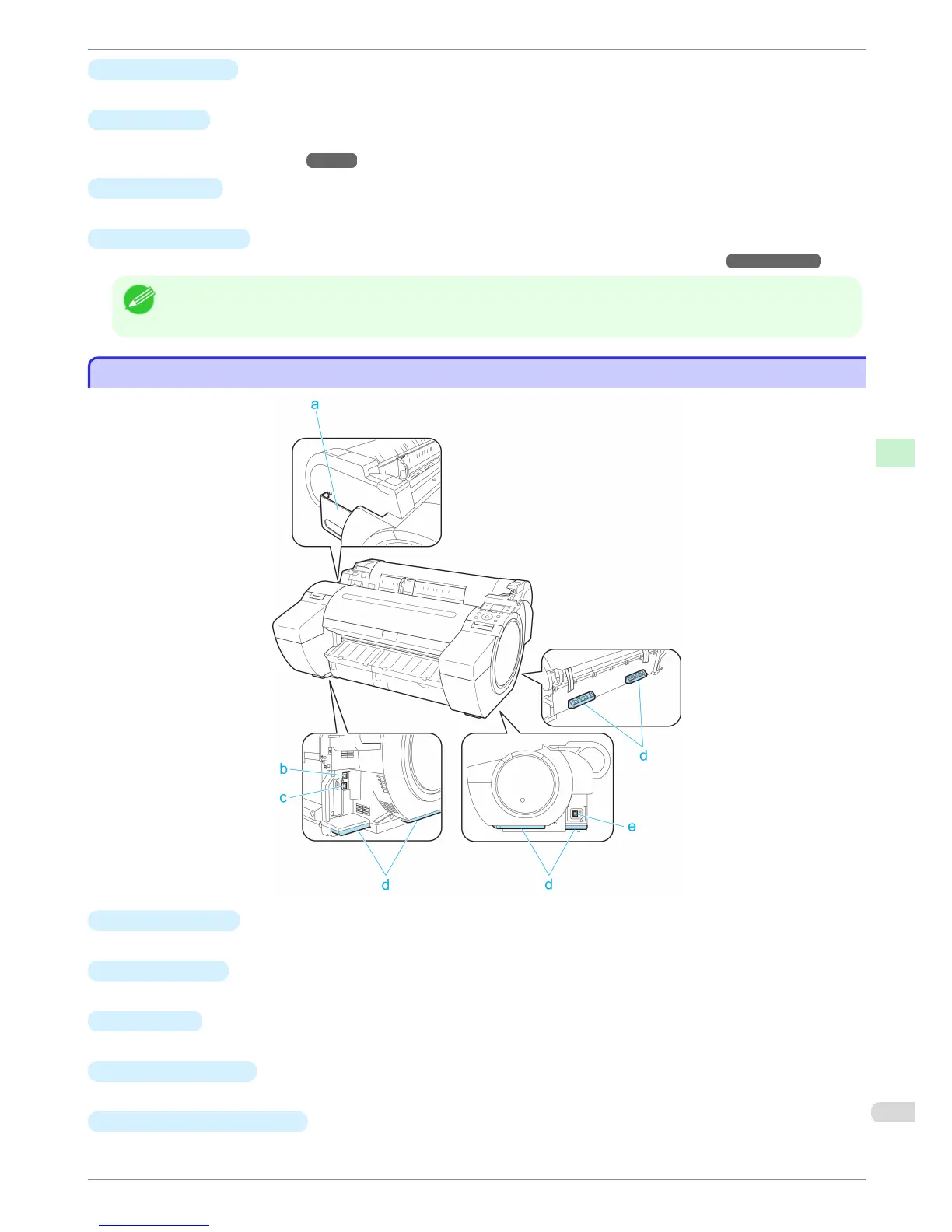
a
Manual Pocket
Store printer manuals in this pocket.
b
Ethernet Port
Connect an Ethernet cable to this port.
c
USB Port
Connect a USB cable to this port. The printer is compatible with Hi-Speed USB connections.
d
Carrying Handles
When carrying the printer, have three people hold it by these handles on the back at both ends.
e
Power Supply Connector
Connect the power cord to this connector.
iPF680 Series
Side
Basic Guide
Printer Parts Printer parts
57


 To Next Page
 Loading...









