Chapter 1
1-35
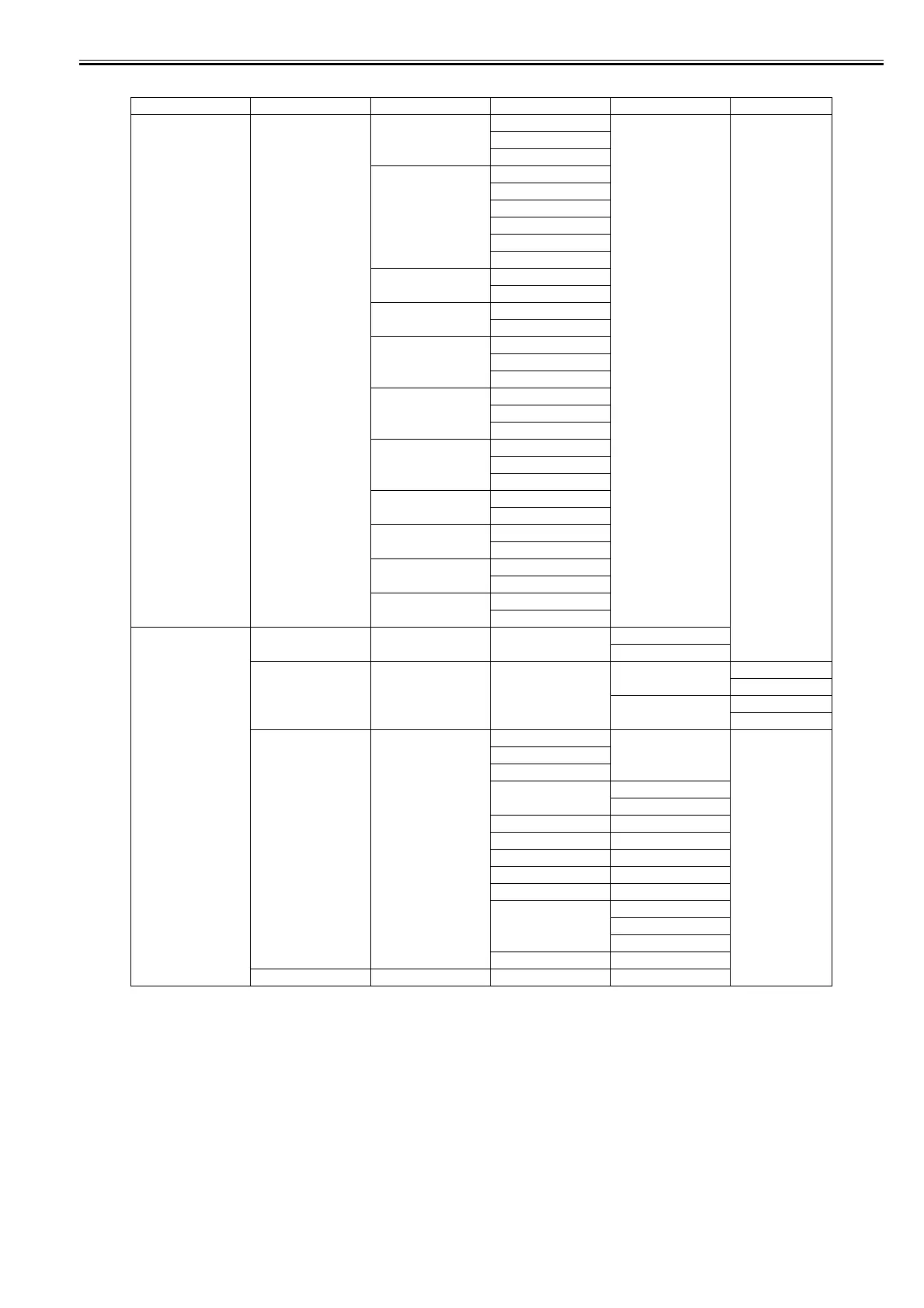
T-1-11
First Level Second Level Third Level Fourth Level Fifth Level
[Paper Details] (The paper type is
displayed here.) (*5)
[Skew Check Lv.] [Standard]
[Loose]
[Off]
[VacuumStrngth] [Automatic]*
[Strongest]
[Strong]
[Standard]
[Weak]
[Weakest]
[Width Detection] [Off]
[On]
[NearEnd RollMrgn] [3mm]
[20mm]
[Cut Speed] [Fast]
[Standard]
[Slow]
[Trim Edge First] [Automatic]
[Off]
[On]
[Cutting Mode] [Automatic]
[Eject]
[Manual]
[Bordless Margin] [Automatic]
[Fixed]
[CutDustReduct.] [Off]
[On]
[NearEnd Sht Mrgn] [3mm]
[20mm]
[Return Defaults] [No]
[Yes]
[Job Management] [Print Job] [Job List] (Choose a print job) [Delete]
[Preempt Jobs]
[Stored Job] [Mailbox List] (Enter a password if one
has been set.)
[Job List] [Print]
[Delete]
[Print Job List] [No]
[Yes]
[Job Log] (Choose from information
about the latest three print
jobs.)
[Document Name]
[User Name]
[Page Count]
[Job Status] [OK]
[CANCELED]
[Print Start Time] [yyyy/mm/dd hh:mm]
[Print End Time] [yyyy/mm/dd hh:mm]
[Print Time] [xxx sec.]
[Print Size] [xxxxxxxxsq.mm]
[Media Type]
[Interface] [USB]
[Network]
[IEEE1394]
[Ink Consumed] [xx.x ml]
[HDD Information] [HDDSpace]: xx.xGB



 To Next Page