28
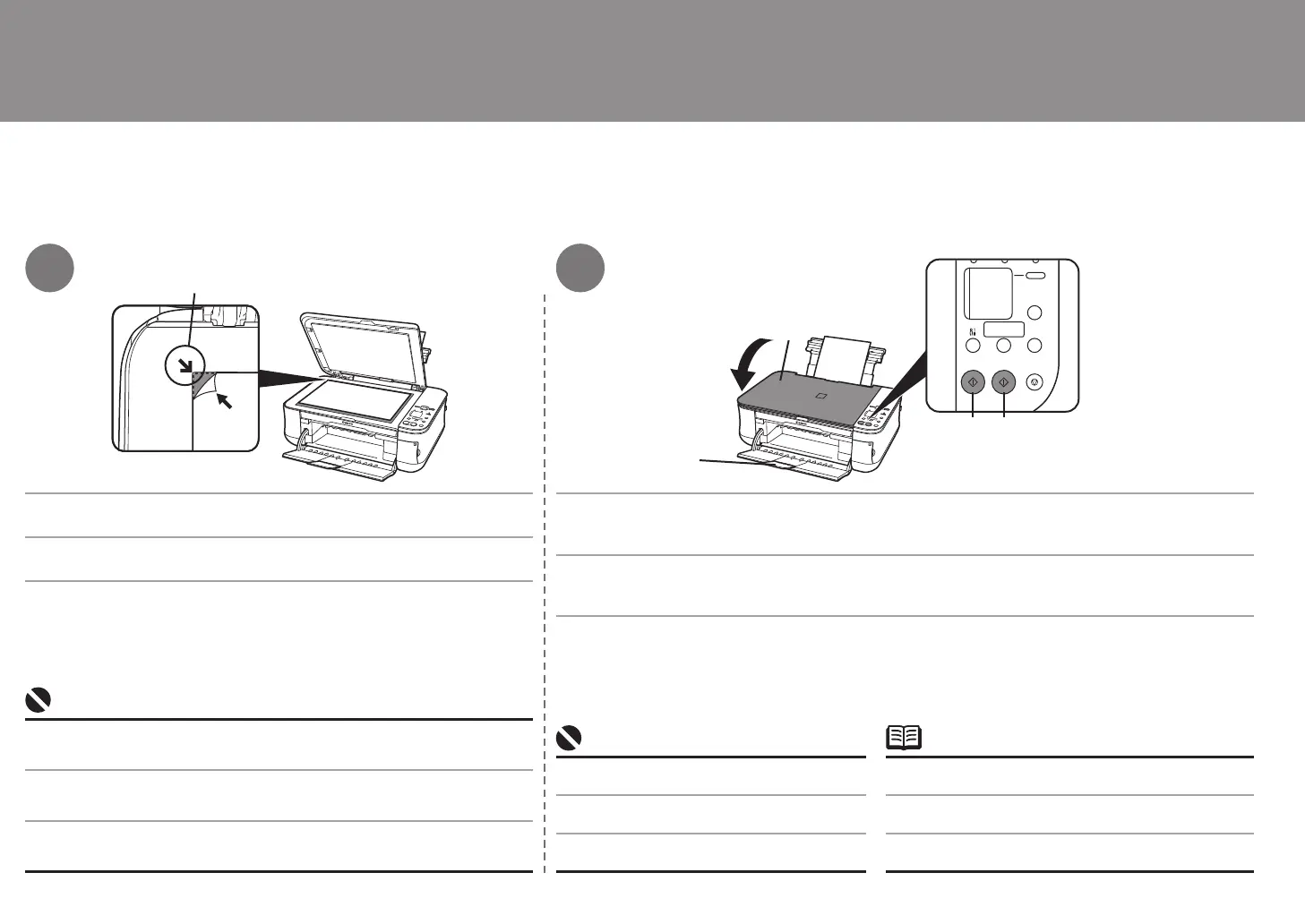
(B)
(A)
(E)
(C) (D)
3
4
무게가 4.4lb/2.0kg을 초과하는 물체를 평판 유리 위에 올려 놓지 마십시오.
원본에 4.4lb/2.0kg 을 초과하는 하중을 가하지 마십시오 .
이렇게 하면 스캐너가 고장을 일으키거나 평판 유리가 깨질 수 있습니다 .
•
•
請勿在原稿玻璃上置放任何重量超過 4.4lb/2.0kg 的物件。
請勿用超過 4.4lb/2.0kg 的壓力向下按或放置超過此壓力的重物到原稿上。
這樣做可能會使掃描器發生故障或導致原稿玻璃破裂。
•
•
Do not place any objects weighing more than 4.4 lb / 2.0 kg on the Platen Glass.
Do not press or put weight on the original with pressure exceeding 4.4 lb / 2.0 kg.
Doing so may cause the scanner to malfunction or the Platen Glass to break.
•
•
문서를 복사면이 아래로 향하도록 올려 놓고 정렬 표시(B)와 맞춥니다.
복사가 시작됩니다.
문서 커버(A)를 닫은 다음 흑백 복사에는 흑백 버튼(C)을 누르고 컬러 복사에는 컬러 버튼(D)을 누릅니
다.
출력 확장 트레이(E)가 확장되었는지 확인합니다.•복사가 완료될 때까지 문서 커버를 열지 마십시오.•
복사 해보기
將文件面向下放置並使其與對準標記 (B) 對齊。
影印開始。
關閉文件蓋板 (A),然後按一下黑色按鈕 (C) 進行黑白影印,或按一下彩色按鈕 (D) 執行彩色影印。
確保出紙托盤擴展架 (E) 已擴展。
•
請勿開啟文件蓋板直至影印完成。
•
嘗試影印
Place the document face-down and align it with the Alignment Mark (B). Close the Document Cover (A), then press the Black button (C) for black & white copying, or the
Color button (D) for color copying.
Copying will start.
Make sure that the Output Tray Extension (E) is extended.•Do not open the Document Cover until copying is
complete.
•
Try Copying



 To Next Page