Specifications
Appendix Specifications
A-9
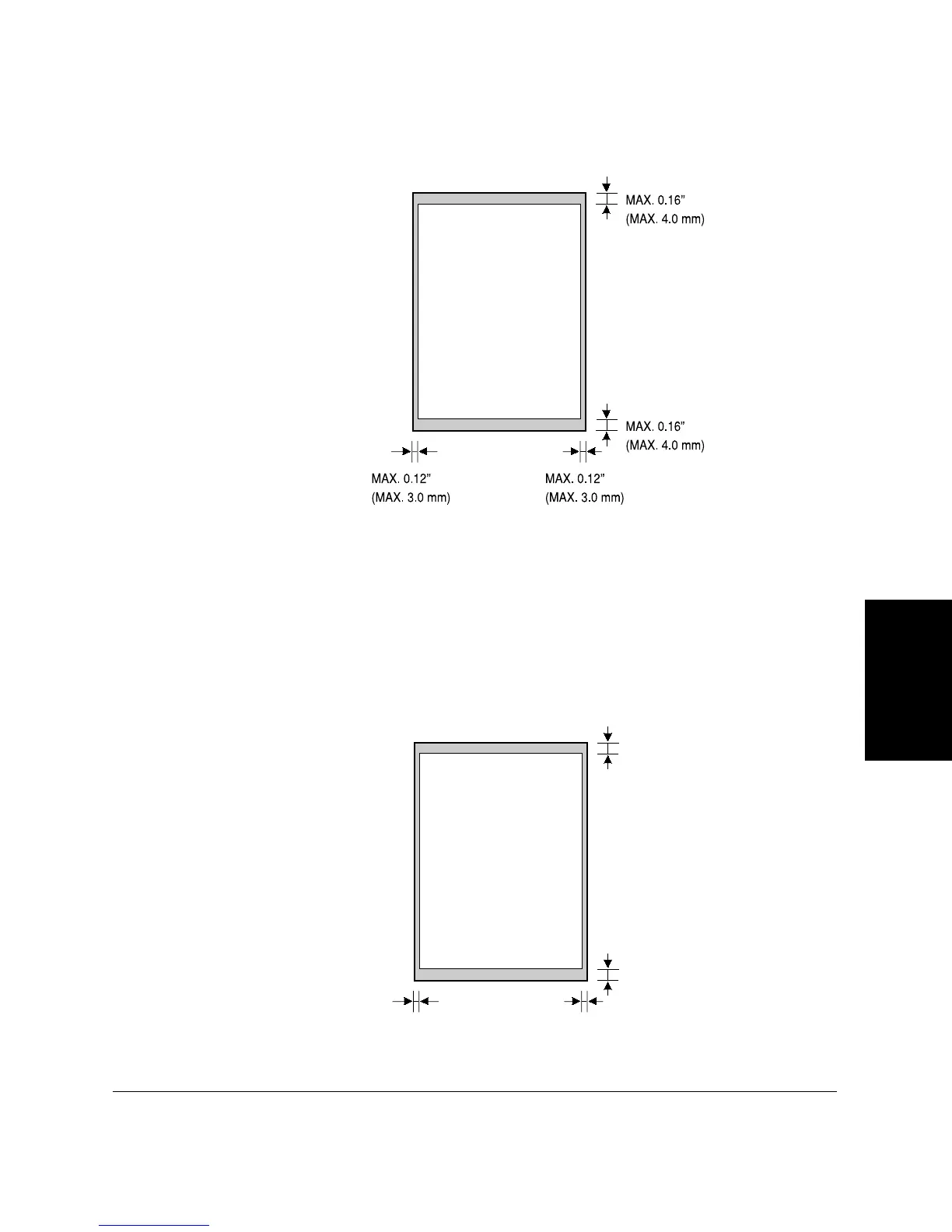
The figure below shows how much of a letter-, legal-, or A4-size
document the LASER CLASS 2060P scans when faxing or scanning.
The margins of 0.12 in. (3.0 mm) on either side of the sheet and 0.16 in.
(4.0 mm) on the top and bottom are outside the LASER CLASS 2060P’s
scanning area.
Printing Area
Note that the unit cannot print completely from the edge of one border to
another. The size of the margin differs slightly with the paper size.
LETTER/LEGAL/A4
LEGAL:MAX. 0.41”(MAX. 10.5mm)
LETTER,LEGAL:
MAX.0.28”
(
MAX.7.0mm)
LETTER,LEGAL:
MAX. 0.24”
(
MAX. 6.0mm)
A4:MAX. 0.16”(MAX. 4.0mm) A4:MAX. 0.20”(MAX. 5.0mm)
A4,LETTER:MAX.
0.39”(MAX. 10.0mm)
MAX. 0.16”(MAX. 4.0mm)
LETTER/LEGAL/A4









 To Next Page