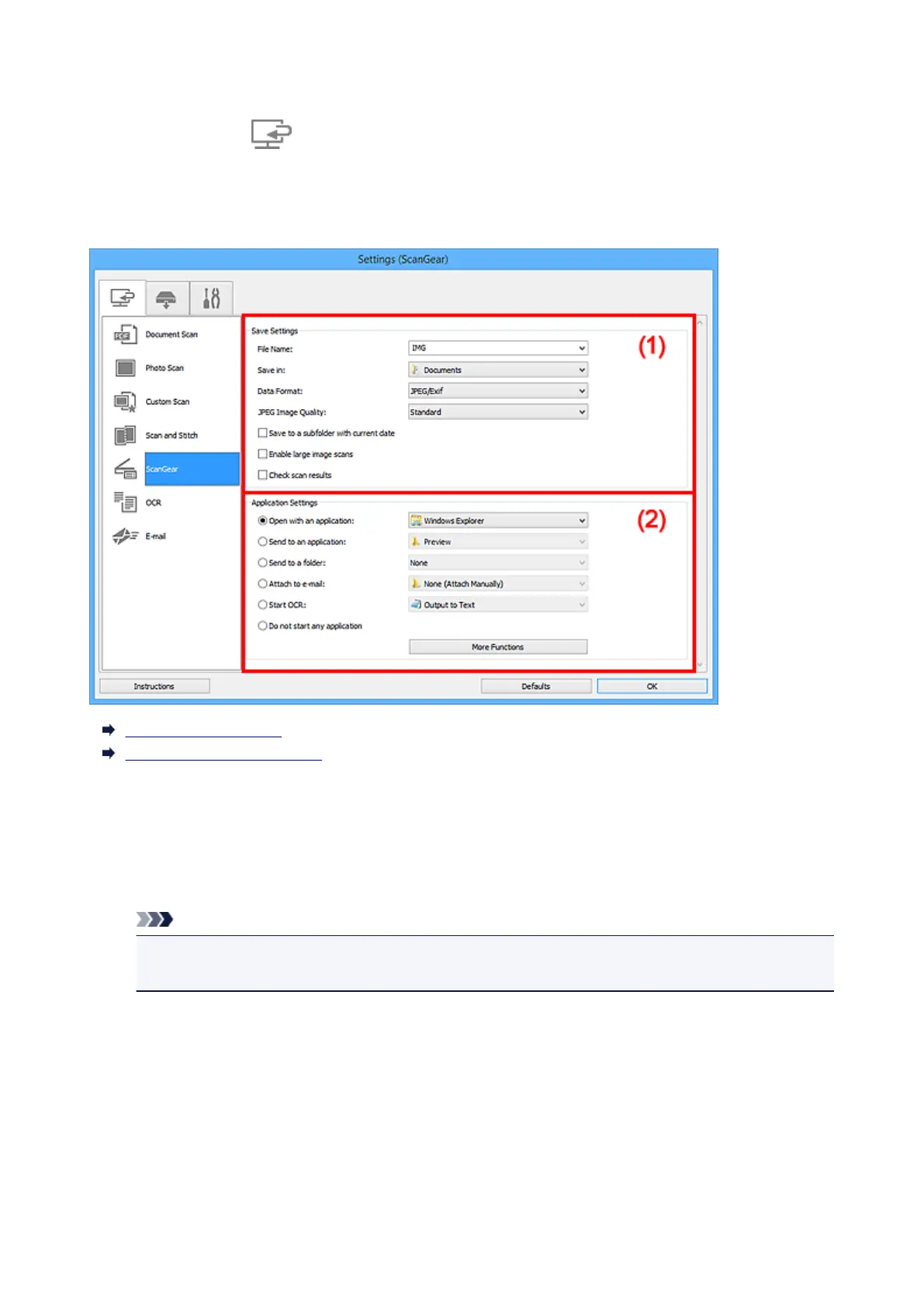
Settings (ScanGear) Dialog Box
Click ScanGear on the (Scanning from a Computer) tab to display the Settings (ScanGear) dialog
box.
In the Settings (ScanGear) dialog box, you can specify how to save images when scanning items by
starting ScanGear (scanner driver) and how to respond after saving them.
(1) Save Settings Area
(2) Application Settings Area
(1) Save Settings Area
File Name
Enter the file name of the image to be saved. When you save a file, the date and four digits are
appended to the set file name in the "_20XX0101_0001" format.
Note
• When you select the Save to a subfolder with current date checkbox, the date and four digits
are appended to the set file name.
Save in
Displays the folder in which to save the scanned images. To change the folder, specify the
destination folder in the Select Destination Folder dialog box displayed by selecting Add... from the
pull-down menu.
The default save folders are as follows.
• Windows 8.1: Documents folder
• Windows 8: My Documents folder
• Windows 7: My Documents folder
• Windows Vista: Documents folder
616













 To Next Page