EasyManua.ls Logo

Canon MV200 - Page 6

Canon MV200
100 pages
Print Icon
To Next Page IconTo Next Page
To Previous Page IconTo Previous Page
Loading...
Mastering
the
Basics
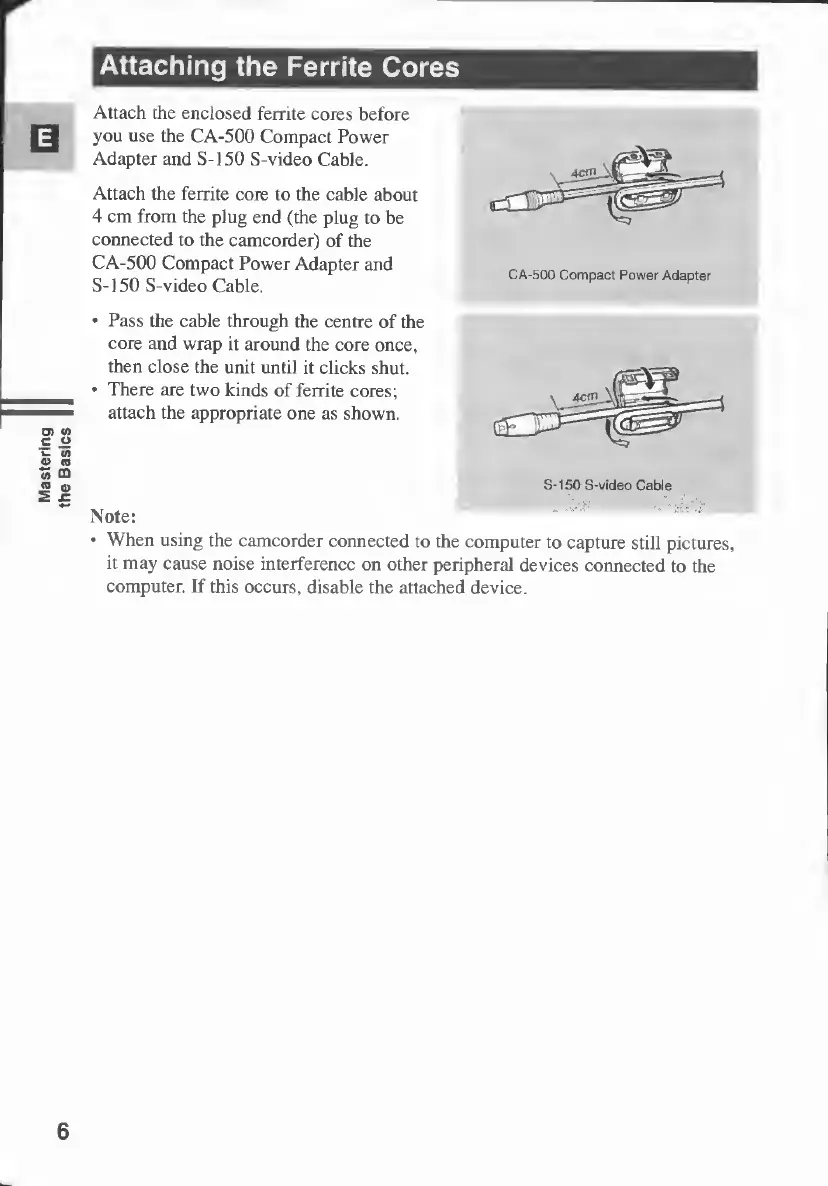
Attach
the
enclosed
ferrite
cores
before
you
use
the
CA-500
Compact
Power
Adapter
and
S-150
S-video
Cable.
Attach
the
ferrite
core
to
the
cable
about
4
cm
from
the
plug
end
(the
plug
to
be
connected
to
the
camcorder)
of
the
CA-500
Compact
Power
Adapter
and
S-150
S-video
Cable.
•
Pass
the
cable
through
the
centre
of
the
core
and
wrap
it
around
the
core
once,
then
close
the
unit
until
it
clicks
shut.
•
There
are
two
kinds
of
ferrite
cores;
attach
the
appropriate
one
as
shown.
S-150
S-video
Cable
Note:
•
When
using
the
camcorder
connected
to
the
computer
to
capture
still
pictures,
it
may
cause
noise
interference
on
other
peripheral
devices
connected
to
the
computer.
If
this
occurs,
disable
the
attached
device.
6

Table of Contents