EasyManua.ls Logo

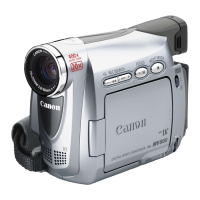
Canon MV730i - User Manual

Canon MV730i
151 pages
Print Icon
To Next Page IconTo Next Page
Loading...
Digital Video Camcorder
Instruction Manual
English
PAL
CANON INC.
Canon Europa N.V.
P.O. Box 2262, 1180 EG Amstelveen, the Netherlands
Canon UK Ltd.
CCI Service Centre, Unit 130
Centennial Park, Borehamwood, Hertfordshire, WD6 3SE, England
Telephone 0870-241-2161
Canon Australia Pty. Ltd.
Info-Line: 131383
www.canon.com.au
Canon New Zealand Ltd.
Customer Care: (09) 489 0470
www.canon.co.nz
Canon Singapore Pte. Ltd
79 Anson Road #09-01/06, Singapore 079906
Telephone (65)-532-4400, Fax (65)-221-2939
Canon Hongkong Company Ltd
19/F., The Metropolis Tower, 10 Metropolis Drive, Hunghom, Kowloon, Hong Kong
Canon Latin America, Inc.
Sales & Enquiries: 703 Waterford Way Suite 400 Miami, FL 33126 USA
Printed on 100% reused paper.
PRINTED IN JAPAN
© CANON INC. 2004
DY8-9020-130-000
0039W767
PUB.DIE-199
0000Ni0.0
PUB.DIE-199
PUB.DIE-199
Introduction
Basic Functions
Advanced
Functions
Editing
Using a
Memory Card
Direct
Printing
Additional
Information
Mini
Digital
Video
Cassette
Please read also the following instruction
manuals.
Digital Video Software (MV750i/MV730i)
•DV Network Software
Digital Video Software Version 10
Instruction Manual
If you are using Windows operating system, use the supplied
DIGITAL VIDEO SOLUTION DISK For Windows.
If you are using Macintosh operating system, use the supplied
DIGITAL VIDEO SOLUTION DISK For Macintosh.
E
DV Network Software Version 2
Instruction Manual (Installation and Preparation)
This software is for use with Windows
®
XP only.
PUB. DIE-195
E
This manual covers the installation and the connection procedures only.For
more operating instructions, refer to the PDF format manual provided on the
DIGITAL VIDEO SOLUTION DISK For Windows.


Table of Contents

Questions and Answers

  • S
    samantha69Sep 23, 2025
    What does 'remove the cassette' message mean on Canon MV730i Camcorder?
    • G
      ginaberrySep 23, 2025
      If the message “Remove the cassette” appears on the screen of your Canon Camcorder, unload and reload the cassette, as the camcorder stopped operating to protect the tape.
  • A
    Alicia FranklinAug 23, 2025
    What to do if start/stop button on Canon MV730i won't record?
    • C
      Christian WardAug 25, 2025
      If pressing the start/stop button on your Canon Camcorder isn't starting the recording, check the following: 1. Ensure the camcorder is turned on. 2. Make sure a cassette is loaded. 3. Rewind the tape or replace the cassette if the tape has reached the end (b flashes on the screen). 4. Replace the tape or change the position of the protect switch if the cassette is protected (v flashes on the screen). 5. Set the camcorder to CAMERA mode.
  • A
    Alexandra WhiteAug 25, 2025
    Why is my Canon Camcorder not focusing?
    • M
      Michael WeissAug 26, 2025
      If your Canon Camcorder won't focus, it may be because autofocus does not work on that subject, so try to focus manually. Alternatively, adjust the viewfinder with the dioptric adjustment lever. Finally, the lens may be dirty, so try cleaning it.
  • A
    Albert OwenAug 27, 2025
    Why is my Canon Camcorder not recording to the memory card?
    • B
      Brad BauerAug 27, 2025
      If your Canon Camcorder isn't recording to the memory card, consider these possibilities: * The memory card is full. Replace the memory card or erase images. * The memory card is not formatted. Format the memory card. * The memory card is not inserted. Insert a memory card. * The file number reached maximum value. Set [FILE NUMBERS] to [RESET] and insert a new memory card. * The SD Memory Card is protected. Change the position of the protect switch.
  • T
    Tiffany SheltonAug 27, 2025
    Why is there no image on my Canon MV730i Camcorder screen?
    • A
      amysmithAug 27, 2025
      If the image is not appearing on the screen of your Canon Camcorder, ensure the camcorder is set to CAMERA mode.
  • T
    Travis Decker PhDSep 17, 2025
    What does it mean when 'v' flashes on Canon MV730i screen?
    • B
      Brian AllenSep 17, 2025
      If 'v' flashes on the screen of your Canon Camcorder, load a cassette.
  • D
    Daniel KramerSep 14, 2025
    Why does Canon MV730i Camcorder LCD/viewfinder switch on and off?
    • J
      jamielittleSep 14, 2025
      If the LCD/viewfinder on your Canon Camcorder switches on and off, replace or charge the battery pack.
  • S
    Stephen JoyceSep 16, 2025
    How to insert memory card in Canon MV730i Camcorder?
    • A
      Amber MeadowsSep 16, 2025
      If a memory card cannot be inserted into your Canon Camcorder, turn the memory card over and reinsert it, as the memory card was not facing the correct direction.
  • A
    Ashley ThomasSep 6, 2025
    Why is there no image on TV from my Canon MV730i?
    • M
      Megan TurnerSep 6, 2025
      If the image from your Canon Camcorder is not appearing on the TV screen, check if [AV/PHONESH] is set to [PHONESH] in the menu; if so, set it to [AV]. Also, check if [AV \ DV OUT] is set to [ON]; if so, set it to [OFF].
  • J
    James MitchellSep 3, 2025
    Why is my Canon Camcorder wireless controller not working?
    • W
      Wendy SandersSep 3, 2025
      If the wireless controller for your Canon Camcorder is not working, ensure that the camcorder and wireless controller are set to the same remote sensor mode. If that doesn't work, replace the batteries in the wireless controller.

Canon MV730i Specifications

General IconGeneral
Sensor TypeCCD
Optical Zoom20x
Digital Zoom400x
Video Resolution720 x 576
Weight410 g
Camcorder Media TypeMiniDV
FocusAuto/Manual
White BalanceAuto/Manual
Recording MediaMiniDV tape
Video Recording FormatDV
Still Image Resolution640 x 480
BatteryLithium-ion
LCD Screen Size2.5 inches
Effective Pixels800, 000
ViewfinderColor
Exposure ControlYes
InterfaceFireWire, USB

Related product manuals