PC-D320/PC-D340/FAX-L400 Chapter 3: Assembly and Disassembly
3-11
2.1.2 Recording section
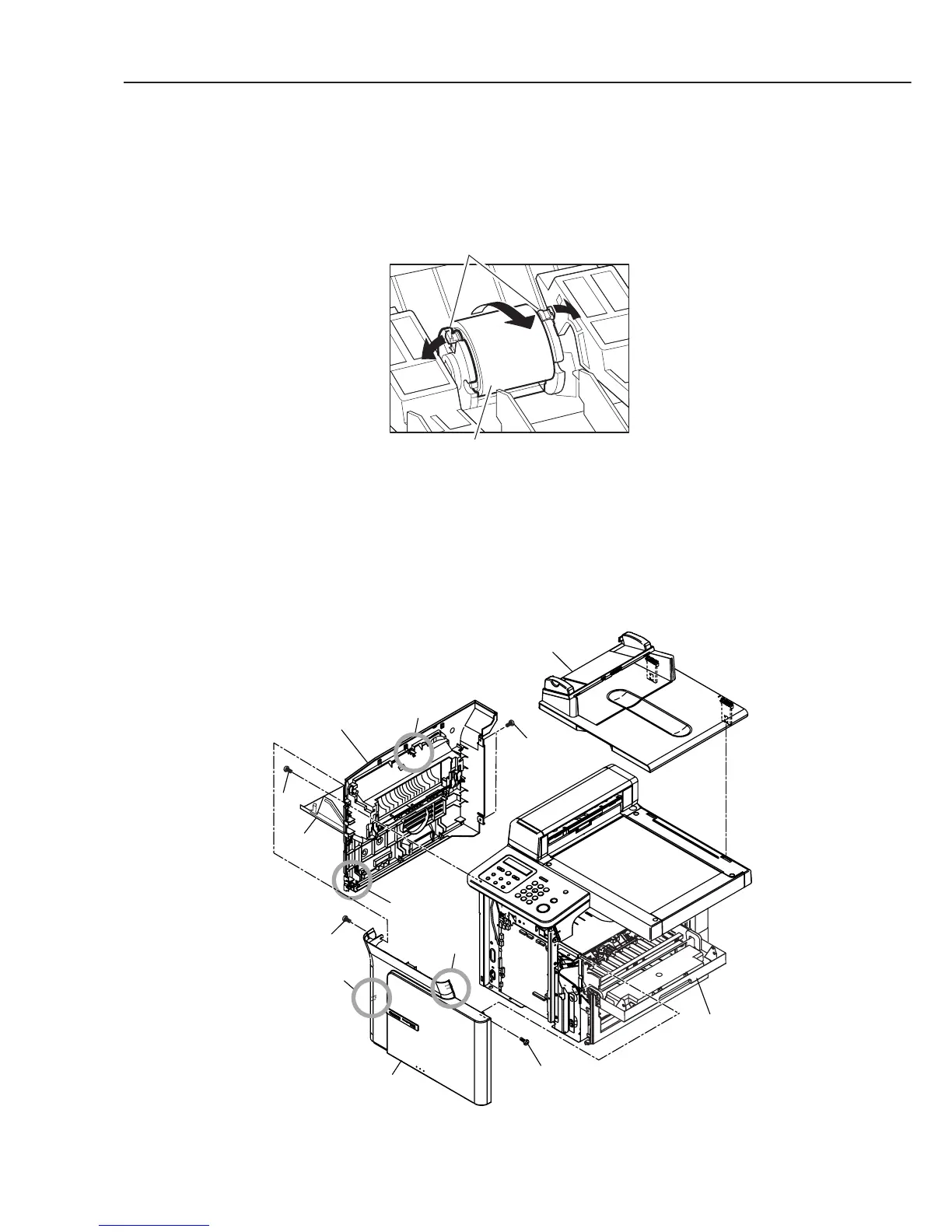
Pick-up Roller
(1) Open the cartridge cover, and remove the cartridge.
(2) While opening the both claws of the pick-up roller placed on far behind of the cartridge
inlet, remove the roller by rotating to the front.
Figure 3-11 Recording Section 1
Separation Pad
(1) Open the cartridge cover and the face-up cover; detach the 2 screws (a). Remove the
front cover while detaching the 2 claws.
(2) Remove the 3 screws (b), and detach the left cover ass’y while detaching the 2 claws.
(3) Remove the pressure plate unit by lifting up.
Figure 3-12 Recording Section 2
Claws
Pick-up roller
a
b
b
Front cover
Left cover ass'y
Face-up
cover
Claw
Claw
Cartridge
cover
a
Pressure plate unit
Claw
Claw



 To Next Page