EasyManua.ls Logo

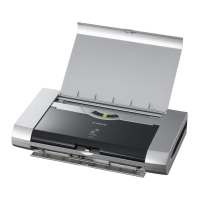
Canon PIXMA iP90v - User Manual

Canon PIXMA iP90v
108 pages
Print Icon
To Next Page IconTo Next Page
Loading...
Photo Printer
Quick Start Guide
Quick Start GuideQuick Start Guide
Quick Start Guide
QT5-0848-V01 XXXXXXXX ©CANON INC.2005 PRINTED IN VIETNAM
The following ink tanks are compatible with iP90.
For details on ink tank replacement, refer to “Replacing an Ink Tank in this gu
ide.
Quick Start Guide
Quick Start GuideQuick Start Guide
Quick Start Guide
Canon U.S.A., Inc.
One Canon Plaza, Lake Success, NY 11042, U.S.A.
Canon Inc.
30-2, Shimomaruko 3-Chome, Ohta-ku, Tokyo 146-8501, Japan
Canon Canada, Inc.
6390 Dixie Road, Mississauga, Ontario, L5T 1P7, Canada
Canon Latin America, Inc.
703 Waterford Way, Suite 400, Miami, FL 33126, U.S.A.
Canon Mexicana S. de R.L. de C.V.
Boulevard Manuel Avila Camacho No. 138 PB
y Pisos 15, 16 y 17, Colonia Lomas de Chapultepec
Delegación Miguel Hidalgo, CP 11000, Mexico D.F.

Table of Contents

Question and Answer IconNeed help?

Do you have a question about the Canon PIXMA iP90v and is the answer not in the manual?

Summary

Basic Printing Operations

Loading Paper and Envelopes

Guidance on loading various paper types and envelopes.

Printing Techniques and Settings

Advanced Printing Features

Adjusting Print Quality for Photographs

Optimizing print quality settings for photos.

Printing Maintenance and Troubleshooting

Print Quality Issues

Troubleshooting steps for print quality problems.

Nozzle Check and Print Head Cleaning

Procedures for checking nozzles and cleaning print heads.

Aligning the Print Head

Steps to correct print head misalignment.

Replacing an Ink Tank

Procedures for replacing ink tanks and resetting counters.

General Troubleshooting

Guide to common printing problems and solutions.

Summary

Basic Printing Operations

Loading Paper and Envelopes

Guidance on loading various paper types and envelopes.

Printing Techniques and Settings

Advanced Printing Features

Adjusting Print Quality for Photographs

Optimizing print quality settings for photos.

Printing Maintenance and Troubleshooting

Print Quality Issues

Troubleshooting steps for print quality problems.

Nozzle Check and Print Head Cleaning

Procedures for checking nozzles and cleaning print heads.

Aligning the Print Head

Steps to correct print head misalignment.

Replacing an Ink Tank

Procedures for replacing ink tanks and resetting counters.

General Troubleshooting

Guide to common printing problems and solutions.

Canon PIXMA iP90v Specifications

General IconGeneral
ColorYes
Number of print cartridges2
Maximum print size216 x 297 mm
Paper tray media typesPhoto paper
ISO A-series sizes (A0...A9)A4, A5
ISO B-series sizes (B0...B9)B5
Maximum ISO A-series paper sizeA4
Resolution color4800 x 1200 DPI
Print speed (black, normal quality, A4/US Letter)12.7 ppm
Print speed (color, normal quality, A4/US Letter)7.2 ppm
InterfaceUSB/IrDA 1.1/Bluetooth 1.1
Print technologyInkjet
Dimensions (WxDxH)310 x 174 x 51.8 mm
Total input capacity30 sheets
Minimum storage drive space150 MB
Minimum system requirementsWindows: USB, CD-ROM. Mac: USB, CD-ROM, 340MB HDD
Sound power level (printing)40 dB
Bundled softwareEasy-WebPrint, Easy-PhotoPrint, PhotoRecord
Power consumption (standby)1 W
Power consumption (printing)10 W
Storage temperature (T-T)5 - 35 °C
Operating relative humidity (H-H)10 - 90 %
Market positioningHome & office
Weight and Dimensions IconWeight and Dimensions
Depth174 mm
Width310 mm
Height51.8 mm

Related product manuals