16
Using the Self-Timer
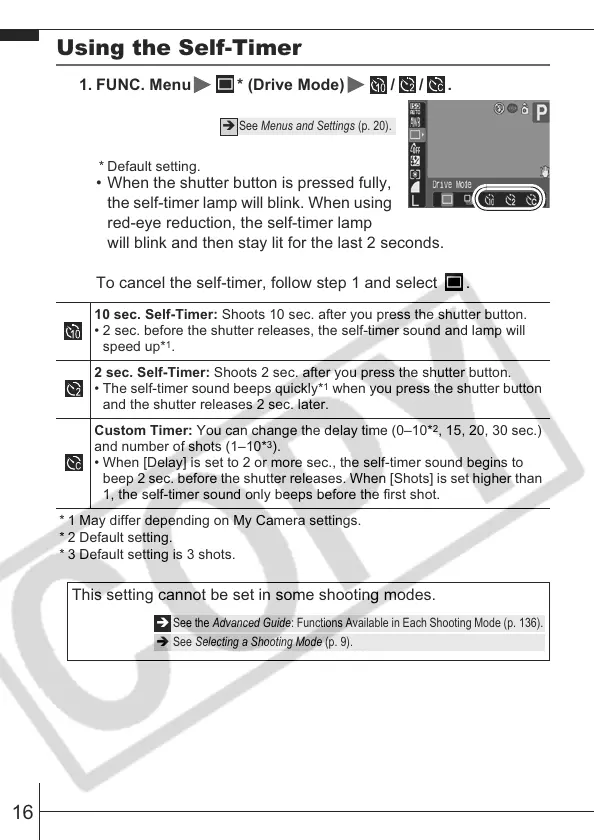
1. FUNC. Menu * (Drive Mode) / / .
* Default setting.
• When the shutter button is pressed fully,
the self-timer lamp will blink. When using
red-eye reduction, the self-timer lamp
will blink and then stay lit for the last 2 seconds.
To cancel the self-timer, follow step 1 and select .
* 1 May differ depending on My Camera settings.
* 2 Default setting.
* 3 Default setting is 3 shots.
Î See Menus and Settings (p. 20).
10 sec. Self-Timer: Shoots 10 sec. after you press the shutter button.
• 2 sec. before the shutter releases, the self-timer sound and lamp will
speed up*
1
.
2 sec. Self-Timer: Shoots 2 sec. after you press the shutter button.
• The self-timer sound beeps quickly*
1
when you press the shutter button
and the shutter releases 2 sec. later.
Custom Timer: You can change the delay time (0–10*
2
, 15, 20, 30 sec.)
and number of shots (1–10*
3
).
• When [Delay] is set to 2 or more sec., the self-timer sound begins to
beep 2 sec. before the shutter releases. When [Shots] is set higher than
1, the self-timer sound only beeps before the first shot.
This setting cannot be set in some shooting modes.
Î See the Advanced Guide: Functions Available in Each Shooting Mode (p. 136).
Î See Selecting a Shooting Mode (p. 9).








 To Next Page