28
Downloading Images to a Computer
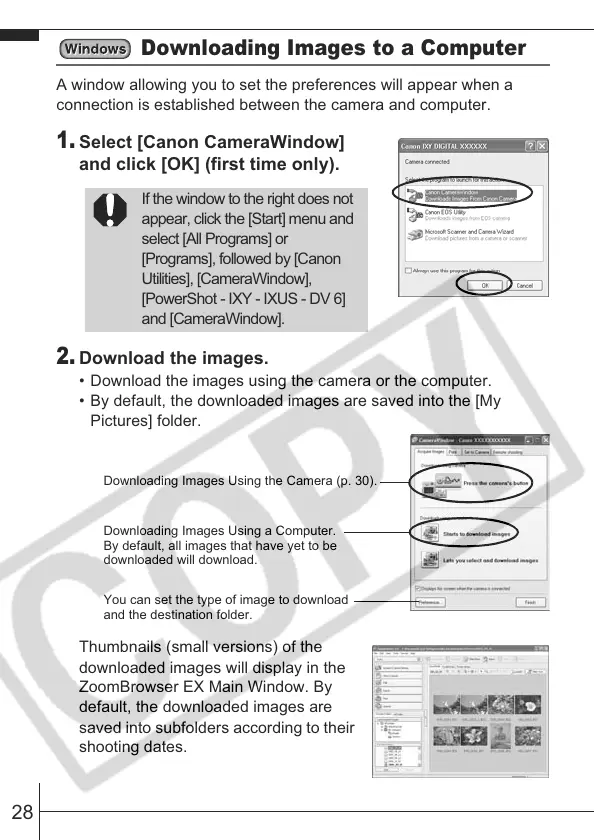
A window allowing you to set the preferences will appear when a
connection is established between the camera and computer.
1.
Select [Canon CameraWindow]
and click [OK] (first time only).
2.
Download the images.
• Download the images using the camera or the computer.
• By default, the downloaded images are saved into the [My
Pictures] folder.
Thumbnails (small versions) of the
downloaded images will display in the
ZoomBrowser EX Main Window. By
default, the downloaded images are
saved into subfolders according to their
shooting dates.
If the window to the right does not
appear, click the [Start] menu and
select [All Programs] or
[Programs], followed by [Canon
Utilities], [CameraWindow],
[PowerShot - IXY - IXUS - DV 6]
and [CameraWindow].
Downloading Images Using the Camera (p. 30).
Downloading Images Using a Computer.
By default, all images that have yet to be
downloaded will download.
You can set the type of image to download
and the destination folder.








 To Next Page