
 Need help?
Do you have a question about the Canon PowerShot D20 and is the answer not in the manual?
Covers general safety rules for product usage and handling.
Precautions to take before using the camera, especially concerning covers and seals.
Guidelines for safe operation of the camera in various conditions.
Step-by-step guide for charging the camera battery using the provided charger.
Instructions for inserting the battery and memory card correctly into the camera.
Introduction to fundamental camera operations and features.
Details on how to use the shutter button for focusing and shooting.
Introduction to the convenient auto mode for easy shooting.
Step-by-step guide to shooting using the Smart Auto mode.
Customizing settings for preferred shooting style in P mode.
How to adjust the standard exposure level of images.
How to enable the flash for shooting and its basic settings.
How to enter playback mode and browse through captured images and movies.
How to protect images from accidental erasure using the menu.
Steps to select and protect specific images from deletion.
How to customize basic camera functions for convenience.
How to format memory cards for use with the camera, erasing all data.
Solutions for problems related to camera power and battery.
Solutions for common problems encountered during shooting.
Important precautions for handling the camera safely and preventing damage.
 General
| Camera type | Compact camera |
|---|---|
| Sensor type | CMOS |
| Image stabilizer | Yes |
| Image sensor size | 1/2.3 \ |
| Image formats supported | JPG |
| Supported aspect ratios | 1:1, 3:2, 4:3, 16:9 |
| Maximum image resolution | 4000 x 3000 pixels |
| Image stabilizer location | Lens |
| Still image resolution(s) | 4:3 - (L) 4000 x 3000, (M1) 2816 x 2112, (M2) 1600 x 1200, (S) 640 x 480\\r 16:9 - (L) 4000 x 2248, (M1) 2816 x 1584, (M2) 1920 x 1080, (S) 640 x 360\\r 3:2 - (L) 4000 x 2664, (M1) 2816 x 1880, (M2) 1600 x 1064, (S) 640 x 424\\r 1:1 - (L) 2992 x 2992, (M1) 2112 x 2112, (M2) 1200 x 1200, (S) 480 x 480 |
| Digital zoom | 4 x |
| Optical zoom | 5 x |
| Combined zoom | 20 x |
| Focal length range | 5 - 25 mm |
| Maximum aperture number | - |
| Minimum aperture number | 3.9 |
| Number of aspheric elements | 4 |
| Lens structure (elements/groups) | 12/10 |
| Maximum focal length (35mm film equiv) | 140 mm |
| Minimum focal length (35mm film equiv) | 28 mm |
| Focus | TTL |
| Focus adjustment | Auto/Manual |
| Auto Focus (AF) points | 9 |
| Auto focusing (AF) modes | Continuous Auto Focus, Servo Auto Focus, Single Auto Focus, Tracking Auto Focus |
| Closest focusing distance | 0.01 m |
| Light metering | Centre-weighted, Evaluative (Multi-pattern), Spot |
| ISO sensitivity | 100, 200, 400, 800, 1600, 3200, Auto |
| ISO sensitivity (max) | 3200 |
| ISO sensitivity (min) | 100 |
| Light exposure correction | ± 2EV (1/3EV step) |
| Fastest camera shutter speed | 1/1600 s |
| Slowest camera shutter speed | 15 s |
| Flash modes | Auto, Flash off, Flash on, Manual, Red-eye reduction, Slow synchronization |
| Flash sync-speed | 0.000625 s |
| Flash range (tele) | 1 - 3 m |
| Flash range (wide) | 0.3 - 3.5 m |
| Video formats supported | H.264, MOV |
| Maximum video resolution | 1920 x 1080 pixels |
| Analog signal format system | NTSC, PAL |
| Resolution at capture speed | 1920x1080@24fps, 640x480@120fps, 640x480@30fps |
| Audio formats supported | PCM |
| Memory slots | 1 |
| Internal memory | - MB |
| Compatible memory cards | SD, SDHC, SDXC |
| Field of view | 100 % |
| Display diagonal | 3 \ |
| Vari-angle LCD display | No |
| Display resolution (numeric) | 461000 pixels |
| USB version | 2.0 |
| USB connector | Mini-USB B |
| HDMI connector type | Mini |
| Data network | Not supported |
| Scene modes | Fireworks, Portrait, Snow, Underwater |
| Image editing | Resizing |
| Photo effects | Black&White, Neutral, Positive film, Sepia, Skin tones, Vivid |
| White balance | Auto, Cloudy, Custom modes, Daylight, Fluorescent, Fluorescent H, Tungsten, Underwater |
| Self-timer delay | 2, 10 s |
| Languages support | Multi |
| Camera file system | DPOF 1.1, Exif 2.3 |
| Playback zoom (max) | 10 x |
| Power source type | Battery |
| Battery type | NB-6L |
| Battery life (CIPA standard) | 280 shots |
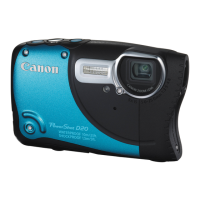
| Product color | Black, Silver |
| Waterproof up to | 10 m |
| International Protection (IP) code | IPX8 |
| Operating temperature (T-T) | -10 - 40 °C |
| Operating relative humidity (H-H) | 10 - 90 % |
| Bundled software | ImageBrowser EX\\r PhotoStitch, Map Utility |
 Weight and Dimensions
| Depth | 70.8 mm |
|---|---|
| Width | 112.3 mm |
| Weight | 228 g |





 To Next Page
