
 Need help?
Do you have a question about the Canon PowerShot D30 and is the answer not in the manual?
Covers important notes, disclaimers, and legal information regarding camera use.
Outlines critical safety warnings and precautions for using the camera and its accessories.
Provides specific warnings and guidelines for using the camera's rugged features.
Details the essential steps to take before starting to use the camera.
Instructions for properly charging the camera's battery pack before first use.
Step-by-step guide on installing the battery and memory card correctly.
Steps to set up and enable GPS functions on the camera.
How to automatically add location data (latitude, longitude, elevation) to images.
Feature to record camera location data over time, separate from image files.
Using automatic settings for optimal shots in various scenes.
Shooting modes tailored for specific scenes like underwater, snow, and portraits.
Basic usage of Program AE mode for customizable shooting styles.
Automatically tracking moving subjects for continuous focus.
Continuous focus adjustment for moving subjects while pressing shutter halfway.
Information on flash modes, settings, and flash exposure lock.
How to view captured images and movies on the camera screen.
Preventing accidental deletion of important images.
Deleting unwanted images one by one or in batches.
Options for editing images directly on the camera, like resizing and cropping.
Customizing core camera settings like sound, volume, and hints.
Preparing new or previously used memory cards for camera use.
Advanced card formatting for resolving errors or performance issues.
Enabling GPS functions for geotagging and automatic time updates.
Resetting camera settings to their factory default values.
Connecting the camera to a TV for viewing images and movies on a larger screen.
Using an AC adapter kit for continuous power supply to the camera.
Guide to installing Canon software and managing images on a computer.
Directly printing shots via PictBridge connection to a compatible printer.
Wireless image transfer with Eye-Fi cards for automatic uploads.
Solutions for common camera problems and error messages.
 General
| Megapixel | 12.1 MP |
|---|---|
| Camera type | Compact camera |
| Sensor type | CMOS |
| Image stabilizer | Yes |
| Image sensor size | 1/2.3 \ |
| Image formats supported | JPG |
| Maximum image resolution | 4000 x 3000 pixels |
| Still image resolution(s) | 4000 x 3000, 2816 x 2112, 1600 x 1200, 640 x 480, 4000 x 2248, 2816 x 1584, 1920 x 1080, 640 x 360, 4000 x 2664, 2816 x 1880, 1600 x 1064, 640 x 424, 2992 x 2992, 2112 x 2112, 1200 x 1200, 480 x 480. |
| Digital zoom | 4 x |
| Optical zoom | 5 x |
| Combined zoom | 20 x |
| Focal length range | 5 - 25 mm |
| Maximum aperture number | 4.8 |
| Minimum aperture number | 3.9 |
| Lens structure (elements/groups) | 12/10 |
| Maximum focal length (35mm film equiv) | 140 mm |
| Minimum focal length (35mm film equiv) | 28 mm |
| Focus | TTL |
| Focus adjustment | Auto/Manual |
| Auto focusing (AF) modes | Continuous Auto Focus, Servo Auto Focus, Single Auto Focus, Tracking Auto Focus |
| Closest focusing distance | 0.01 m |
| Light metering | Centre-weighted, Evaluative (Multi-pattern), Spot |
| ISO sensitivity | 100, 200, 400, 1600, 3200, Auto |
| Light exposure modes | - |
| ISO sensitivity (max) | 3200 |
| ISO sensitivity (min) | 100 |
| Light exposure correction | ± 2EV (1/3EV step) |
| Fastest camera shutter speed | 1/1600 s |
| Slowest camera shutter speed | 15 s |
| Flash modes | Auto, Flash off, Flash on, Manual, Red-eye reduction, Slow synchronization |
| Flash sync-speed | 0.000625 s |
| Flash range (tele) | 1 - 3 m |
| Flash range (wide) | 0.3 - 3.5 m |
| Power source type | Battery |
| Video resolutions | 320 x 240, 640 x 480, 1280 x 720, 1920 x 1080 pixels |
| Video formats supported | MOV |
| Maximum video resolution | 1920 x 1080 pixels |
| Analog signal format system | NTSC, PAL |
| Resolution at capture speed | 1920x1080@24fps, 640x480@120fps, 640x480@30fps |
| Memory slots | 1 |
| Compatible memory cards | SD, SDHC, SDXC |
| Display diagonal | 3 \ |
| Display resolution (numeric) | 461000 pixels |
| USB version | 2.0 |
| USB connector | Mini-USB B |
| HDMI connector type | Mini |
| Bluetooth | No |
| Scene modes | Fireworks, Night, Portrait, Snow, Underwater |
| Photo effects | Black&White, Neutral, Positive film, Sepia, Skin tones, Vivid |
| White balance | Auto, Cloudy, Custom modes, Daylight, Fluorescent, Fluorescent H |
| Image processor | DIGIC 4 |
| Self-timer delay | 2, 10 s |
| Languages support | Multi |
| Camera file system | DPOF 1.1, Exif 2.3 |
| Playback zoom (max) | 10 x |
| Mac operating systems supported | Mac OS X 10.7 Lion, Mac OS X 10.8 Mountain Lion, Mac OS X 10.9 Mavericks |
| Windows operating systems supported | Windows 7 Home Basic, Windows 7 Home Basic x64, Windows 7 Home Premium, Windows 7 Home Premium x64, Windows 7 Professional, Windows 7 Professional x64, Windows 7 Starter, Windows 7 Starter x64, Windows 7 Ultimate, Windows 7 Ultimate x64, Windows 8, Windows 8 Enterprise, Windows 8 Enterprise x64, Windows 8 Pro, Windows 8 Pro x64, Windows 8 x64, Windows 8.1, Windows 8.1 Enterprise, Windows 8.1 Enterprise x64, Windows 8.1 Pro, Windows 8.1 Pro x64, Windows 8.1 x64, Windows Vista Business, Windows Vista Business x64, Windows Vista Enterprise, Windows Vista Enterprise x64, Windows Vista Home Basic, Windows Vista Home Basic x64, Windows Vista Home Premium, Windows Vista Home Premium x64, Windows Vista Ultimate, Windows Vista Ultimate x64, Windows XP Home, Windows XP Home x64, Windows XP Professional x64 |
| Battery type | NB-6LH |
| Battery life (CIPA standard) | 300 shots |
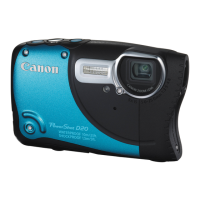
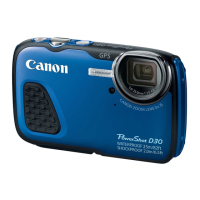
| Product color | Blue |
| Operating temperature (T-T) | 10 - 40 °C |
| Operating relative humidity (H-H) | 10 - 90 % |
| Cables included | USB |
| Bundled software | ImageBrowser EX\\r PhotoStitch\\r Map Utility |
 Weight and Dimensions
| Depth | 27.5 mm |
|---|---|
| Width | 109.4 mm |
| Height | 68 mm |
| Weight | 218 g |






 To Next Page
