Before Use
Basic Guide
Advanced Guide
Camera Basics
Using GPS
Functions
Auto Mode
Other Shooting
Modes
P Mode
Playback Mode
Setting Menu
Accessories
Appendix
Index
4
Part Names and Conventions in This Guide
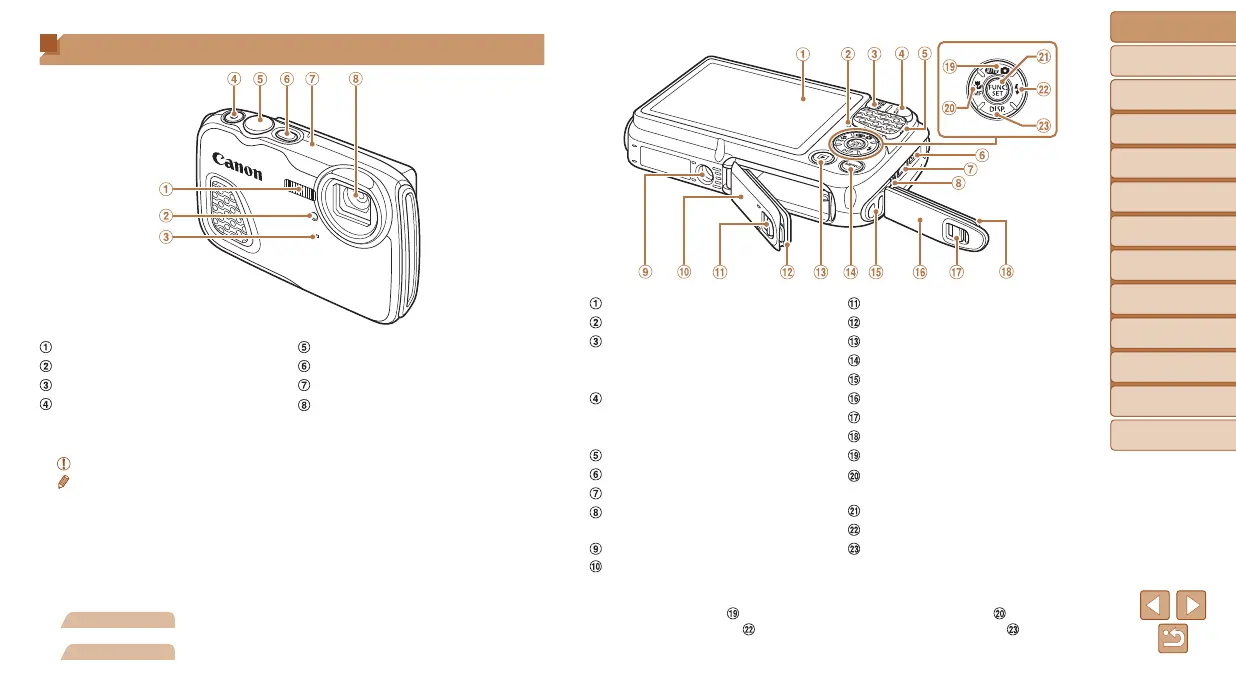
Flash
Lamp
Microphone
Movie button
Shutter button
Power button
GPS antenna
Lens
• In this guide, icons are used to represent the corresponding camera
buttons on which they appear, or which they resemble.
•
: Important information you should know
•
: Notes and tips for expert camera use
• =xx: Pages with related information (in this example, “xx” represents a
page number)
• Instructions in this guide apply to the camera under default settings.
• For convenience, all supported memory cards are simply referred to as
the “memory card”.
• The tabs shown above titles indicate whether the function is used for still
images, movies, or both.
Still Images
: Indicates that the function is used when shooting or
viewing still images.
Movies
: Indicates that the function is used when shooting or
viewing movies.
Screen (LCD monitor)
Indicator
Zoom button
Shooting: <j (wide angle)>
Playback: <g (index)>
Zoom button
Shooting: <i (telephoto)>
Playback: <k (magnify)>
Speaker
DC IN (Power input) terminal
HDMI
TM
terminal
AV OUT (Audio/video output) /
DIGITAL terminal
Tripod socket
Memory card/battery cover
Memory card/battery cover lock
Waterproof seal
<1 (Playback)> button
<n> button
Strap mount
Terminal cover
Terminal cover lock
Waterproof seal
Mode selection/Up button
<e (Macro)> / <f (Manual
focus)> / Left button
FUNC./SET button
<h (Flash)> / Right button
<l (Display)> / Down button
• The following camera buttons and controls are represented by icons.
<o> Up button
on back <q> Left button on back
<r> Right button
on back <p> Down button on back
• Shooting modes and on-screen icons and text are indicated in brackets.





 To Next Page