25
DIRECT PRINT SOLUTION
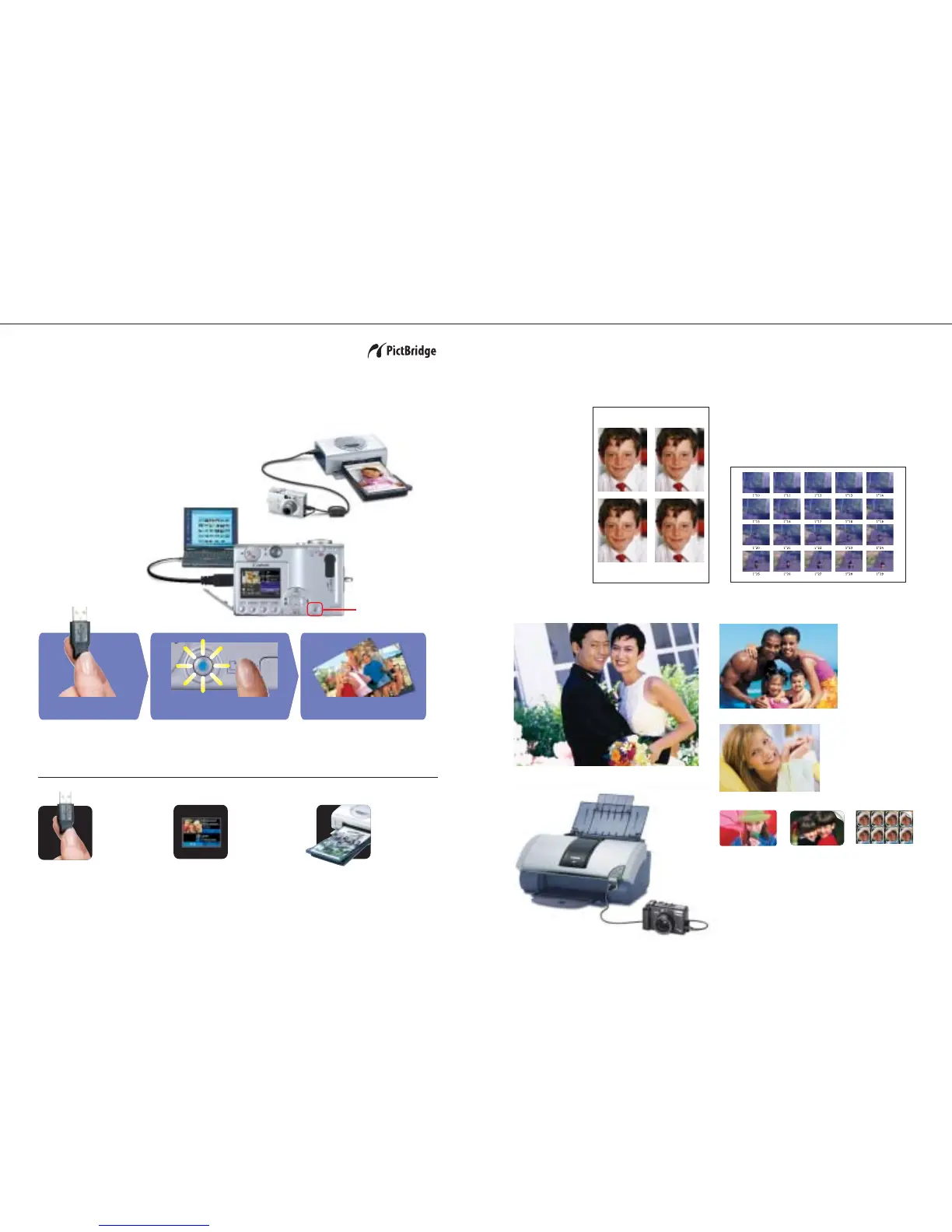
ID PHOTO PRINT
Need a quickID-sized photo, for example, for a
passport?* PowerShot cameras with ID Photo
Print make it easy. You can crop the recorded
image to the required area and choose from up
to 28 different
photo sizes. When
you’re ready, print
multiple ID photos
on a single sheet via
a direct-connected
Canon Card Photo
Printer.
* For official documents,
check with your local
authorities for size and
other requirements.
MOVIE PRINT
With Canon PowerShot camerasyou can not
only shoot movies but also print them! Using a
direct-connected Canon Card Photo Printer, you
can use the Movie Print feature to create an
index print ofindividual frames from a recorded
movie. The camera automatically calculates the
interval and selects the framesbased on the
length of the movie and the number of stills
required to fillthe sheet.
8.5˝ x 11˝ (Bubble Jet Only)
PRINT SIZES
4˝ x 6˝ (Bubble Jet or Card Photo Printers)
Credit Card Size
(Card Photo Printers
Only)
Mini Label
(Card Photo Printers
Only)
Credit Card-Sized Label
(Card Photo Printers
Only)
5˝ x 7˝ (Bubble Jet Only)
PICTBRIDGE
Canon PowerShot camerassupport the PictBridge
standard, which provides basic direct printing
functions and connectivity between any compliant
camera and printer regardless of the
manufacturers of the equipment.
3 EASYSTEPS FOR FABULOUS PRINTS
†
Connect the camera to the
printer using the USB cable.
Select the desired image
and print size righton your
PowerShot camera using the
LCD menu. Choose bordered
or borderless. You can even
crop the image to your liking.
Press the camera’sset button
and print the photo. In minutes,
you’ll have a crisp, full-color
picture.
CONNECT
SELECT PRINT
†
* S500,S400, SD110,A75, and A310 as of
Spring 2004.
For PowerShot models without
Print/Share button.
24
Connect the camera to
the printer orcomputer.
Press the LIGHTED Print/Share
button.
You'll have quick and easy
prints or share them across
the internet.
CANON’S ONE-TOUCH
DIRECT PRINT SOLUTION V
Making spectacular prints from your favorite
digital images doesn’t get any easier than this!
PowerShot cameras* featuring the advanced
Print/Share button, combined with one of Canon’s
superb Direct Photo Printersor PictBridge-
compatible printer, make the entire process
fast and simple. When the camera detects
connection to a compatible printer, the Print/Share
button lights blue. With the desired image on
the camera’s LCD (in playback
mode),
simply press the
Print/Share button. In minutes,
you’ll have a crisp, full-color
photograph of the image
you selected. Also use
this button to transfer
image files directlyto a
computer (Windows only).
Print/Share button.








 To Next Page