10
Shooting Close-Ups/Infinity Shots
1.
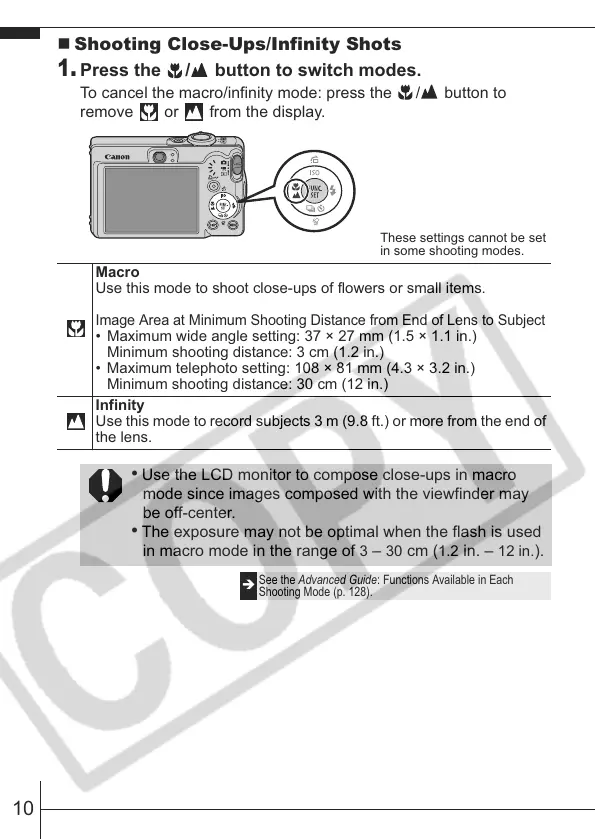
Press the / button to switch modes.
To cancel the macro/infinity mode: press the / button to
remove or from the display.
These settings cannot be set
in some shooting modes.
Macro
Use this mode to shoot close-ups of flowers or small items.
Image Area at Minimum Shooting Distance from End of Lens to Subject
• Maximum wide angle setting: 37 × 27 mm (1.5 × 1.1 in.)
Minimum shooting distance: 3 cm (1.2 in.)
• Maximum telephoto setting: 108 × 81 mm (4.3 × 3.2 in.)
Minimum shooting distance: 30 cm (12 in.)
Infinity
Use this mode to record subjects 3 m (9.8 ft.) or more from the end of
the lens.
• Use the LCD monitor to compose close-ups in macro
mode since images composed with the viewfinder may
be off-center.
• The exposure may not be optimal when the flash is used
in macro mode in the range of
3 – 30 cm (1.2 in. – 12 in.).
Î
See the Advanced Guide: Functions Available in Each
Shooting Mode (p. 128).










 To Next Page