EasyManua.ls Logo

Canon Selphy CP730 - Prepare Printer for Printing; Install Ink and Paper Cassettes

Canon Selphy CP730
28 pages
Print Icon
To Next Page IconTo Next Page
To Previous Page IconTo Previous Page
Loading...
EJ
Prepare
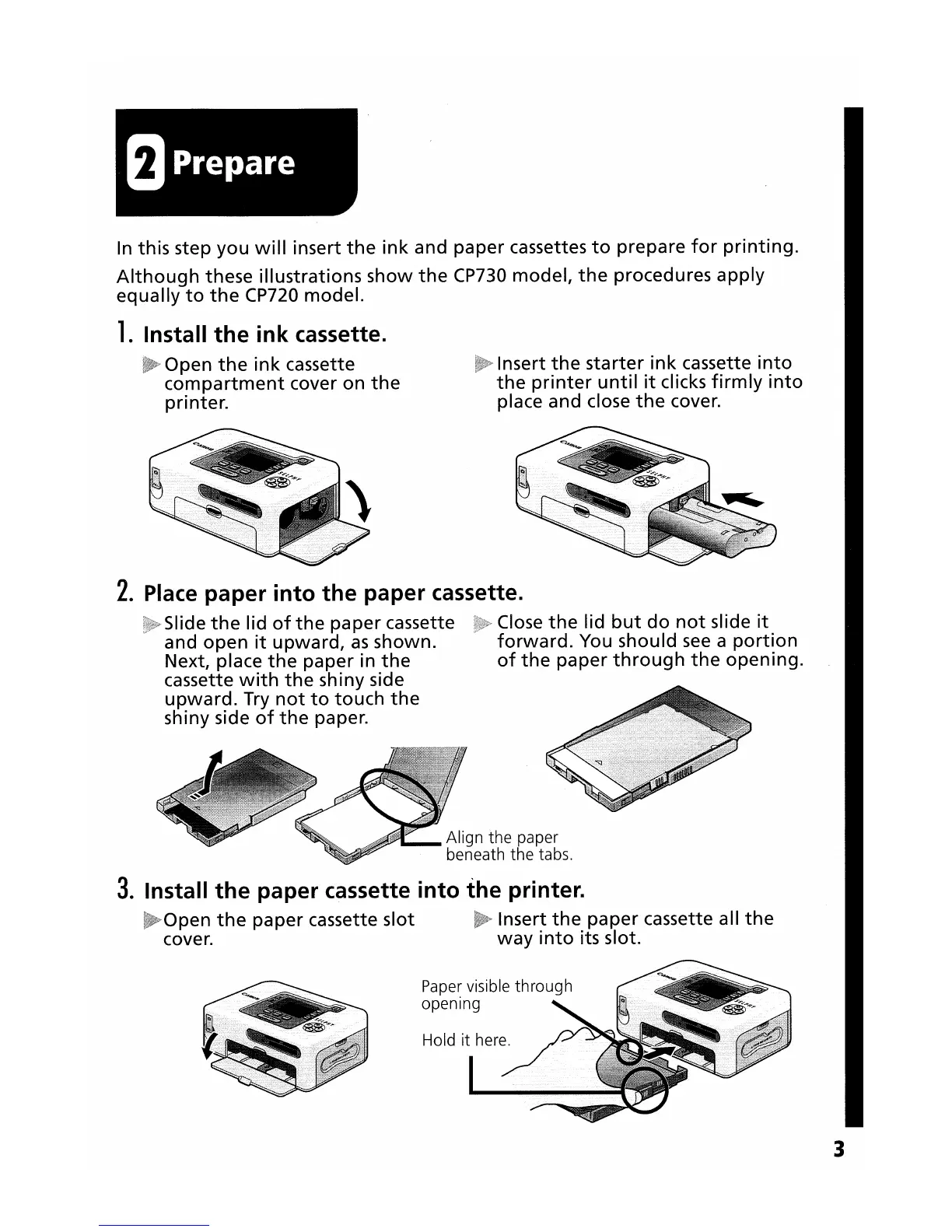
In this step
you
will
insert
the
ink
and
paper
cassettes
to
prepare
for
printing.
Although
these
illustrations
show
the
CP730
model,
the
procedures
apply
equally
to
the
CP720
model.
1.
Install
the
ink
cassette.
Open
the
ink
cassette
compartment
cover on
the
printer.
Insert
the
starter
ink
cassette
into
the
printer
until
it
clicks
firmly
into
place and close
the
cover.
2.
Place
paper
into
the
paper cassette.
Slide
the
lid
of
the
paper
cassette Close
the
lid
but
do
not
slide
it
and
open
it
upward,
as
shown.
forward.
You should
see
a
portion
Next, place
the
paper
in
the
of
the
paper
through
the
opening.
cassette
with
the
shiny side
upward.
Try
not
to
touch
the
shiny side
of
the
paper.
3.
Install
the
paper cassette
into
the
printer.
Open
the
paper
cassette slot Insert
the
paper
cassette all
the
cover.
way
into
its slot.
3