EasyManua.ls Logo

Canon Selphy CP730 - Attach Power Cord

Canon Selphy CP730
28 pages
Print Icon
To Next Page IconTo Next Page
To Previous Page IconTo Previous Page
Loading...
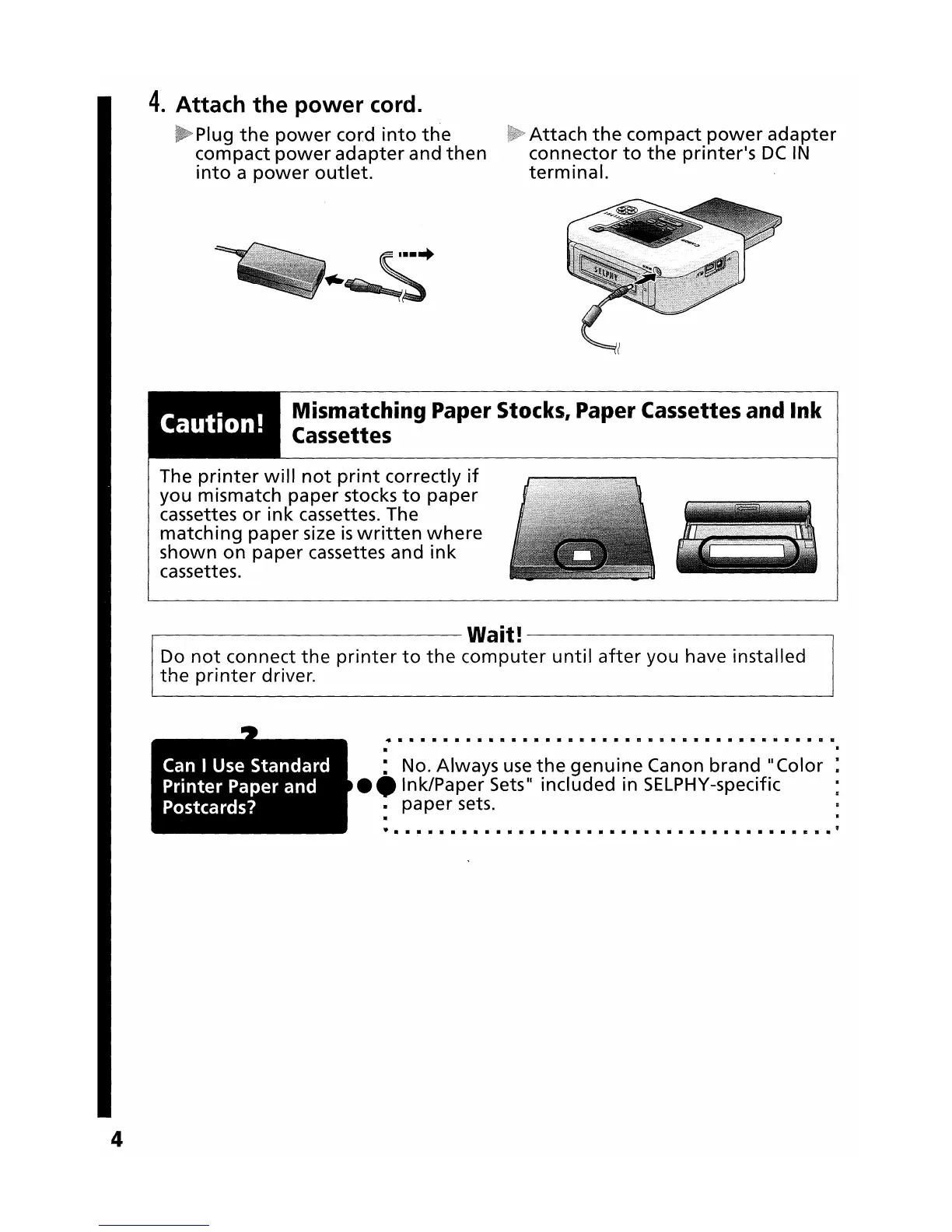
4.
Attach
the
power
cord.
Plug
the
power
cord
into
the
compact
power
adapter
and
then
into
a
power
outlet.
Attach
the
compact
power
adapter
connector
to
the
printer's
DC
IN
terminal.
Caution!
Mismatching Paper Stocks, Paper Cassettes and
Ink
Cassettes
The
printer
will
not
print
correctly
if
you mismatch paper stocks
to
paper
cassettes
or
ink
cassettes. The
matching
paper
size
is
written
where
shown
on
paper cassettes and
ink
cassettes.
.---------------
Wait!
-------------,
Do
not
connect
the
printer
to
the
computer
until
after
you have installed
the
printer
driver.
•
•••••••••••••••••••••
1lI.1II
••••••••
1II11
•••
1II.
· .
4
Can
I Use Standard
Printer
Paper and
Postcards?
: No. Always
use
the
genuine
Canon
brand"
Color :
_.Ink/Paper
Sets" included in SELPHY-specific :
III paper sets.
·
• •
111 111
111
•
111
•••••
111
••
111 111
111
111 111
111
••••
111
•••••
111
•
111
111 111
•
II
III
• "