EasyManua.ls Logo

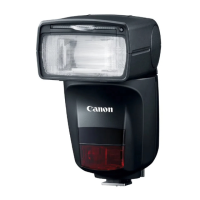
Canon Speedlite 470EX-AI - User Manual

Canon Speedlite 470EX-AI
116 pages
Print Icon
To Next Page IconTo Next Page
Loading...
1
J
E
INSTRUCTION
MANUAL

Table of Contents

Question and Answer IconNeed help?

Do you have a question about the Canon Speedlite 470EX-AI and is the answer not in the manual?

Summary

Introduction

Before Starting to Shoot, Be Sure to Read the Following

Read safety precautions and manual carefully to ensure correct product use and avoid accidents.

Using the Speedlite with a Camera

Explains how to use the Speedlite with different EOS camera types for flash photography.

Safety Precautions

Warnings for Safe Operation

Follow warnings to prevent fire, heat, chemical leaks, explosions, and electrical shock.

Cautions for Injury and Damage Prevention

Follow cautions to prevent physical injury or property damage from product use.

Manual Flash Operation

Getting Started and Basic Operations

Cautions for Firing Continuous Flash

Advises on limiting continuous flash firing to prevent overheating and damage.

Installing the Batteries

Attaching and Detaching the Speedlite

Turning on the Power

ETTL: Fully Automatic Flash Photography

E-TTL II;E-TTL Autoflash by Shooting Mode

AF-Assist Beam Function

Advanced Flash Photography

Flash Exposure Compensation

FEL: FE Lock

High-speed Sync

Second-curtain Sync

ZOOM: Setting the Flash Coverage

M: Manual Flash

Metered Manual Flash Exposure

Bounce Flash Photography

Cautions for the AI Bounce Flash Function

Precautions for AI bounce flash, e.g., warning people, avoiding contact with flash head.

AI Bounce Flash

AI.B Full-Auto Mode

AI.B Semi-Auto Mode

AI.B Full-Auto Shooting

FAQ: AI.B Full-Auto Shooting

General Cautions for AI.B Shooting Modes

AI.B Semi-Auto Shooting

FAQ: AI.B Semi-Auto Shooting

Manual Bounce Flash Photography

Combined Use with the Bounce Adapter

Setting Flash Functions with Camera Controls

Flash Control from Camera Menu Screen

Flash Function Settings

How to access and set various flash functions through the camera menu.

Flash Custom Function Settings via Camera Menu

Wireless Flash Photography: Optical Transmission

Optical Transmission Wireless Flash Photography

Wireless Settings Configuration

Receiver Unit Setting

Steps to set the Speedlite as a receiver unit for wireless flash.

ETTL: Fully Automatic Wireless Flash Photography

Setting the Sender Unit

Steps to set up the device functioning as the optical transmission wireless sender.

Setting the Receiver Unit

Steps to set the 470EX-AI as the receiver unit.

Setting the Flash Mode to ETTL

How to set the flash mode on the sender unit for ETTL automatic wireless flash.

Advanced Shooting with Automatic Wireless Flash

Setting the Firing Group

Manual Flash Setting on a Receiver Unit

Customizing the Speedlite

Setting Custom and Personal Functions (C.Fn;P.Fn)

C.Fn: Custom Functions Guide

Guides on displaying and setting Custom Functions (C.Fn) on the Speedlite.

P.Fn: Personal Functions Guide

Guides on displaying and setting Personal Functions (P.Fn) unique to the 470EX-AI.

C.Fn: Setting Custom Functions (Part 1)

C.Fn: Setting Custom Functions (Part 2)

C.Fn-13: Flash Exposure Compensation Setting

How to set flash exposure compensation using Speedlite buttons/dial.

C.Fn: Setting Custom Functions (Part 3)

P.Fn: Setting Personal Functions (Part 1)

P.Fn: Setting Personal Functions (Part 2)

P.Fn: Setting Personal Functions (Part 3)

P.Fn: Setting Personal Functions (Part 4)

P.Fn: Setting Personal Functions (Part 5)

470 EX-AI System Overview

Flash Firing Restrictions due to Temperature Increase

Temperature Increase Warning Levels

Explains the two levels of temperature warnings and their implications.

Continuous Flashes and Rest Time Guidelines

Continuous flash limits and required rest times before warnings appear.

Troubleshooting Guide

Normal Flash Photography Issues

Common issues and solutions for normal flash photography problems.

Power Issues: Not Turning On or Turning Off

Solutions for power-related problems like failure to turn on or auto power off.

Speedlite Does Not Fire

Solutions for when the Speedlite fails to fire.

Troubleshooting: Exposure and Blur Issues

Pictures Underexposed or Overexposed

Solutions for underexposed or overexposed pictures.

Troubleshooting: Coverage, Functions, and Continuous Fire

Troubleshooting Bounce Flash Photography

Troubleshooting: Warnings, Underexposure, and Color Issues

Underexposed Pictures in Bounce Flash

Solutions for underexposed pictures, especially during bounce flash.

Troubleshooting: Modeling Flash Not Working

Troubleshooting Wireless Flash Photography

Receiver Unit Does Not Fire

Solutions for when the wireless receiver unit fails to fire.

Speedlite Specifications (Part 1)

Speedlite Specifications (Part 2)

Speedlite Specifications (Part 3)

Guide Number Tables (ISO 100)

Using with a Type-B Camera

Summary

Introduction

Before Starting to Shoot, Be Sure to Read the Following

Read safety precautions and manual carefully to ensure correct product use and avoid accidents.

Using the Speedlite with a Camera

Explains how to use the Speedlite with different EOS camera types for flash photography.

Safety Precautions

Warnings for Safe Operation

Follow warnings to prevent fire, heat, chemical leaks, explosions, and electrical shock.

Cautions for Injury and Damage Prevention

Follow cautions to prevent physical injury or property damage from product use.

Manual Flash Operation

Getting Started and Basic Operations

Cautions for Firing Continuous Flash

Advises on limiting continuous flash firing to prevent overheating and damage.

Installing the Batteries

Attaching and Detaching the Speedlite

Turning on the Power

ETTL: Fully Automatic Flash Photography

E-TTL II;E-TTL Autoflash by Shooting Mode

AF-Assist Beam Function

Advanced Flash Photography

Flash Exposure Compensation

FEL: FE Lock

High-speed Sync

Second-curtain Sync

ZOOM: Setting the Flash Coverage

M: Manual Flash

Metered Manual Flash Exposure

Bounce Flash Photography

Cautions for the AI Bounce Flash Function

Precautions for AI bounce flash, e.g., warning people, avoiding contact with flash head.

AI Bounce Flash

AI.B Full-Auto Mode

AI.B Semi-Auto Mode

AI.B Full-Auto Shooting

FAQ: AI.B Full-Auto Shooting

General Cautions for AI.B Shooting Modes

AI.B Semi-Auto Shooting

FAQ: AI.B Semi-Auto Shooting

Manual Bounce Flash Photography

Combined Use with the Bounce Adapter

Setting Flash Functions with Camera Controls

Flash Control from Camera Menu Screen

Flash Function Settings

How to access and set various flash functions through the camera menu.

Flash Custom Function Settings via Camera Menu

Wireless Flash Photography: Optical Transmission

Optical Transmission Wireless Flash Photography

Wireless Settings Configuration

Receiver Unit Setting

Steps to set the Speedlite as a receiver unit for wireless flash.

ETTL: Fully Automatic Wireless Flash Photography

Setting the Sender Unit

Steps to set up the device functioning as the optical transmission wireless sender.

Setting the Receiver Unit

Steps to set the 470EX-AI as the receiver unit.

Setting the Flash Mode to ETTL

How to set the flash mode on the sender unit for ETTL automatic wireless flash.

Advanced Shooting with Automatic Wireless Flash

Setting the Firing Group

Manual Flash Setting on a Receiver Unit

Customizing the Speedlite

Setting Custom and Personal Functions (C.Fn;P.Fn)

C.Fn: Custom Functions Guide

Guides on displaying and setting Custom Functions (C.Fn) on the Speedlite.

P.Fn: Personal Functions Guide

Guides on displaying and setting Personal Functions (P.Fn) unique to the 470EX-AI.

C.Fn: Setting Custom Functions (Part 1)

C.Fn: Setting Custom Functions (Part 2)

C.Fn-13: Flash Exposure Compensation Setting

How to set flash exposure compensation using Speedlite buttons/dial.

C.Fn: Setting Custom Functions (Part 3)

P.Fn: Setting Personal Functions (Part 1)

P.Fn: Setting Personal Functions (Part 2)

P.Fn: Setting Personal Functions (Part 3)

P.Fn: Setting Personal Functions (Part 4)

P.Fn: Setting Personal Functions (Part 5)

470 EX-AI System Overview

Flash Firing Restrictions due to Temperature Increase

Temperature Increase Warning Levels

Explains the two levels of temperature warnings and their implications.

Continuous Flashes and Rest Time Guidelines

Continuous flash limits and required rest times before warnings appear.

Troubleshooting Guide

Normal Flash Photography Issues

Common issues and solutions for normal flash photography problems.

Power Issues: Not Turning On or Turning Off

Solutions for power-related problems like failure to turn on or auto power off.

Speedlite Does Not Fire

Solutions for when the Speedlite fails to fire.

Troubleshooting: Exposure and Blur Issues

Pictures Underexposed or Overexposed

Solutions for underexposed or overexposed pictures.

Troubleshooting: Coverage, Functions, and Continuous Fire

Troubleshooting Bounce Flash Photography

Troubleshooting: Warnings, Underexposure, and Color Issues

Underexposed Pictures in Bounce Flash

Solutions for underexposed pictures, especially during bounce flash.

Troubleshooting: Modeling Flash Not Working

Troubleshooting Wireless Flash Photography

Receiver Unit Does Not Fire

Solutions for when the wireless receiver unit fails to fire.

Speedlite Specifications (Part 1)

Speedlite Specifications (Part 2)

Speedlite Specifications (Part 3)

Guide Number Tables (ISO 100)

Using with a Type-B Camera

Canon Speedlite 470EX-AI Specifications

General IconGeneral
TypeCompact flash
Flash modesAuto, High-speed synchronization, Manual
Product colorBlack
Flash coverage14 - 105 mm
Channels quantity4 channels
Shooting distance47 m
Focal length range24 - 105 mm
Vertical rotation angle0 - 120 °
Horizontal rotation angle0 - 180 °
Approximate recycling time- s
Camera brands compatibilityCanon
Flash exposure compensationYes
Brand specific flash systemsE-TTL I (Canon), E-TTL II (Canon)
Approximate recycling time (max)5.5 s
Approximate recycling time (min)0.1 s
Battery typeAA
Power supply typeBattery
Number of batteries supported4
Weight and Dimensions IconWeight and Dimensions
Depth130.4 mm
Width74.6 mm
Height105.1 mm
Weight385 g

Related product manuals