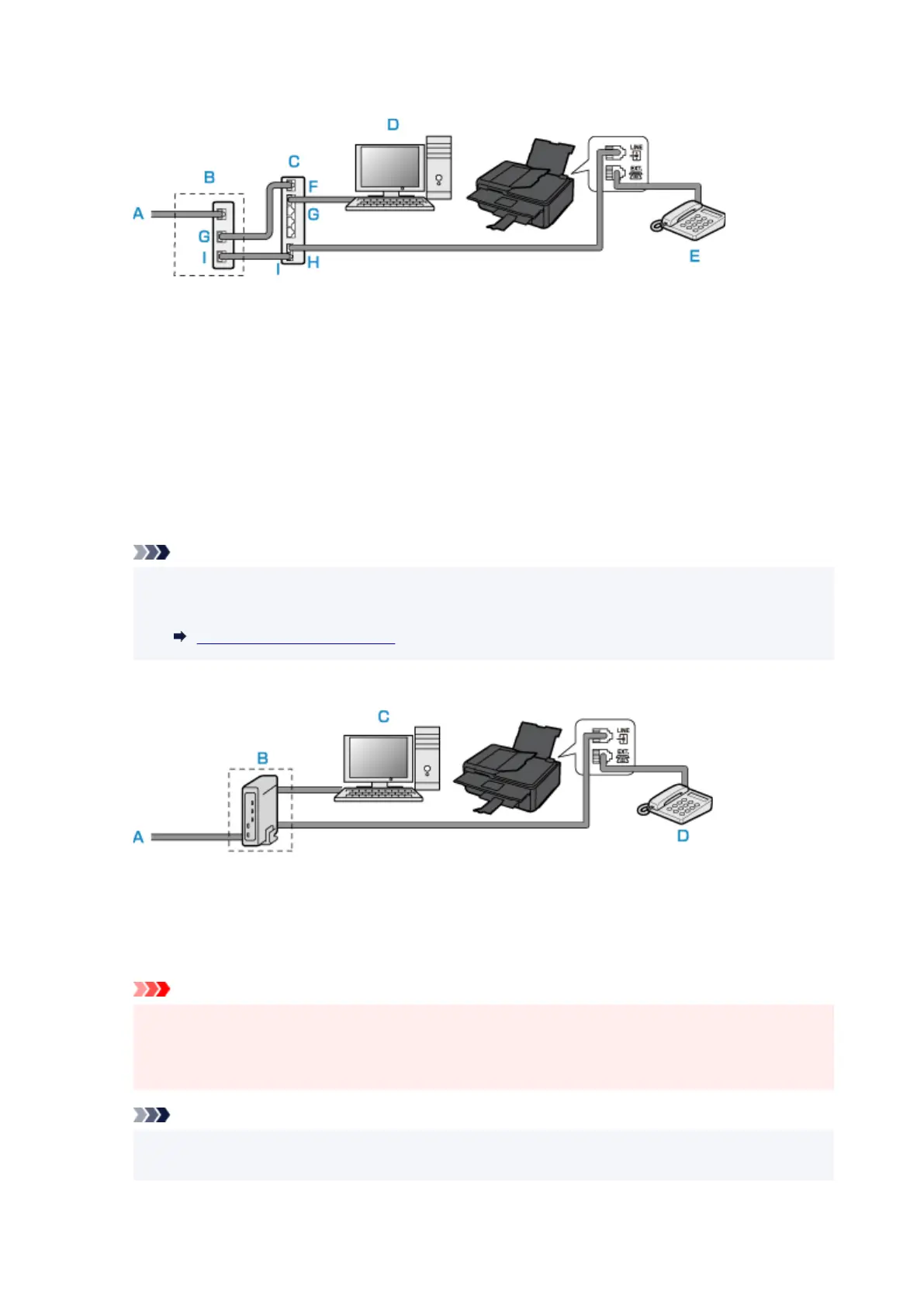
• Connecting to an Internet Telephone
A: Digital Subscriber Line
B: xDSL modem (splitter may not be built-in to the modem)
C: Broadband router compatible with Internet Telephone
D: Computer
E: Telephone or answering machine
F: WAN (Wide Area Network) port
G: LAN (Local Area Network) port
H: TEL port
I: LINE port
* Port configurations and names may vary depending on the product.
Note
• When connecting to the xDSL line, select the same line type as you are subscribing to in
Telephone line type.
Setting Telephone Line Type
• Connecting to an xDSL
A: Analog Subscriber Line
B: xDSL modem (splitter may not be built-in to the modem)
C: Computer
D: Telephone or answering machine
Important
• When the splitter is not built-in to the xDSL modem, do not branch the telephone line before the
splitter (wall side). And also, do not connect splitters in parallel. The printer may not be able to
operate properly.
Note
• When connecting to the xDSL line, select the same line type as you are subscribing to in
Telephone line type.
342



 To Next Page