EasyManua.ls Logo

Canon TX - Page 28

Canon TX
44 pages
Print Icon
To Next Page IconTo Next Page
To Previous Page IconTo Previous Page
Loading...
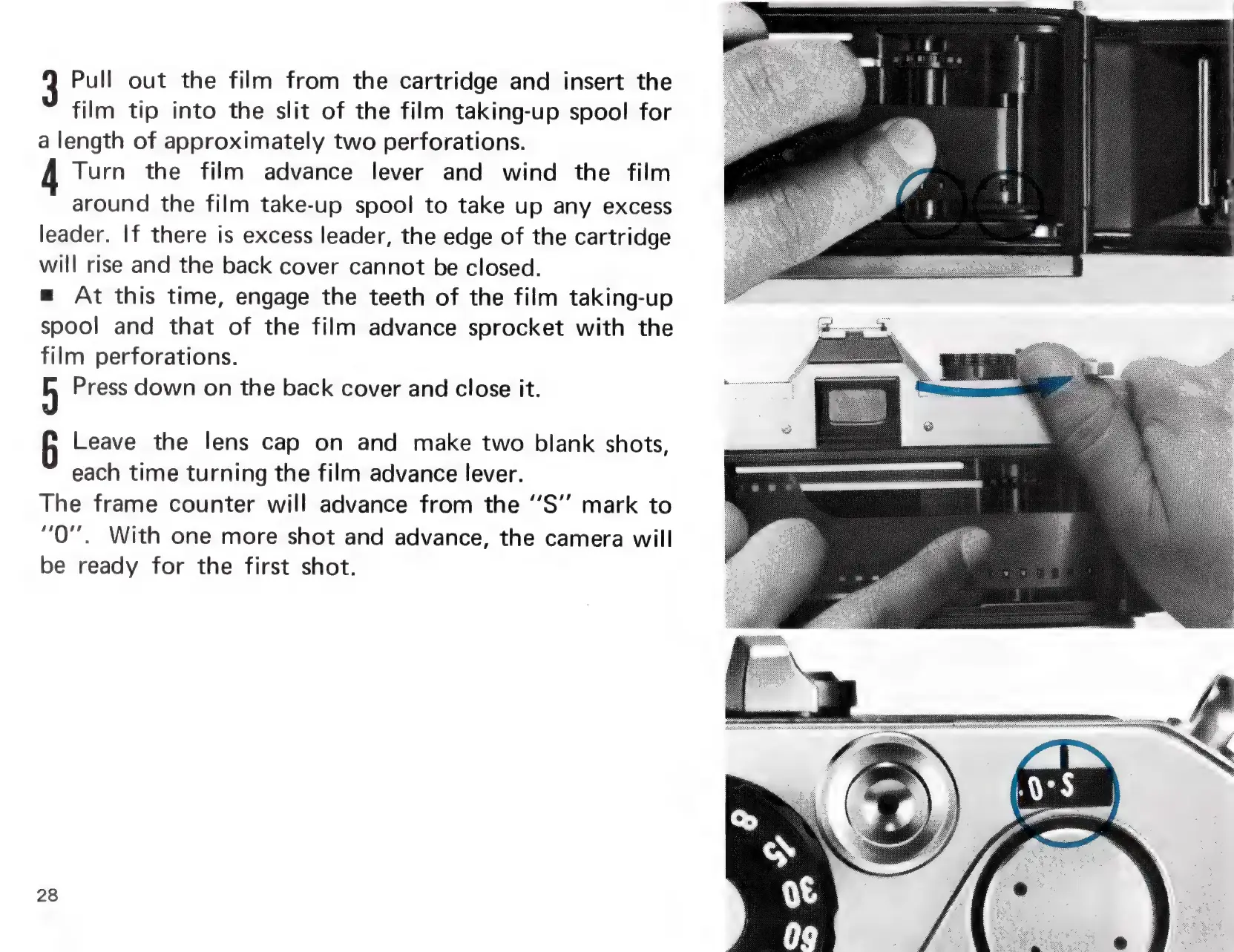
Pull
out
the
film
from
the
cartridge
and
insert
the
film
tip
into
the
slit
of
the
film
taking-up
spool
for
a
length
of
approximately
two
perforations.
Turn
the
film
advance
lever
and
wind
the
film
around
the
film
take-up
spool
to
take
up
any
excess
leader.
If
there
is
excess
leader,
the
edge
of
the
cartridge
will
rise
and
the
back
cover
cannot
be
closed.
=
At
this
time,
engage
the
teeth
of
the
film
taking-up
spool
and
that
of
the
film
advance
sprocket
with
the
film
perforations.
H
Press
down
on
the
back
cover
and
close
it.
Leave
the
lens
cap
on
and
make
two
blank
shots,
each
time
turning
the
film
advance
lever.
The
frame
counter
will
advance
from
the
‘“’S’’
mark
to
“Q"".
With
one
more
shot
and
advance,
the
camera
will
be
ready
for
the
first
shot.
28

Related product manuals