Recording Movies and Photos
40
Recording
Recording Movies and Photos
You can select the memory card that will be used to record movies and photos (A 39). For details on
recording audio, refer to Recording Audio (A 79).
POINTS TO CHECK
• Before you begin recording, make a test recording first to check that the camcorder is operating
correctly.
Preparing to Record
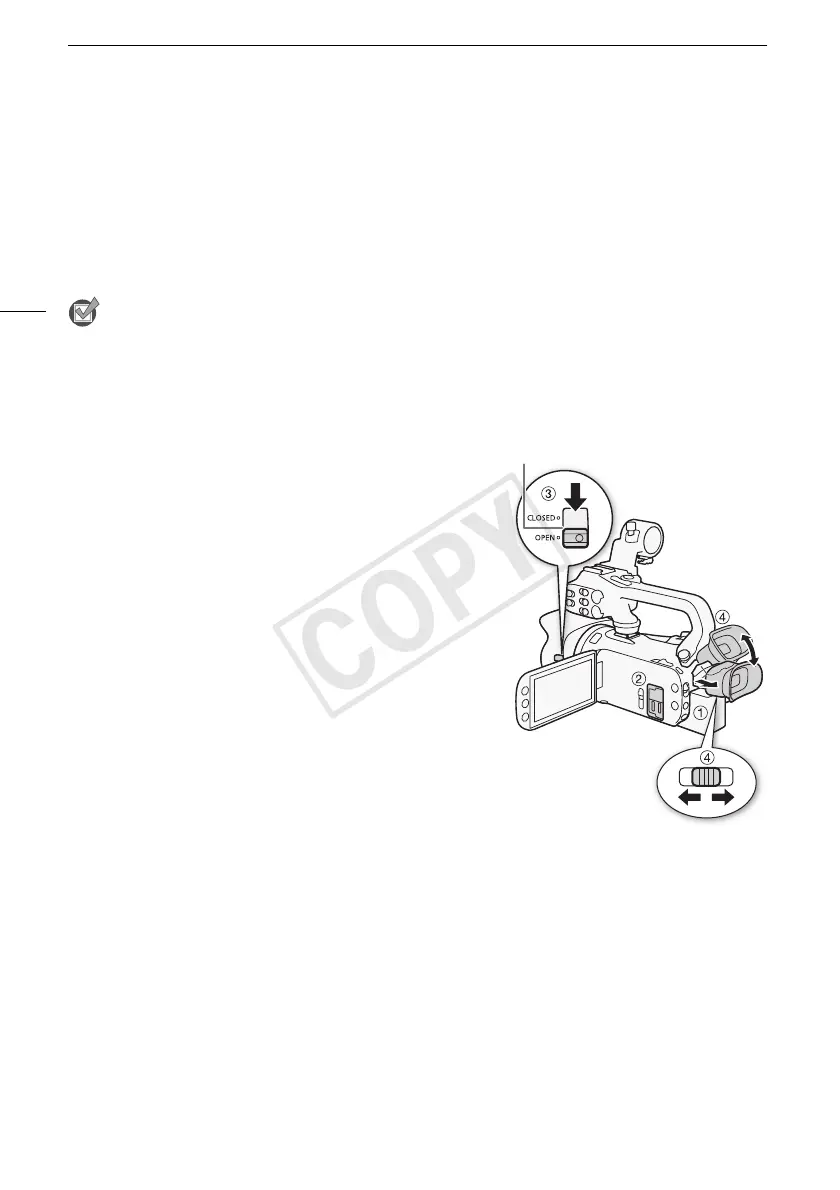
1 Attach a charged battery pack to the camcorder
(A 21).
2 Insert a memory card into a memory card slot.
• To use relay recording or dual recording (A 49), insert
memory cards into both memory card slots.
3 Open the lens barrier.
• Set the lens barrier switch to OPEN.
4 If you need to use the viewfinder, pull it out and adjust it,
if necessary.
• You can use the dioptric adjustment lever and tilt the
viewfinder 45 degrees upward.
Lens barrier switch
3
Recording



 To Next Page