batter y precautions:
Follow these precautions when using batteries in this device:
u
Warning - Danger of explosion if batteries are incorrectly replaced. Replace only with the same or equivalent type.
v
Use only the size and type of batteries specied.
w
Be sure to follow the correct polarity when installing the batteries as indicated in the battery compartment.
note: A reversed battery may cause damage to the device.
x
Do not mix different types of batteries together (e.g. Alkaline, Rechargeable and Carbon-zinc) or old batteries with fresh ones.
y
If the device is not to be used for a long period of time, remove the batteries to prevent damage or injury from possible battery leakage.
U
Do not try to recharge a battery not intended to be recharged - it can overheat and rupture. (Follow battery manufacturer’s directions.)
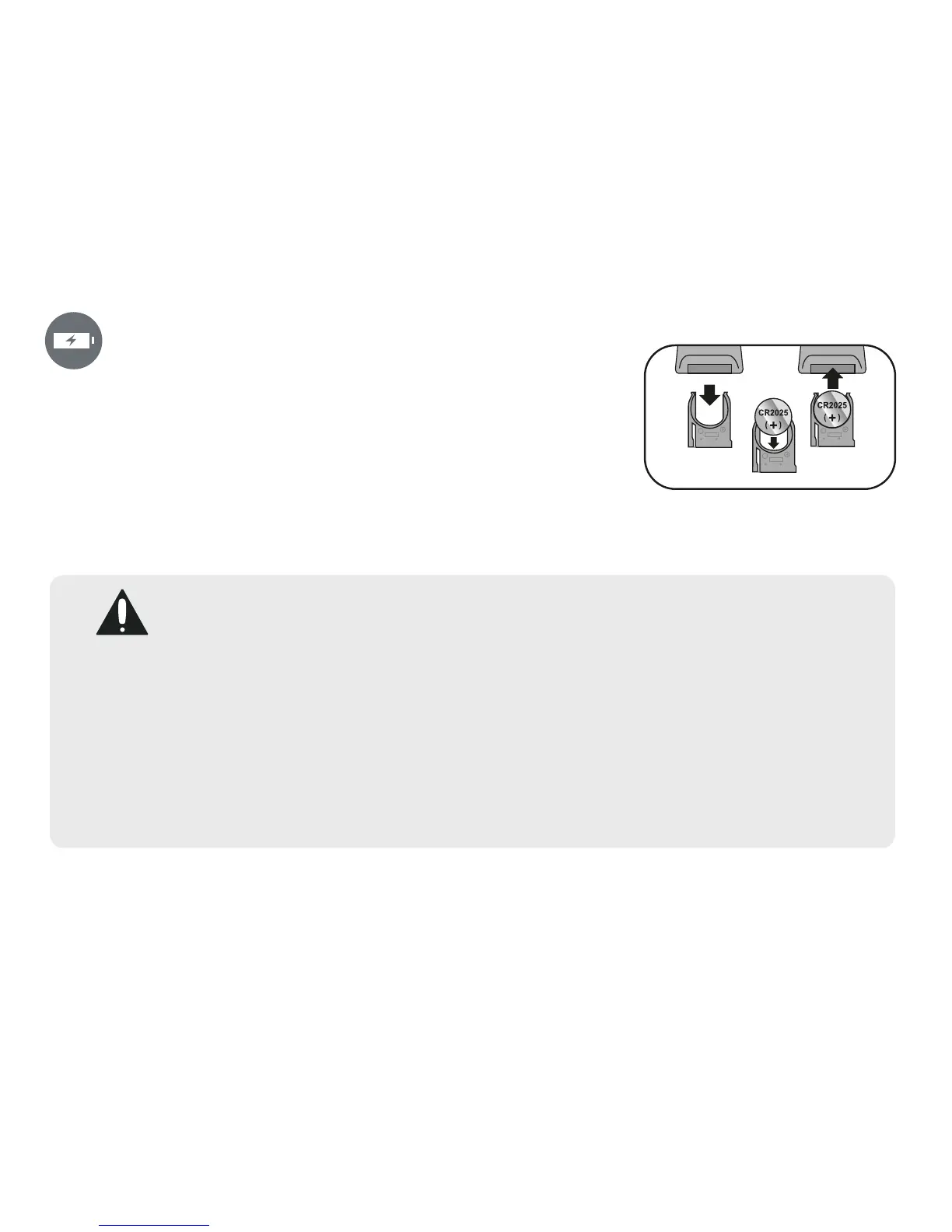
inserting remote battery
u
Remove the battery compartment, located on the bottom rear of the
remote control, by sliding the compartment out. (You can also insert
a penny or similar object into the groove on the compartment to help
side it out.
v
Install a CR2025 battery, paying attention to the polarity diagram
in the compartment (positive side up).
w
Replace the battery compartment.


 To Next Page