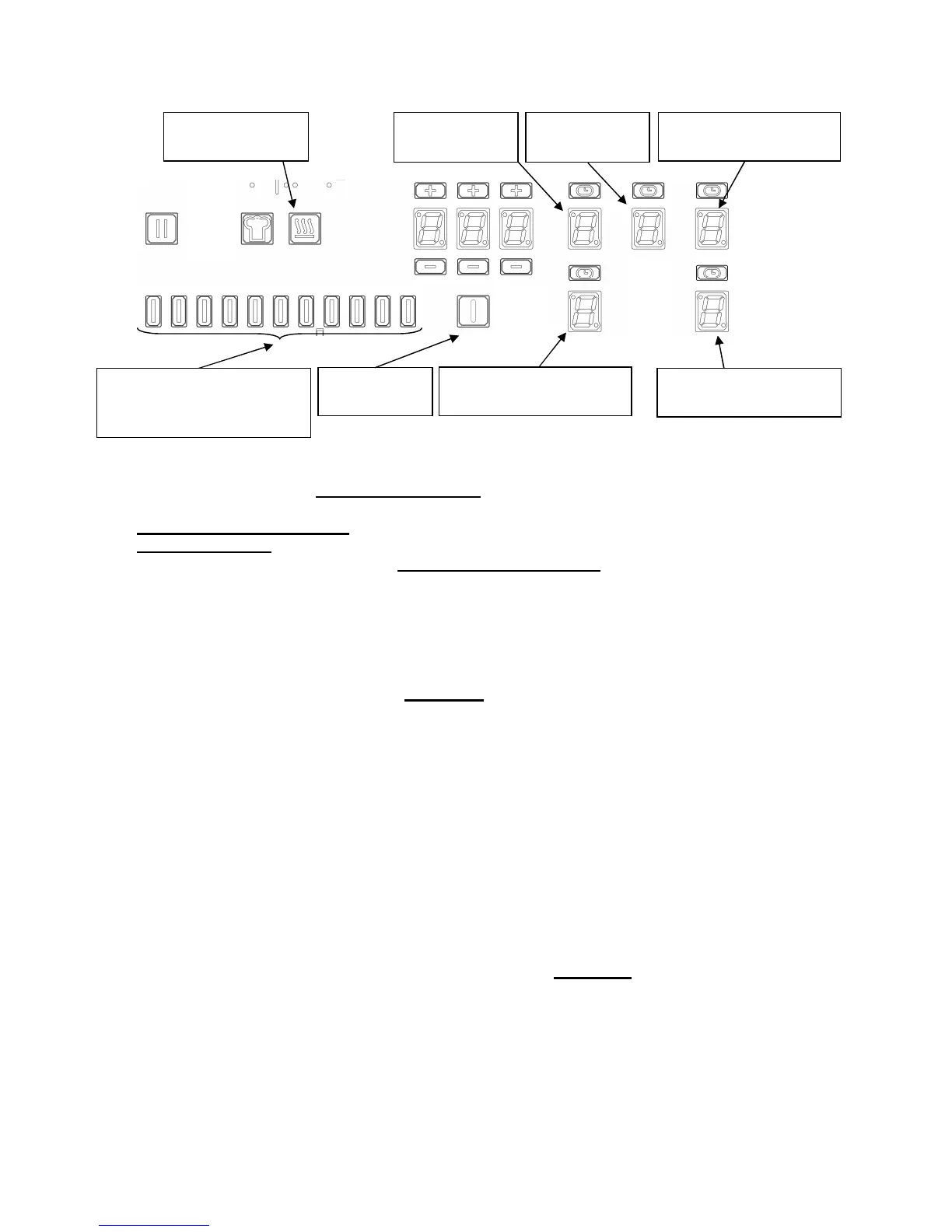
A. Disconnect the hob from the electrical network.
B. Connect the network and take into account that the configuration setting has to be made in a
maximum time of 2 minutes.
C. Do not switch ON the hob key ( 8 ).
D. Press the “keep warm” key ( 1 ) and keep the finger on this key.
E. With another finger press at the same time. one after the other, following touches:
( 2 ) Key : front right
( 3 ) Key : rear right
( 4 ) Key : middle
( 5 ) Key : rear left
( 6 ) Key : front left
Every touch has to be pressed within 2 seconds maximum.
A double “BEEP” indicates that the procedure failed (time exceeded in the selection of the keys,
wrong direction of selection…) In this case the procedure must be begun again to the stage, D
or A if necessary.
Release the finger from “keep warm” key ( 1 )
F. [ C ] and [ 0 ] blinks alternately on the rear left display ( 5 )
G. The configuration code displays on the front left display ( 6 )
H. Select the rear left display ( 5 )
I. Choose the adapted configuration with the “SLIDER” ( 7 ), slide to the left to decrease and to the
right to increase. Slide until [ C ] and [ 6 ] blink alternately.
J. Then select the front left display ( 6 ) ; choose the right configuration with the slider :
0 corresponds to C 6/0 – Demo mode is deactivated
1 corresponds to C 6/1 – Demo mode is activated
K. Validate this choice by pushing the On / Off key [O/I] ( 8 ) (during 3s).
A long “BEEP” is perceptible and the segments will move upwards during a few seconds. The hob
is now ready to be used.
DEMO function
On/off key
(8)
Keep warm key
(1)
Power display / Rear
right (3)
Power selection zone
“SLIDER” and timer
setting zone (7)
Power display /
Rear left (5)
Power display / Front
right (2)
Power display / Front
left (6)
Power display /
Middle (4)
22



 To Next Page