21
Clock Settings
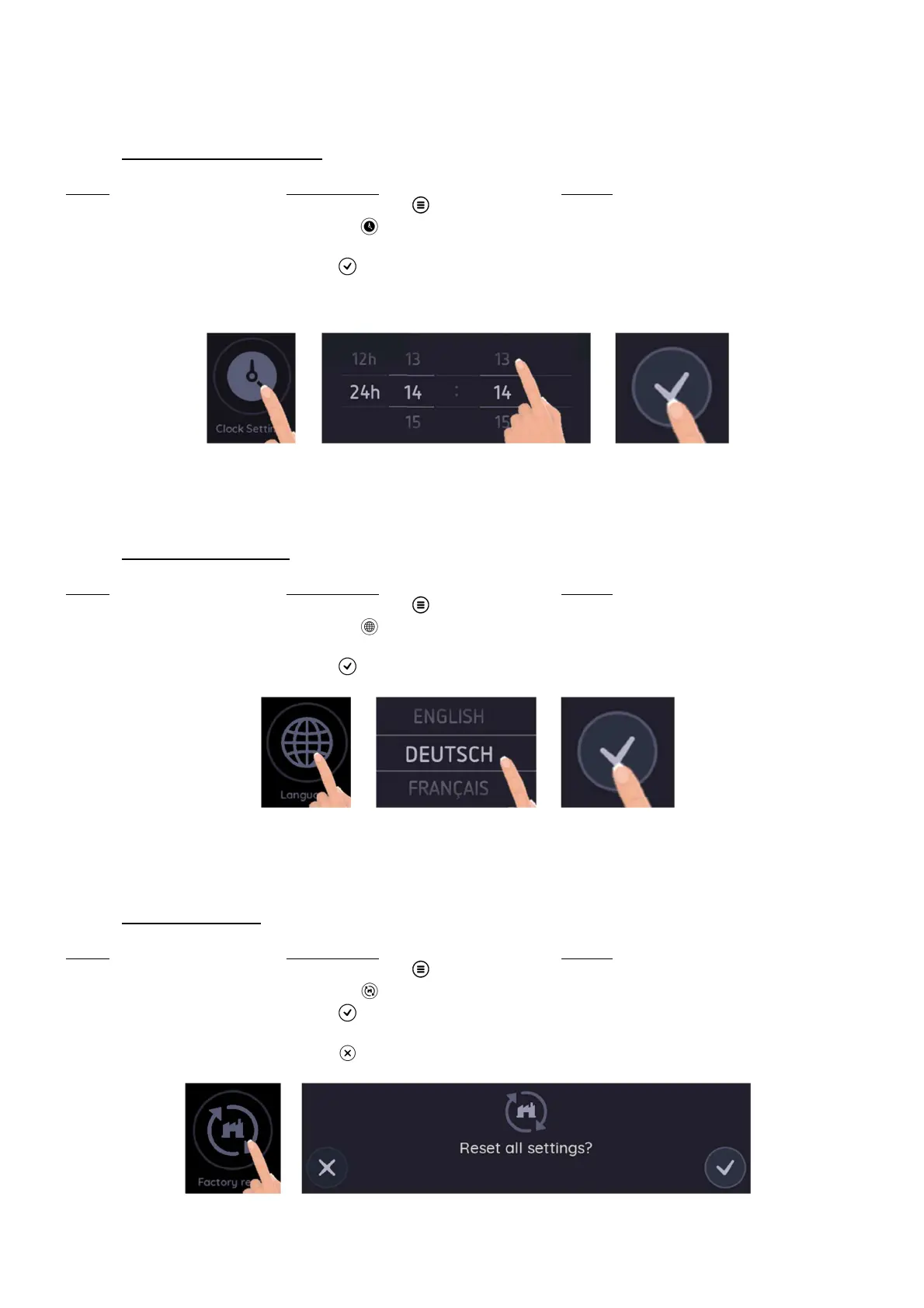
This function allows to set the time of the clock that shows on the main screen.
• Change the Clock settings:
Action Control panel Display
Enter in the Settings menu Press menu key [ ] The settings are displayed
Enter in the Clock settings Press on [ ] Clock Settings is open
Set the Clock Scroll to set the minutes and hours The Clock is set
Validate the settings Press [ ] to validate the settings Settings main menu
It is possible to choose between a 12 hours or 24 hours format display.
Language
This function allows to set the language you prefer.
• Change the Language:
Action Control panel Display
Enter in the Settings menu Press menu key [ ] The settings are displayed
Enter in the Language setting Press on [ ] Language settings is open
Set the Language Scroll to set the desired language The language is set
Validate the settings Press [ ] to validate the settings Settings main menu
Factory reset
This function allows to reset all settings.
• Reset the settings:
Action Control panel Display
Enter in the Settings menu Press menu key [ ] The settings are displayed
Enter in the Factory reset Press on [ ] Factory reset is open
Reset all settings Press [ ] Settings are set again as out of factory
or
Abort the reset Press [ ] Exit the Factory reset menu



 To Next Page