9
starts to work after you touching the START pad.
You may need to turn food over at the middle of cooking time to obtain uniform cooking.
For example, to cook 400g of fish..
Press STOP/CANCEL button.
Turn MENU dial to fish cooking, which is the item 6 on the auto-menu.
Press WEI. ADJ. pad 8 times to indicate weights 400g.
Press START button.
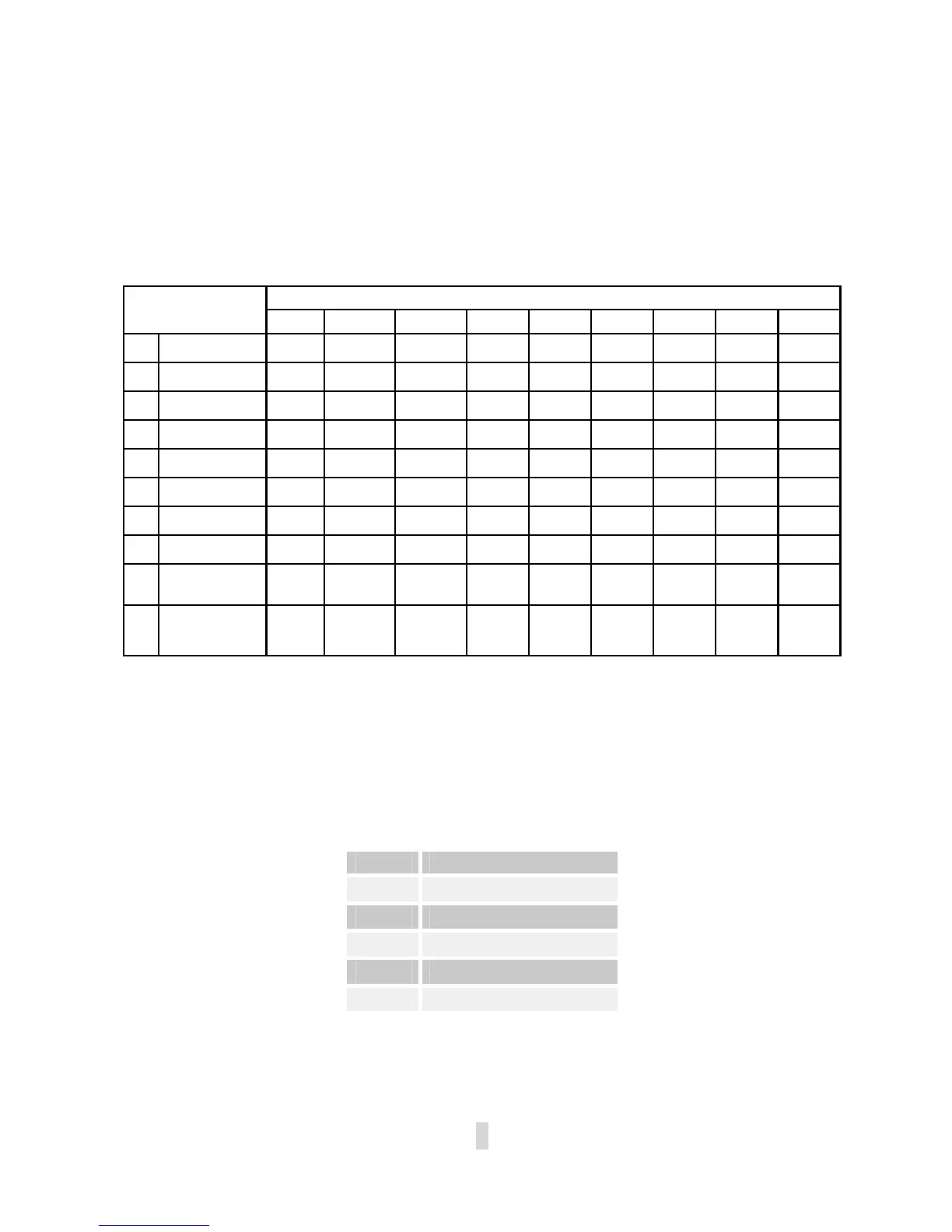
Press WEIGHT ADJ., to indicate weights or number of servings
AUTO COOK
MENU
1 2 3 4 5 6 7 8 9
1.
Coffee/Soup 1cup 1soup 2 soup
2.
Rice 80g 100g 120g
3.
Spaghetti 100g 200g 300g
4.
Potatoes 150g 300g 450g 600g
5.
Reheating 70g 140g 210g 280g 320g 350g 380g 420g 450g
6.
Fish 50g 100g 150g 200g 250g 300g 350g 400g 450g
7.
Chicken 800g 1000g 1200g 1300g 1400g 1500g 1700g 1800g 2000g
8.
Beef/Mutton 300g 500g 800g 1000g 1200g 1300g 1800g
9.
Skewered
Meat
80g 100g 150g 200g 300g 400g 500g 600g 700g
10.
Auto Defrost
However, please remember that the result of auto cooking depends on factors such as the shape
and size of food, your personal preference as to the doneness of certain foods and even how well
you happen to place the food in the oven. If you find the result at any rate not quite satisfactory,
please adjust the cooking time a little bit accordingly.
EXPRESS COOKING
The oven will operate at HIGH power (100% power output) for EXPRESS cooking program.
With each press of the START button you can program the oven for the following settings:
TIME PRES START BUTTON
0:30 once
1:00 twice
1:30 thrice
… …
12:00 15 times
For example, to set the oven to cook for 2 minutes using this feature:.
Press STOP/CANCEL button.
Press START button 4 times, the oven starts working immediately at full power.


 To Next Page