EasyManua.ls Logo

Caple Ri552FF - Appliance Functions; Control Panel and Indicators; Temperature Settings and Controls; Over Temperature Warning and Buzzer

Caple Ri552FF
28 pages
Print Icon
To Next Page IconTo Next Page
To Previous Page IconTo Previous Page
Loading...
2 Power indicato
r
T
he power indicator will illuminate a
f
ter the appliance is connected to the powe
r
reso
u
rce.
Functions
F
uctos
unctions
s
s
Fi
F
F
Fi
Fi
s
F
Functions
Functions
unctions
unctions
s
F
F
F
F
F
Fi
Fi
Fi
Fi
Functions
Functions
Functions
Functions
Functions
FunctionsFunctions
Functions
Functions
Functions
FunctionsFunctions
Functions
1
C
ontrol pane
l
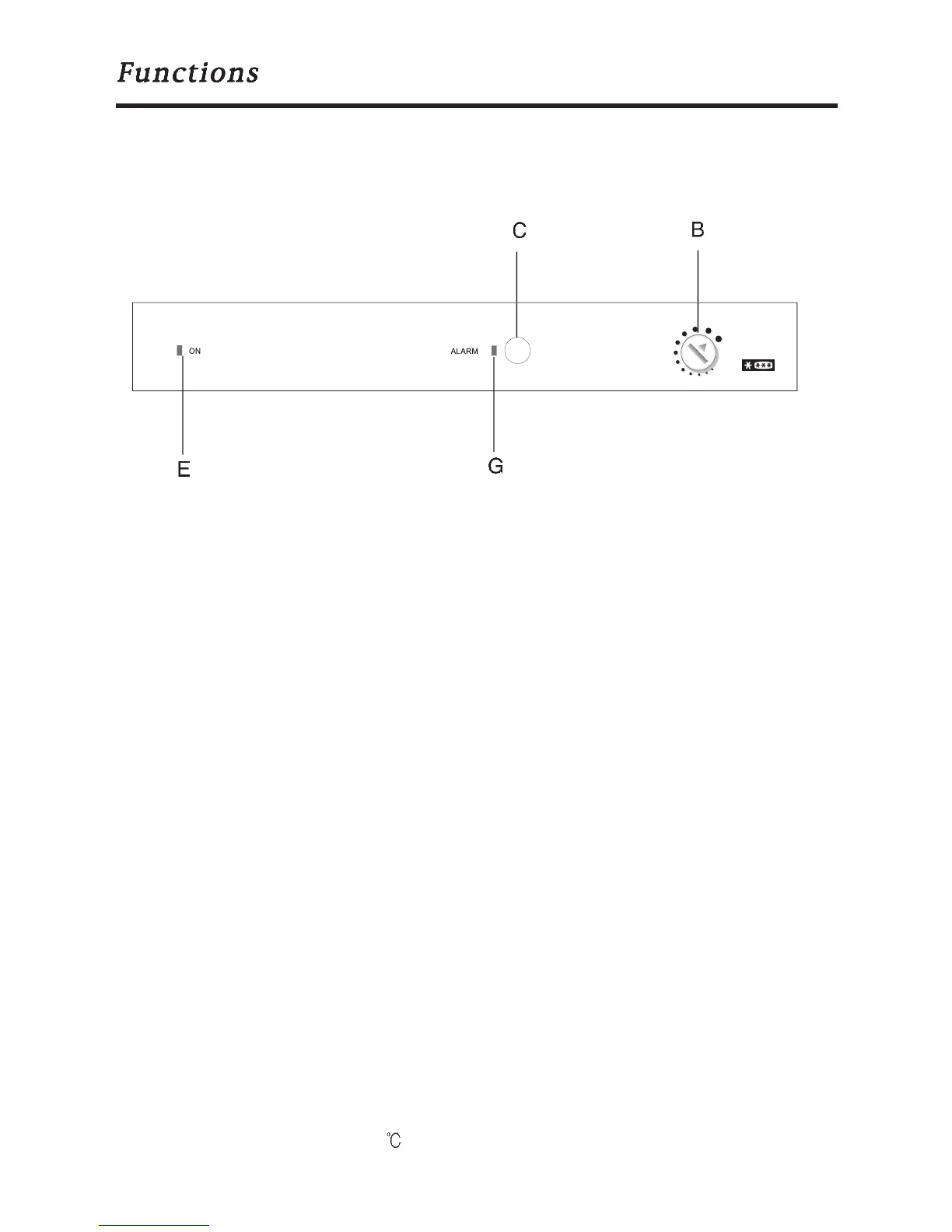
When refrigerator is connected a power source, the green lamp
(
E
)
and the re
d
overtemp warning lamp (
G
) illuminate
.
B
.
T
emperature sett
i
n
g
C
. Buzzer releas
e
E. Power indicator
(
green
)
G
.
O
ver temperature indicator (red
)
3 Temperature setting
s
T
urn the temperature knob "B" to set temperatures o
f
the re
f
rigerator. With the valu
e
i
ncreas
i
ng, the temperature goes down and v
i
ce versa
.
4
O
ver temperature warning and buzzer release
When the actual temperature as sensed
i
s above set po
i
nt, the over temperatur
e
warning indicator
G
will blink accompanied by a buzzing.
C
heck to see if the refrigera
-
tor door is properly closed or i
f
the re
f
rigerator is
f
irst operated. When the temperatur
e
in the
f
reezer compartment
f
alls to the desired value, the red over temperature-warn
-
ing indicator will automatically extinguish. When the re
f
rigerator is
f
irst used, the indi
-
cator
G
illuminates
.
Pressing the button
C
will cease the activated over-temp buzzer. When the temperature i

n
the
f
reezer
f
alls down below -
5
, the over-temp warn
i
ng
i
nd
i
cator w
i
ll ext
i
ngu
i
s
h
8

Related product manuals