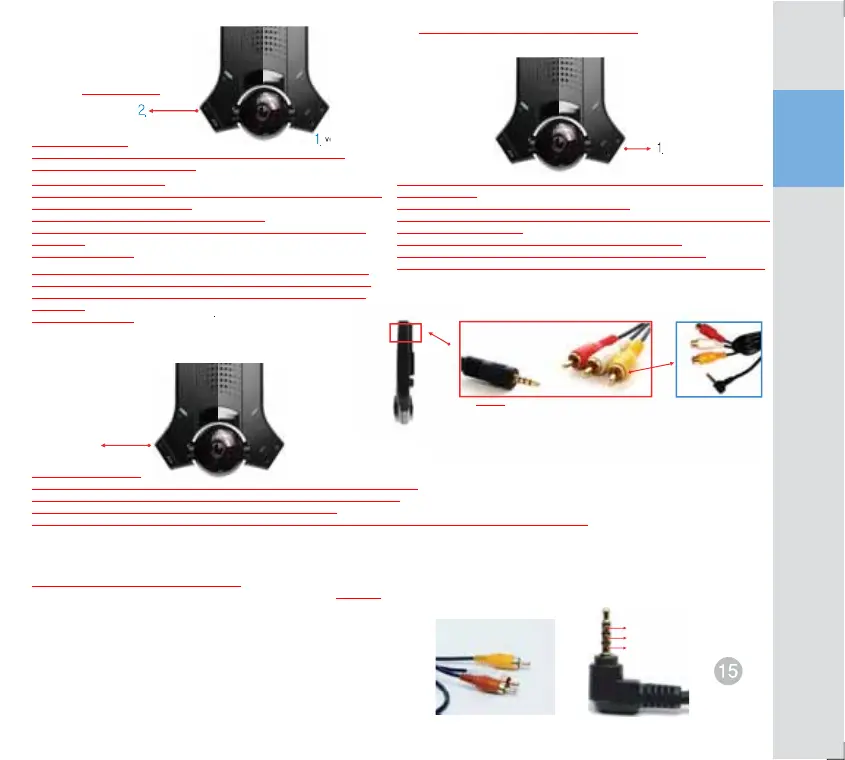
Delete image Sensitivity control function
Monitor playback function
(Use TV Out cable)
TV Out recording function (Use TV Out cable)
Image delete function
SD card general recording (N), Optional recording (B), Event recording
(E), image delete and other all delete
1. Delete using volume switch
(This can be used only in the case of voice announcement that images shall be
deleted due to storage space short.)
Operating instruction: Press volume button for 5 sec.
Voice announcement: All data will be erased. It will take several minutes, so
please wait.
Data has been erased.
Sensitivity control function (G sensor, impact, acceleration, deceleration, detection,
sensitivity control)
Operating instruction: Press volume button for 5 sec.
Voice announcement: Now you’re in sensitivity control mode. Current sensitivity is 3.
Button operation is required.
+ adjusts 4 and 5 sensitively, and – adjusts 2 and 1 insensitively.
After adjustment, press 2CH button to cancel sensitivity control mode.
Voice announcement: Sensitivity control mode is to be cancelled. Sensitivity control
2. Using selection switch for 2 channel photograph (Available to use always)
Operating instruction: press room image recording selection button for 3 sec.
Voice announcement: All data will be erased. It will take several minutes, so
please wait.
Data has been erased.
1. Emergent save button
Recorded image data can be confirmed in all monitor that has AV terminal including TV.
1) Remove rubber packing on volume button and connect TV Out cable to terminal.
2) Connect power and press emergent save button at the same time.
3) Latest image is output first and upon pressing ‘-‘button recorded images are played back by room and front order sequence.
TV Out recording function (* Use TV Out cable)
Current screen in recording can be displayed in all monitor including navigation
(PAL/NTSC compatible)
1) Remove rubber packing on volume button and connect TV Out cable to terminal.
2) Connect power and press “+” volume button at the same time.
Voice announcement : “Now it is installation mode. TV Out has been set. Room
recording has been selected. Start recording.
3) When power is off, installation mode is cancelled.
Voice announcement: “Installation mode is to be cancelled.”
2 channel photograph
Emergent save button
volume up/down
volume up/down
Video out cable (optional part)
Navigation cable
(General-purpose 2.5 ĭ4-pin terminal cable)
Video
GND(-)
voice
Video output
Audio output
(stereo)


 To Next Page
 Loading...