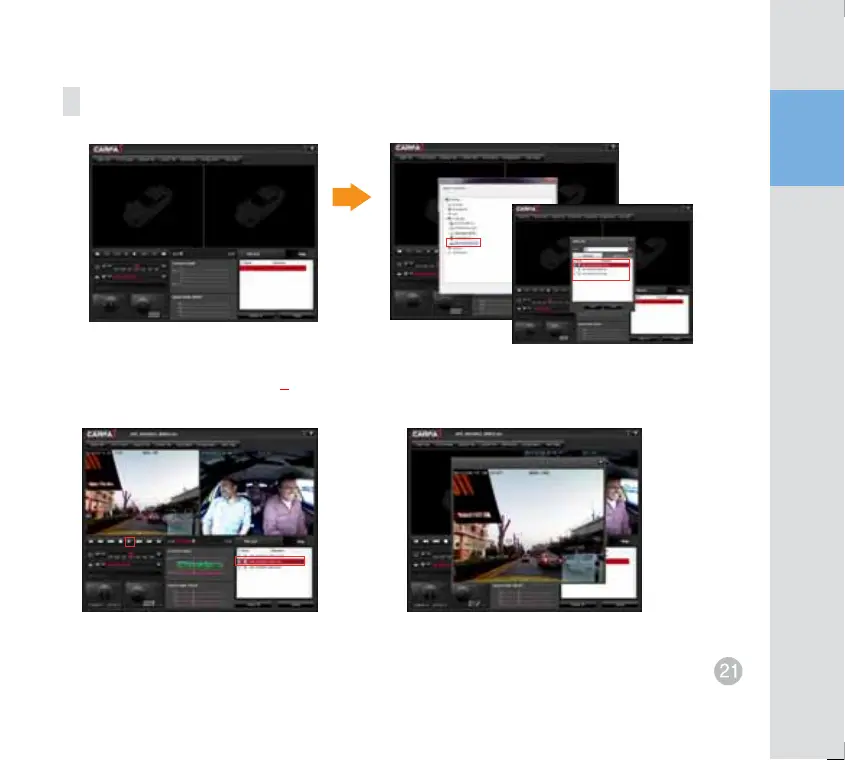
Instruction for program use
Select playback image
Double-click to enlarge
Select file location 倝#Select a mobile disk (SD card).
To open a file 倝#Select file location 倝 Select a mobile disk. 倝 Confirm 倝 Select a movie file to playback and
click on the [倝] button.
Event files (E) and Normal files (E) are listed in timely manner.
The selected movie file is added to a Playback List. Select a movie file to playback
and click on the [倝] button.
Double-click on the screen to enlarge the image during an indoor or a front recording file is playing.


 To Next Page