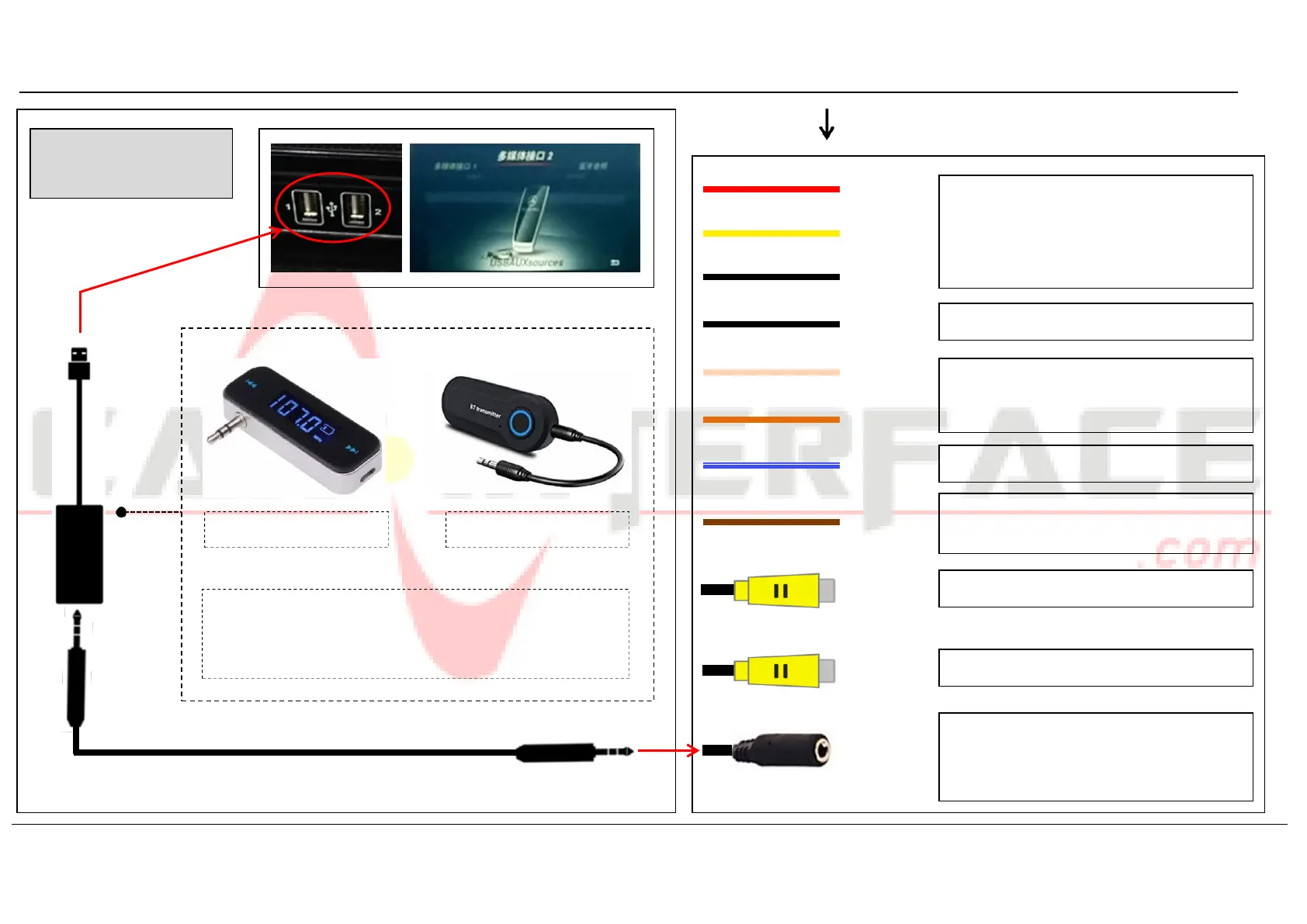
How to delivering
audio to OEM radio
Chart A:
ACC_OUT
B+
GND
Supply power for DVR or other video
devices. Just connect the ACC_OUT (RED)
when use aftermarket front view camera
GND 2
Connect GND if there is any audio noise
LEFT_DET
RIGHT_DET
N/A
N/A
CAM_POWER
Supply 12V power for backup camera
FM audio transmitter
BT audio transmitter
REVERSE
Reverse detect (Connect to reverse light if
CAM_POWER cable does not output 12V)
NOTE! Other ways like activating OEM AUX function, FM/BT
audio transmitter, etc. could be also used for audio
transmission to factory radio.
REAR_CVBS
FRONT_CVBS
Rear view camera video input
Front view camera/DVR video input
3.5mm AUX cable
AUDIO OUT
AUX audio output (Connect to AUX-USB
adapter or other audio transmitters for
audio delivering to OEM radio)


 To Next Page