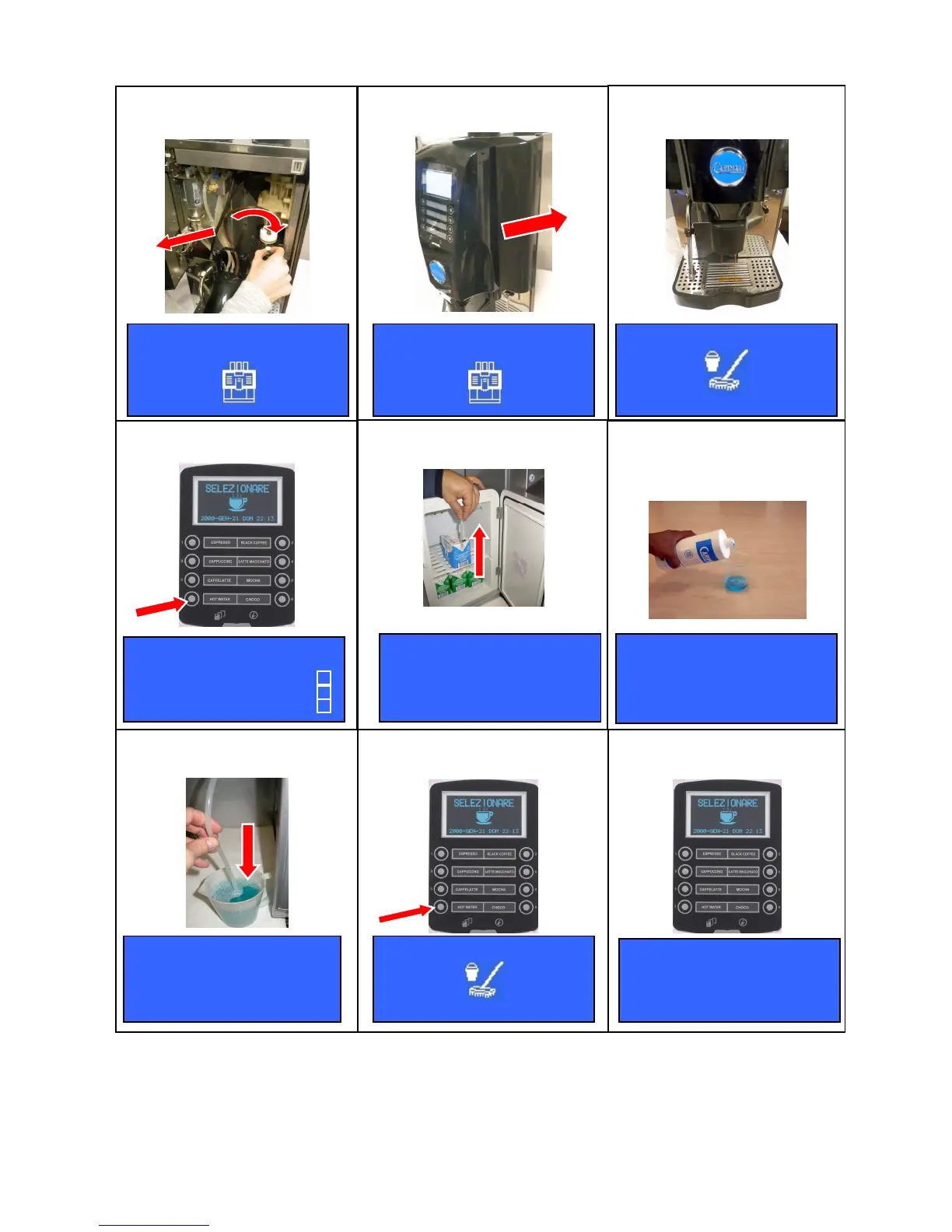
- Put the milk infeed pipe into a glass of cold water
- Press (N°7) key
,
the milk frother will start dispensing another cleaning cycle only with water.
Open the front door -1-, insert the
detergent tablet into the brewing
chamber -2-
Insert the milk feeding tube into a
container with detergent
Prepare a solution of water and
detergent (q.ty 200ml for standard
version, 500ml if milk pump present) by
following the instructions indicated in the
product label
Take the milk feeding tube out of the
milk box
Press (N°7) key to start the milker
cleaning cycle.
INSERT
CLEANING SOLUTION
PRESS B7 TO START
INSERT
CLEANING SOLUTION
PRESS B7 TO START
INSERT
CLEANING SOLUTION
PRESS B7 TO START
Wait the end of the group cleaning
cycle delivery.
1
2
POWER CLEANER √
√√
√
GROUP CLEANING √
√√
√
Press (N°7) key to start the milker
cleaning cycle.
At the end of the milker cleaning
cycle the display will show :
REPEAT CLEAN
USING ONLY WATER
PRESS B7 TO START













 To Next Page