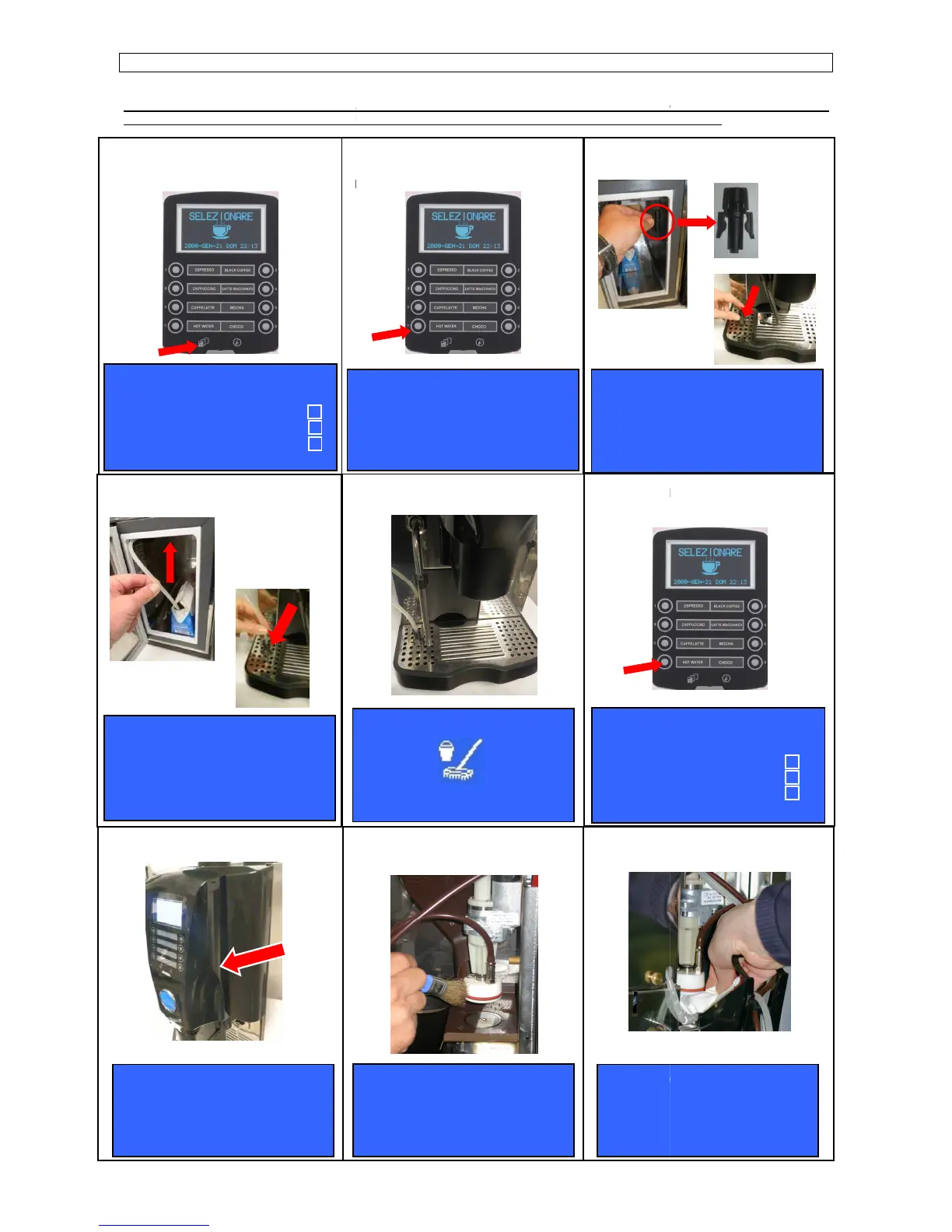
AT THE END OF EACH WORKING DAY , AND/OR IN CASE THE MACHINE WILL NOT BE USED SOME TIME, WE STRONGLY
RECOMMEND TO CARRY OUT AUTOMATI
cleaner cycle ( press N°4 key to skip the
Keep (Shift) key pressed for five
seconds ( for SELF configuration insert
the waiter password 61111).
Insert the silicone tube into the black
support and press (N°7) key.
PRESS B 4 TO SKIP
POWER CLEANER
GROUP CLEANING
MILKER CLEANING
OPEN FRONT PANEL
AND CLEAN COMPONENT
Remove the silicone tube from
the milk box and place it into the
black support
PRESS B 7 TO START
OF POWER CLEANER - COFFEE GROUP -
AT THE END OF EACH WORKING DAY , AND/OR IN CASE THE MACHINE WILL NOT BE USED SOME TIME, WE STRONGLY
RECOMMEND TO CARRY OUT AUTOMATI
C CLEANING OF THE COFFEE GROUP
Press (N°7) key to start the Power
cleaner cycle ( press N°4 key to skip the
Insert the black pipe support in the drip
Wait the end of the Power cleaner
Insert the black pipe support
into the hole in the drip tray grid
into the hole in the drip tray grid
Clean the group from any coffee
residues.
CLEAN &
CLOSE FRONT PANEL
Clean the group filters by means of a
AT THE END OF EACH WORKING DAY , AND/OR IN CASE THE MACHINE WILL NOT BE USED SOME TIME, WE STRONGLY
Insert the black pipe support in the drip
into the hole in the drip tray grid
Clean the group filters by means of a













 To Next Page