EasyManua.ls Logo

Carrier Infinity series - User Manual

Carrier Infinity series
16 pages
Print Icon
To Next Page IconTo Next Page
Loading...
Turn to the Expertg_
INFINITY _ ERIE:_

Other manuals for Carrier Infinity series

Questions and Answers

  • K
    Kristin HarrisJul 26, 2025
    What to do if Carrier Infinity Control Unit has no communication with server?
    • W
      Wendy JacksonJul 26, 2025
      If your Carrier Control Unit has no communication with the server, ensure that the router is connected to the Internet and that the network parameters are correct.
  • N
    Nancy HolmesAug 1, 2025
    How to fix Carrier Control Unit when wireless network not detected?
    • R
      roberta66Aug 2, 2025
      If the wireless network is not detected by your Carrier Control Unit, make sure the network parameters are correct in the WiFi B--SAM setup screens.
  • M
    Megan JonesAug 7, 2025
    What to do if Carrier Infinity Control Unit loss of communication with Ethernet device?
    • P
      peterwilsonAug 7, 2025
      If your Carrier Control Unit loses communication with the Ethernet device: * Ensure that the cable between WiFi B--SAM circuit boards is seated properly. * Replace the WiFi B--SAM.
  • B
    Brandon ThompsonAug 13, 2025
    Why is the auxiliary sensor active on my Carrier Control Unit?
    • M
      Megan WalkerAug 13, 2025
      If the auxiliary sensor is active on your Carrier Control Unit, it may be because the auxiliary sensor terminals are shorted by an external device.
  • K
    Karen BarberAug 19, 2025
    How to fix Carrier Infinity board failure?
    • T
      Thomas BeltranAug 19, 2025
      To address a board failure in your Carrier Control Unit, replace the WiFi B--SAM.

Summary

Account Setup & Login

Step 1 - New User Agreement

Details the process of agreeing to terms and conditions, entering SAM serial number and PIN for new user setup.

Step 2 - User Profile

Step 3 - Location Information

Guides users to enter location-specific details such as name, address, and system identifiers for their installed system.

Step 4 Setting Up Notifications

Step 5 Subscription Billing

Subscription Payment

Explains how to pay for the 1-year subscription service, either immediately or later, using credit card information.

Credit Card Information

Details the process for entering credit card and billing information for the subscription service through Verisign.

Program Schedule Management

Create New Schedule

Guides users through creating a new comfort schedule by setting start times, temperatures, and fan speeds for different periods.

Modify Existing Schedule

Explains how to alter start times or temperatures in existing comfort schedules without re-programming the entire schedule.

Vacation Settings

Create or Modify Vacation Setting

Provides steps to program a new vacation schedule or terminate an existing one by selecting dates, times, and modes.

Carrier Infinity series Specifications

General IconGeneral
SeriesInfinity
MountingWall-mounted
Energy MonitoringYes
ColorWhite
ConnectivityWi-Fi
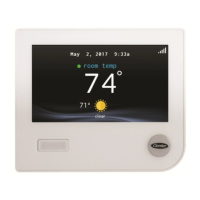
Display TypeTouchscreen
CompatibilityCarrier Infinity System
Remote AccessYes
AlertsYes
Indoor Air Quality IntegrationYes
Programming7-day programmable, multiple schedules

Related product manuals