BUTTONS BUTTONS
3. BUTTONS 3. BUTTONS
7
6
7
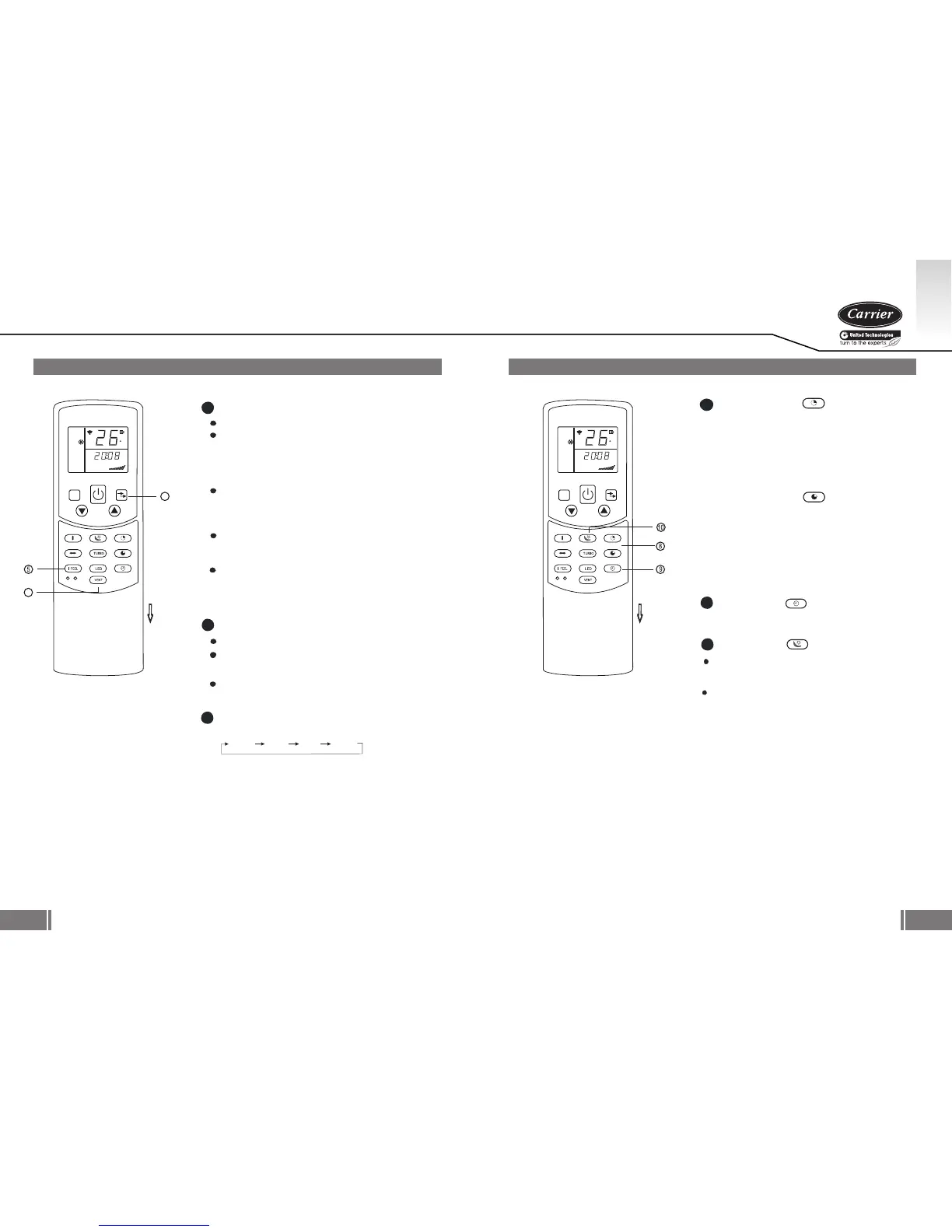
Press tis button to select the fan speed:
AUTO LOW MED HIGH
FAN Button
5
TIMER ON Button (
)
TIMER OFF Button ( )
Press this button to initiate the auto-on time
sequence. Each press will increase the auto-
timed setting in 30 minutes increments. When
the setting time displays 10, each press will
increase the auto-timed setting 60 minutes
increments. To cancel the auto-timed program,
simply adjust the auto-on time to 0.0.
Press this button to initiate the auto-off time
sequence. Each press will increase the auto-
timed setting in 30 minutes increments. When
the setting time displays 10, each press will
increase the auto-timed setting 60 minutes
increments. To cancel the auto-timed program,
simply adjust the auto-off time to 0.0
8
9
SLEEP Button ( )
Active/Disable sleep function. It can maintain
the most comfortable temperature and save
energy.
For the detail, see sleep operation in
USER S MANUAL.
,
,,
,,
,,
,,
Active/Disable I FEEL function for each press.
Under SELF CLEAN mode, the air conditioner
will automatically clean and dry the evaporator
and keep it as fresh for the next operation.
Disable/ActiveVENT function for each press.
When the I FEEL function is activated,
the remote display is actual temperature at
its location. The remote control will send this
signal to the air conditioner every 3 minutes
until press the I FEEL button again.
The I FEEL function is not available under
DRY and FAN mode. Switch the operation mode
or turn off the unit will cancel the I FEEL function
automatically.
When press more than 2 seconds, the
SELF CLEAN function will be activated, press
more than 2 seconds again to disable.
0605
NOTE: While the unit is running under
SLEEP mode, it would be cancelled if
MODE, FAN or ON/OFF button is pressed.
G B
MODE
FAN SPEED
SWING V
SWING H
SLEEP
IONIZER
TIMER ON
TIMER OFF
CLOCK
SEL F CLEAN
AUT O CLEAN
RES ET LOCK
AUTO
COOL
DRY
HEAT
FAN
E
TEMP.
SET
CLO CK
TIM ER
HOUR
ON OFF
M
OPEN
I FEEL / SELF CLEAN Button
6
VENT / AUTO CLEAN Button
When press more than 2 seconds, the AUTO
CLEAN function will be activated, press more
than 2 seconds again to disable.
The AUTO CLEAN is only available when the
air conditioner is off.
MODE
FAN SPEED
SWING V
SWING H
SLEEP
IONIZER
TIMER ON
TIMER OFF
CLOCK
SEL F CLEAN
AUT O CLEAN
RES ET LOCK
AUTO
COOL
DRY
HEAT
FAN
E
TEMP.
SET
CLO CK
TIM ER
HOUR
ON OFF
M
OPEN
To set the remote clock.
CLOCK Button ( )
10





 To Next Page