Page 6 of 8 SC-1022-20 Installation Instructions
1/3/20 CP5208A
OPERATION
POWER ON/OFF
The unit is normally turned on with ignition switch on the vehicle. See INSTALLATION section.
The hand control will also be backlit.
SIREN CONTROLS
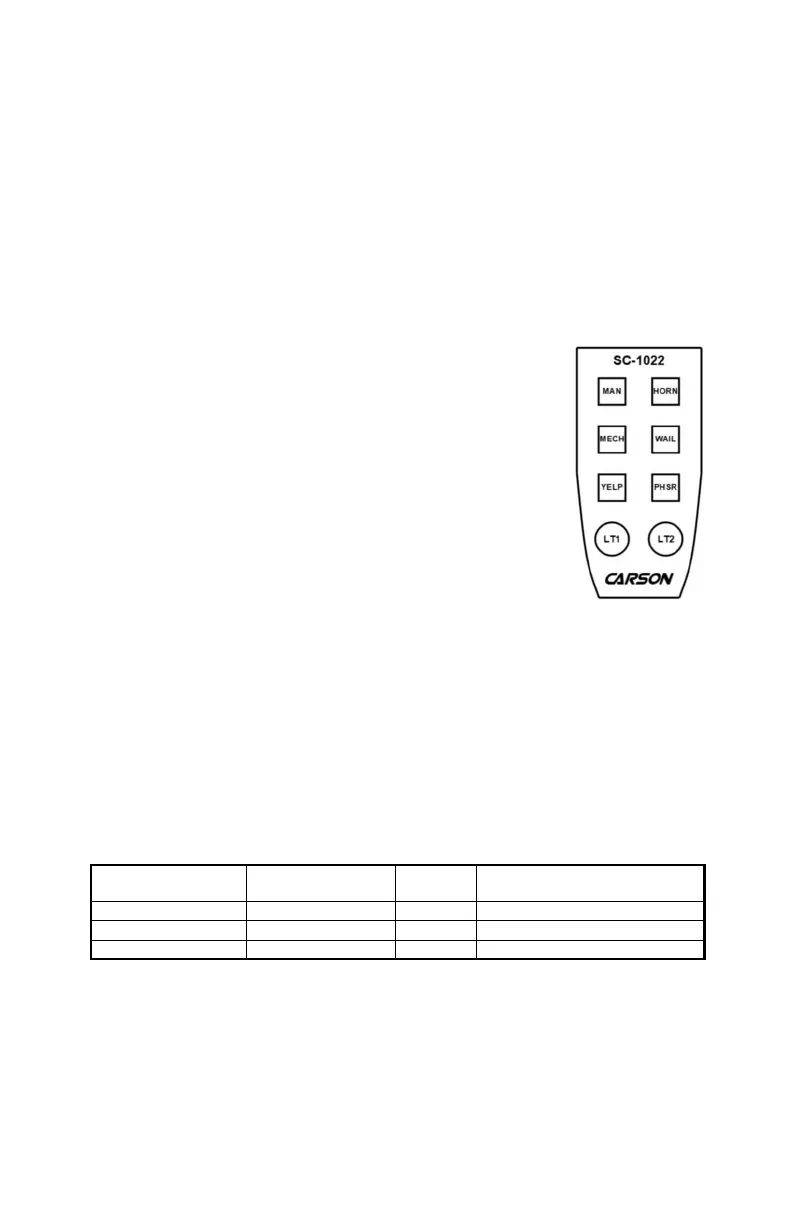
MECH, WAIL, YELP, AND PHSR PUSHBUTTON SWITCHES
Four pushbutton switches control the primary operating mode of the siren.
The primary operating modes are:
Standby - A silent mode that may be overridden at any time.
Mech - A simulated mechanical siren tone. Tone may be changed or disabled. See OPTION
SWITCHES section.
Wail - A slower changing tone used on highways.
Yelp - A rapidly changing tone used in congested areas.
Phaser - A very rapid changing tone used at intersections and very highly
congested areas. May be optionally replaced with Two-Tone or disabled.
Two-Tone is two alternating frequencies like a European HI-LO. See OP-
TION SWITCHES section.
Momentarily press button to activate (lit red). Momentarily press button
again to de-activate. Also while a particular mode is activated, switch to a
different mode by pressing one of the other three buttons. The unit is in
Standby when NONE of the four buttons are activated (NOT lit red). For
example starting with all four buttons off, press the Wail button to turn on
Wail. Now press the Yelp button to change to Yelp. Press the Yelp button
again to turn off sound (return to Standby).
When Mechanical or Wail is turned off the tone will die out. Turn on Short
Manual option to stop tone immediately. See OPTION SWITCHES section.
MAN PUSHBUTTON SWITCH
Provides manual control of siren tone depending on the primary operating
mode selected.
While in Standby, the Manual button controls the Mechanical tone. Rising to peak while pressed
then falling until die out when released. May be optionally replaced with manual Wail tone.
See OPTION SWITCHES section.
While in Mech, Yelp, or Phaser mode, pressing the Manual button causes tone to rise and peak
then resume when released. While in Wail mode pressing this button toggles between Wail and
Power C tone.
HORN PUSHBUTTON SWITCH
Produces a simulated Air-Horn tone while pressed. Overrides all siren modes. Horn tone may be
disabled. See OPTION SWITCHES section.
AUXILIARY INPUT FUNCTIONS
The switch or horn ring attached is intended to be momentary. While in Mech, Wail, Yelp, or
Phaser mode, activating auxiliary will produce Horn tone. While in Standby, activating auxiliary
will normally produce Horn tone. Different tones are available. See OPTION SWITCHES section.
Horn Ring Cycler 2 (HRC2) - this feature may also be added. See description on Page 4.
LIGHT CONTROLS
LT1 and LT2 PUSHBUTTON SWITCHES
Momentarily push button to activate (will light red) corresponding light output.
Momentarily push button again to de-activate corresponding light output.
Primary Mode
and Tone
MAN
Button
HORN
Button
Auxiliary Input
(Horn Ring)
Standby (Silent) M. Mech or M. Wail Horn Horn, M. Mech., M. Wail, or HRC2
Mechanical Man. Mech. Rise Horn Horn
Wail, Yelp, or Phaser Man. Wail Rise Horn Horn





 To Next Page