0000000000000000
[gJ' •••••
ii ••
."".-J.
Chapter 2
<11I£I11»
CD, Tuner and Auxillary connections
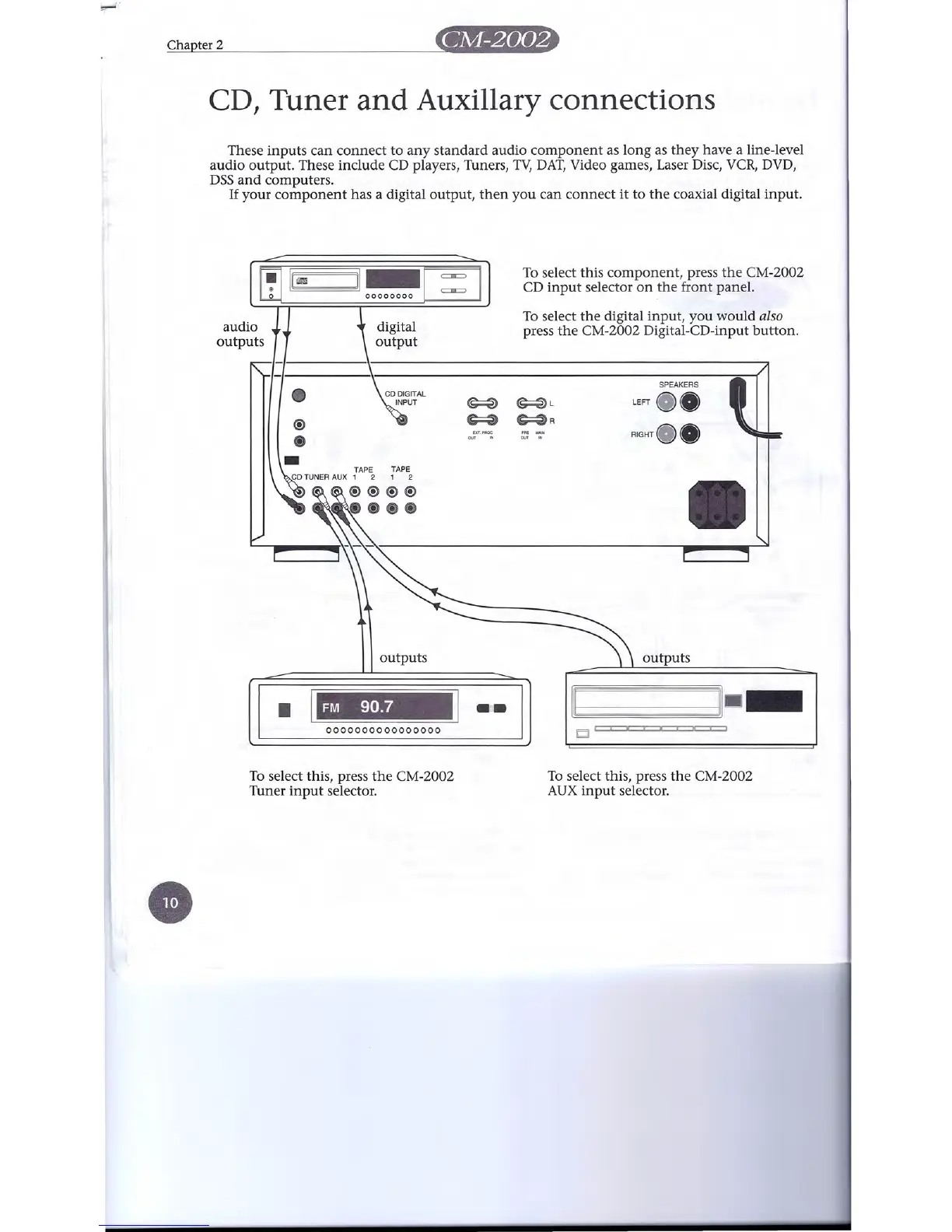
These inputs can connect to any standard audio component as long as they have a line-level
audio output. These include CD players, Tuners, TV, DAT, Video games, Laser Disc, VCR, DVD,
DSS and computers.
If your component has a digital output, then you can connect it to the coaxial digital input.
To select this component, press the CM-2002
CD input selector on the front panel.
To select the digital input, you would also
press the CM-2002 Digital-CD-input button.
00
11
m
11_[
c:::n=
c=EC:l
00000000
audio
digital
outputs
output
(!)
SPEAKERS
m
•
~
~
~L
~R
LEFT
00
sxr.sacc
our "
PRE
MAIN
ccr "
RIGHT_O
-
•
outputs
outputs
•
FM 90.7
..:..
[II
111--
To select this, press the CM-2002
Tuner input selector.
To select this, press the CM-2002
AUX input selector.
e


 To Next Page