Chanter 2
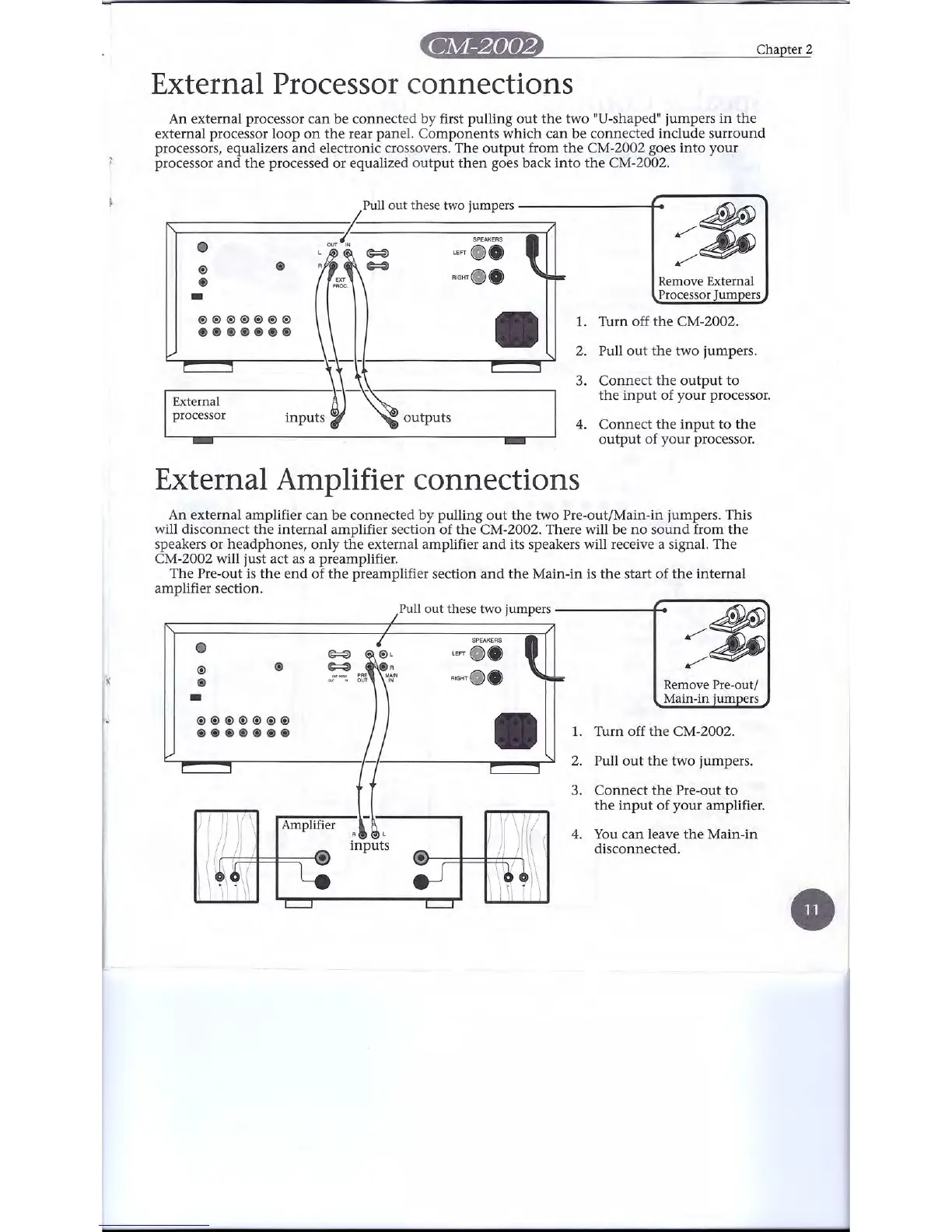
External Processor connections
An external processor can be connected by first pulling out the two "D-shaped" jumpers in the
external processor loop on the rear panel. Components which can be connected include surround
processors, equalizers and electronic crossovers. The output from the CM-2002 goes into your
processor and the processed or equalized output then goes back into the CM-2002.
Remove External
Processor Jumpers
Pull out these two jumpers
I•
, •• ,";;."if-
=> ~ ••
~
RIGHT ••
@)
@)
-
@)
@)@)@)@)@)@)@)
@)@)@)@)@)@)@)
External
processor
•
outputs
::~
1. Turn off the CM-2002.
2. Pull out the two jumpers.
3. Connect the output to
the input of your processor.
4. Connect the input to the
output of your processor. .
External Amplifier connections
An external amplifier can be connected by pulling out the two Pre-out/Main-in jumpers. This
will disconnect the internal amplifier section of the CM-2002. There will be no sound from the
speakers or headphones, only the external amplifier and its speakers will receive a signal. The
CM-2002 will just act as a preamplifier.
The Pre-out is the end of the preamplifier section and the Main-in is the start of the internal
amplifier section.
Pull out these two jumpers , •
0
~
@)
<i>
~
if(
I I
@)
-
.;
I I
@)@)@)@)@)@)@)
@)@)@)@)@)@)@)
Amplifier
R
inputs
SPEAKERS
m
LEFT ••
RIGHT ••
•
Remove Pre-out/
Main-in jumpers
::~
1. Turn off the CM-2002.
2. Pull out the two jumpers.
3. Connect the Pre-out to
the input of your amplifier.
4. You can leave the Main-in
disconnected.


 To Next Page