~~====~~~~======~------------~
Chapter 3.
Front Panel features
Chapter 3 __
e
Cf\RVER
CM-2002 Integrated Amplifier
<9 <9
Tape1 Tape2
( ,.4.,,_."·, ,~
<9
CD
Gl
Aux
WATTS
0.010.1 1 1030100 200
~\\\\iIIMj)'
POWER OUTPUT
WATTS
cot
0.1 1 1030100 200
~~\\\\iIIMjl
POWER OUTPUT
Tuner Phono
(9 (9
Hologram
e
DAC
eON
Volume
IR
window
••
Digital CD input
0'
Treble
Balance Loudness Record
Out
Source
direct
Speaker
Mute
Bass
@
Power Headphones
(9 (9
Tape 1 Tape 2
.iiiiht%~
(9
CD
(9
Aux
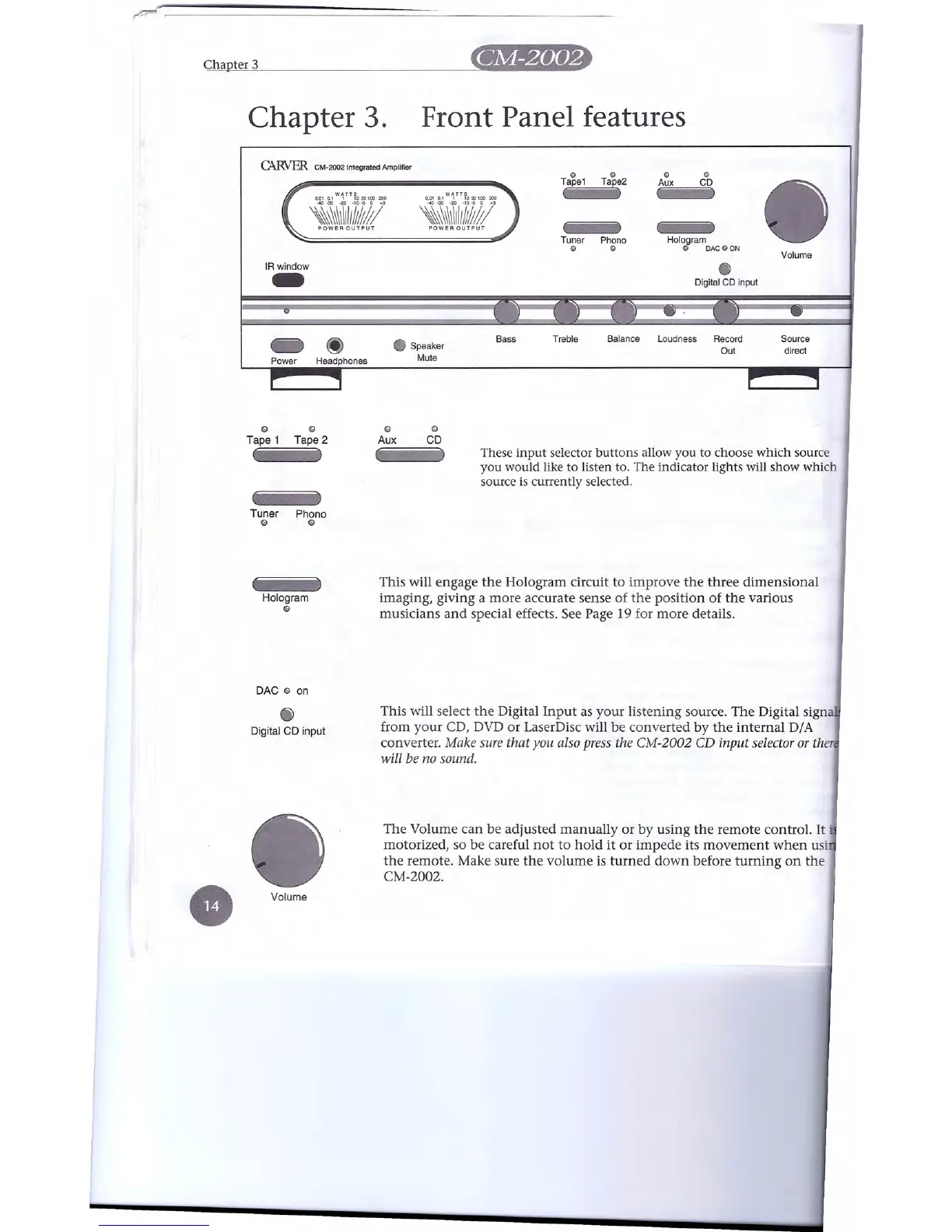
These input selector buttons allow you to choose which source
you would like to listen to. The indicator lights will show which
source is currently selected.
Tuner Phono
G G
This will engage the Hologram circuit to improve the three dimensional
imaging, giving a more accurate sense of the position of the various
musicians and special effects. See Page 19 for more details.
Hologram
G
DAC
G
on
Digital CD input
This will select the Digital Input as your listening source. The Digital sign
from your CD, DVD or LaserDisc will be converted by the internal D/A
converter.
Make sure that you also press the CM-2002
CD
input selector or th
will be no sound.
The Volume can be adjusted manually or by using the remote control. It .
motorized, so be careful not to hold it or impede its movement when us'
the remote. Make sure the volume is turned down before turning on the
CM-2002.
Volume


 To Next Page