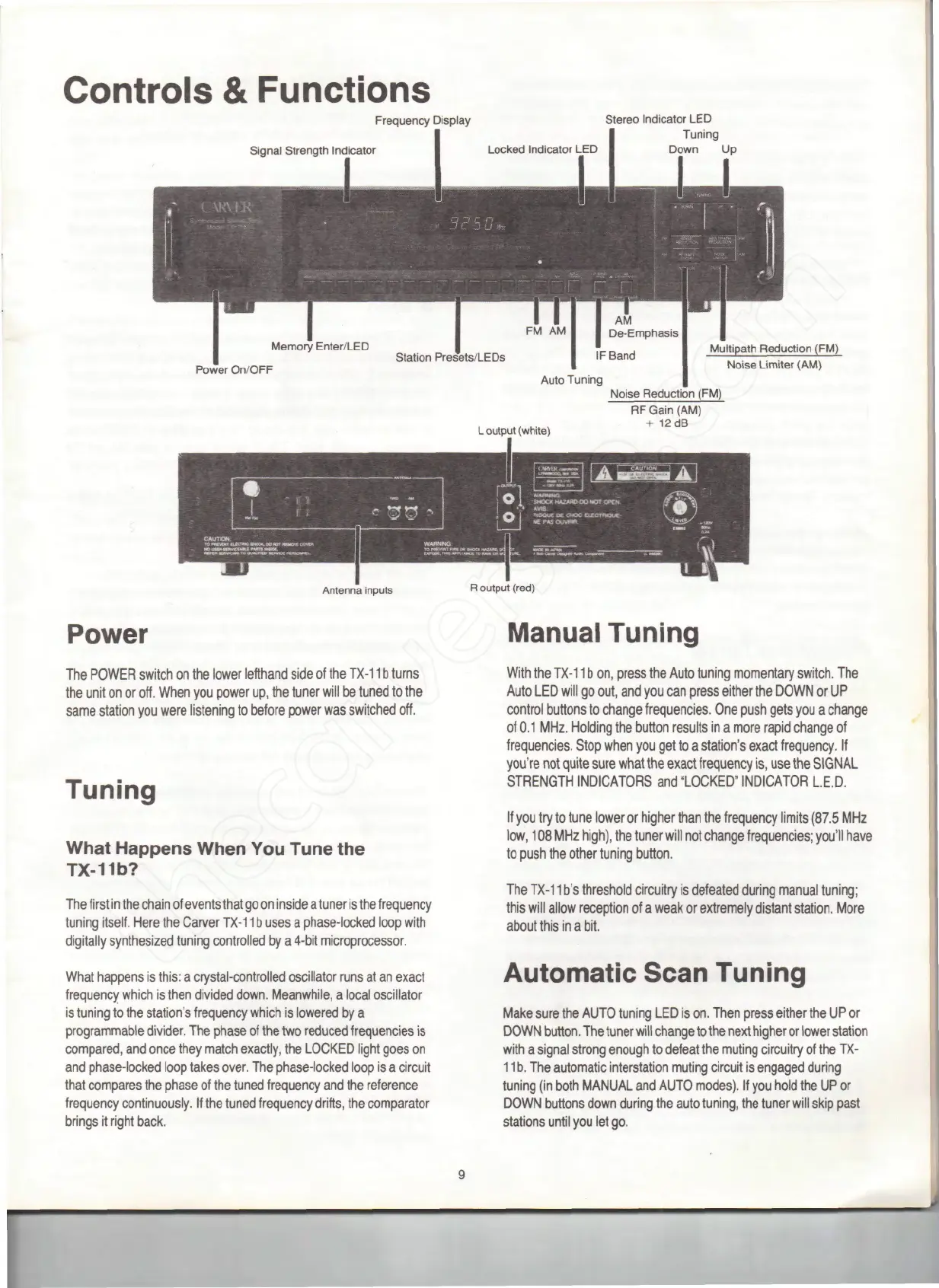
Controls
&
Functions
Frequency Display
Signal
Strength Indicator
Stereo Indicator
LED
Tuning
Down
Up
Power
On/OFF
FM
AM I
IF
Band
Auto
Tuning
Multipath
Reduction (FM)
Noise
Limiter
(AM)
L
output (white)
Noise Reduction (FM)
RF
Gain (AM)
+
12dB
Antenna
inputs
Power
The
POWER switch
on the
lower
lefthand
side
of the
TX-11
b
turns
the
unit
on or
off. When
you
power
up, the
tuner will
be
tuned
to the
same station
you
were listening
to
before power
was
switched off.
R
output
(red)
Manual Tuning
Tuning
What
Happens
When
You
Tune
the
TX-11b?
The
first
in the
chain
of
events that
go on
inside
a
tuner
is the
frequency
tuning itself. Here
the
Carver
TX-11
b
uses
a
phase-locked loop with
digitally synthesized tuning controlled
by a
4-bit microprocessor.
What
happens
is
this:
a
crystal-controlled oscillator runs
at an
exact
frequency which
is
then
divided
down. Meanwhile,
a
local oscillator
is
tuning
to the
station's frequency which
is
lowered
by a
programmable
divider.
The
phase
of the two
reduced
frequencies
is
compared,
and
once they match exactly,
the
LOCKED light goes
on
and
phase-locked loop takes over.
The
phase-locked loop
is a
circuit
that compares
the
phase
of the
tuned frequency
and the
reference
frequency continuously.
If the
tuned frequency drifts,
the
comparator
brings
it
right back.
With
the
TX-11
b on,
press
the
Auto tuning momentary switch.
The
Auto
LED
will
go
out,
and you can
press either
the
DOWN
or UP
control buttons
to
change frequencies.
One
push gets
you a
change
of
0.1
MHz. Holding
the
button results
in a
more rapid change
of
frequencies. Stop when
you get to a
station's exact frequency.
If
you're
not
quite
sure
what
the
exact
frequency
is, use the
SIGNAL
STRENGTH INDICATORS
and
"LOCKED" INDICATOR L.E.D.
If
you try to
tune lower
or
higher than
the
frequency limits (87.5
MHz
low,
108
MHz
high),
the
tuner will
not
change frequencies;
you'll
have
to
push
the
other tuning button.
The
TX-11
b's
threshold circuitry
is
defeated during manual tuning;
this
will
allow reception
of a
weak
or
extremely distant station. More
about this
in a
bit.
Automatic
Scan Tuning
Make
sure
the
AUTO tuning
LED is on.
Then press either
the UP or
DOWN
button.
The
tuner
will
change
to the
next
higher
or
lower
station
with
a
signal strong enough
to
defeat
the
muting circuitry
of the TX-
11
b. The
automatic interstation muting circuit
is
engaged during
tuning
(in
both MANUAL
and
AUTO modes).
If you
hold
the UP or
DOWN buttons down during
the
auto tuning,
the
tuner will skip past
stations
until
you let go.
"



 To Next Page