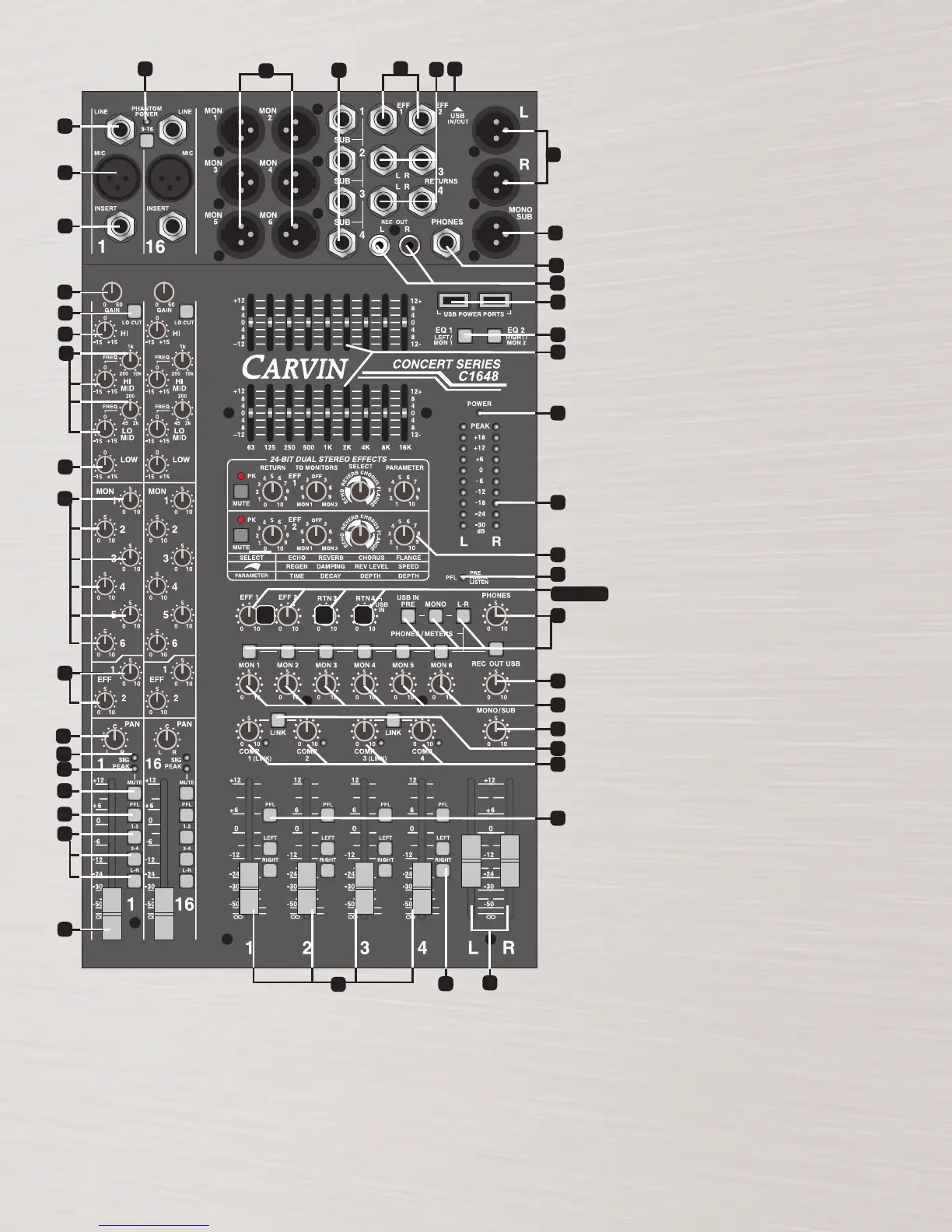
25. GROUP ASSIGNMENT SWITCHES
These switches send the sub-group mix to the main
L/R faders. For mono mixing, assign to both L/R.
26. 1-4 GROUP COMPRESSORS/LEDs
Each of the 4 sub groups features a compressor, which
will reduce the output when it gets above the level you set
with the COMP control. Set at “0” there is no effect. As you
turn UP the COMP knob, the lower the maximum level. The
compressor circuit is pre-fader, so you can set the COMP
once and still adjust the group fader as needed. The LED will
indicate when the compressor is working.
27. COMP LINK SWITCHES
These switches link the COMP controls for stereo pairs of
equal setting. The COMP1 or COMP3 control becomes the
master for the pair. Link 1-2 or 3-4.
28. MASTER L/R FADERS
These faders adjust the level of the main stereo output created
by all channels and groups assigned to L/R faders. Output
appears at the L/R balanced XLR connectors
(#44)
.
29. MONO/SUB CONTROL
A mono output is created from the
L/R
master faders (post)
for center, subwoofers, or side fill speakers. The output is
at the MONO/SUB XLR connector (#45).
30. REC OUT/USB CONTROL
This control sets the level sent to REC OUT L-R RCA jacks
and to the rear USB port. The signal source is the main
L-R mix (pre-fader).
31. HEADPHONE AND METER SOURCE
The stereo PHONES control sets the level of the PHONES
jack (#42). The PFL, L/R, MONO, MON 1-MON 6, USB
IN, and REC OUT USB switches allow for monitoring of
these sources through the headphones and the L/R LED
METERS (#33).
32. PFL RED LED
Indicates that the headphone & meters are monitoring
only the channels or groups where the PFL is switched on.
33. L/R LED VU METERS
This group of 10 LED’s offer 6 dB increment resolution that
give the operator a visual indication of the mixer’s output levels,
selectable by the METER SOURCE or PFL switches
(#31).
34. DUAL 9 BAND GRAPHIC EQs are one
octave filters at 63,125, 250, 500, 1k, 2k, 4k, 8k & 16k
Hz centers that offer ±12dB adjustment to help eliminate
feedback & enhance tone for the main or monitor mix.
35. EQ SWITCH 1 & 2
These switches swap the 9 band EQ’s from the standard L/R
main outputs “OUT” to the MON 1 & MON 2 outputs “IN”
respectively.
36. USB POWER PORTS
Use these ports to supply +5V USB power to run accessories
like LED lighting or to charge MP3 players. Connect audio
outputs to RETURNS 3 or 4, or to channel inputs.
37. POWER BLUE LED Verifies the mixer is on.
38. EFFECTS 1 & 2 OUTPUT JACKS
1/4” outputs drive external effects. Connect your effects
processor’s inputs to these jacks.
39. RETURNS 3 & 4 L-R INPUT JACKS
Returns a stereo signal from an external effect. Connect
your effects processors’ stereo outputs to these jacks. If
only one jack is used, the mono signal will go to both L/R .
40. MONITOR 1-6 XLR OUTPUTS
The C SERIES provides balanced XLR outputs. Connect your
monitor power amps to these connectors.
41. GROUP 1-4 OUTPUT JACKS
The C SERIES provides 4 balanced 1/4” outputs. Connect
your 4-track recorder or side fill power amps to these jacks.
42. HEADPHONE JACK
1/4” stereo jack for headphone or control room output.
43. REC OUT L-R RCA JACKS
RCA jacks for connecting to a recorder input.
44. LEFT & RIGHT XLR OUTPUT CONNECTORS
This set of balanced XLR connectors are for connecting
the main L/R output to power amps or recording gear.
45. MONO/SUB XLR OUTPUT CONNECTOR
A bal. XLR output is featured for side fills or subwoofers.
46. REAR USB CONNECTOR
This rear USB connector will transmit audio to and from
a computer for recording with compatible software and
drivers. Output signal is the pre-fader L-R stereo mix
sent via the REC OUT USB LEVEL. Input from a computer
comes into the RETURN 4 bus, controlled at the RTN4/
USB control.
1
17
40
41
2
3
4
5
7
8
9
10
11
12
13
14
16
6
43
42
45
36
25
28
39
46
38
6
15
44
35
37
33
22
30
31
32
34
29
26
27
24
23
18
20 2119
19, 20, 21
11


 To Next Page
 Loading...