13
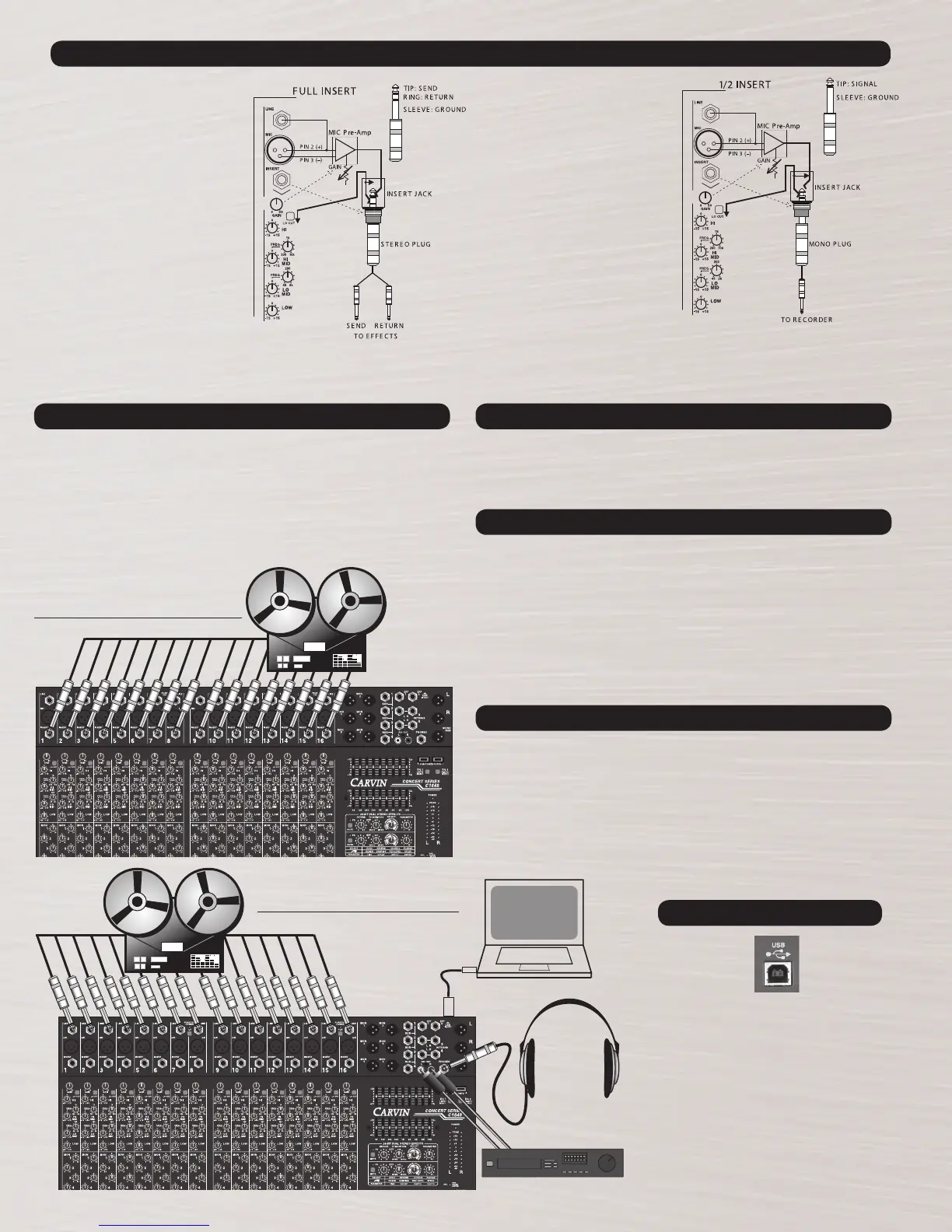
DIRECT OUT (HALF INSERT)
Plug a 1/4” mono cable “half way”
into the Channel Insert Jack. The
“half” insert connection creates a
send signal without breaking the
channels signal path. The insert in
this mode is no longer used as an
insert but becomes what is called a
DIRECT out.
FULL INSERT
The insert jack is a Tip Ring Sleeve (TRS)
1/4” phone jack, where the tip is the send,
the ring is the return and the sleeve is
ground. When used as an insert point
or in full INSERT mode, the channel is
opened up to allow an external piece of
equipment to be inserted into the chan-
nels signal path. The signal coming from
the microphone preamplifier will go out
through the external equipment before it
can continue back through the channel,
re-entering before the channel EQ controls.
Most external equipment is not set up for
the TRS plug directly so an adapter cable
is required. Plug the adapter’s 1/4” stereo
TRS end into the mixer insert all the way.
The two mono 1/4” jacks at the opposite
end are the send and return cables. If both
an INSERT and a DIRECT out is required,
put a “Y” adapter on the SEND cable.
INSERTS AND DIRECT OUTS
A multi-track recorder can be connected to the channel INSERT jacks (1/2 plugged for
Direct Out). This set up could be used with a live set up to record a live show.
Set the GAIN control at the top of each channel so the signal going to your recorder is
not too loud or too weak. Too loud of a signal will distort the input of your recorder, and
there is no correction for a distorted track. Too weak of a signal will reduce recording
quality and increase noise.
With this setup, note that the channel EQ will not affect what is being recorded. The
EQ for each track will be adjusted at mixdown.
USB TO COMPUTER
MULTI TRACK OUTPUTS
MULTI-TRACK RECORDING
To re-record or edit a certain track while listening to the tracks you want to keep, you
can setup only the channel you want to re-record for “Recording”. Have the other chan-
nels set up for “Mixdown”. On the multi-track recorder, enable “Record” ONLY for the
channel you want to edit or the other recorded tracks will likely be erased.
MULTI-TRACK EDITING
The rear USB connector offers an added interface
for recording. Connecting a USB cable between a
computer and a USB equipped Carvin mixer will allow
recording on a computer (with compatible USB drivers
and software).
The L-R stereo mix, (pre-fader, pre-graphic EQ) is
sent via the REC OUT USB LEVEL to the rear USB port.
Inversely, you can bring audio in from computer
playback via USB. The audio comes into the RETURN
4 bus on the mixer to the RTN4/USB LEVEL control.
The USB features up to 48kHz, 16 BIT audio resolution.
USB IN/OUT
MULTI TRACK INPUTS
MULTI-TRACK RECORDING SETUP
MULTI-TRACK MIXDOWN SETUP
Another way to connect your multi-track recorder is to use an insert adapter or TRS
cable on each Channel Insert for each track. Use the “tip” connection for the recorder
inputs, and the “ring “ connection for the recorder outputs. With this setup, you can
record, then mixdown without changing cabling.
A much simpler recording setup would be to use a 4-track recorder, and use each of the
4 subgroups as your track outputs. For example, record drums on subgroup 1, vocals
on 2, guitars on 3, and bass or keys on group 4. This is much more limited to what you
can to with mixdown, but can be great for a live recording at a show when limited time
is available for setup or recording.
ALTERNATE RECORDING SETUPS
Use this set up for mixing down from a multi track recording to a two track recorder, or
to the built-in USB stereo output. Connect the Multi-track recorder’s outputs to the LINE
inputs of the channels. Each channel’s Gain control should be set to minimum and use
the channel fader for level. Monitor your mixdown sessions with high quality headphones
connected to the Headphone jack, or connect a professional power amplifier (Carvin’s
DCM power amps) and high quality studio monitors to your main L/R outputs. The internal
DSP or the external effects loops can both be used during mixdown.
Mixing is a practiced skill. A trained ear will know when to add EQ, effects, compression,
gate. Listen to your favorite CD through the same headphones or monitoring system
you plan to mix through. Note each instrument’s level and position in the stereo mix.
Use this as a guide to help mix your project.
MULTI-TRACK MIXDOWN


 To Next Page
 Loading...