13
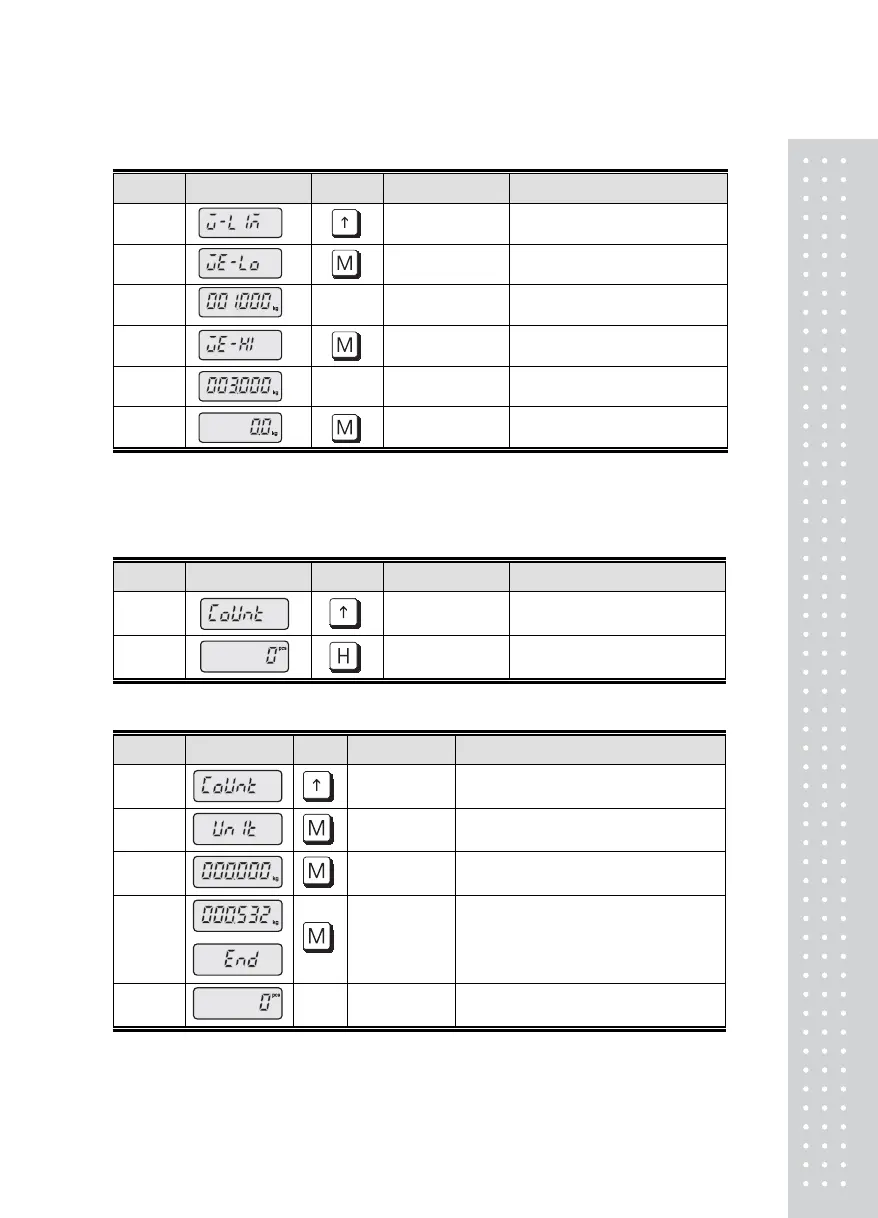
■ In case of resetting the High / Low value
Display KEY PLATFORM DESCRIPTION
STEP 1
Press twice
STEP 1 Press once (Low weight input)
STEP 1 INPUT Refer to 'Digit input' In page 11
STEP 1 High value input
STEP 1 INPUT Refer to 'Digit input' In page 11
STEP 1 Empty Generally operated
5. COUNT MODE CONVERSION
■ In case of no setting the unit / sample weight
Display KEY PLATFORM DESCRIPTION
STEP 1
Press three times
STEP 2 Empty
Press once
Generally operated
■ In case of setting the unit weight (Min. range of unit weight ; Min. Division)
Display KEY PLATFORM DESCRIPTION
STEP 1
Press three times
STEP 2 Press once
STEP 3 Display the set weight
STEP 3
Input the unit weight
Digit input in page 11
STEP 5
Press 'Mode' key to round & display
unit weight. Generally operated
Step 5. Ex) Min. division is 0.1
Input the unit weight as 0.532 and round off the second place of decimal to 0.5



 To Next Page