29
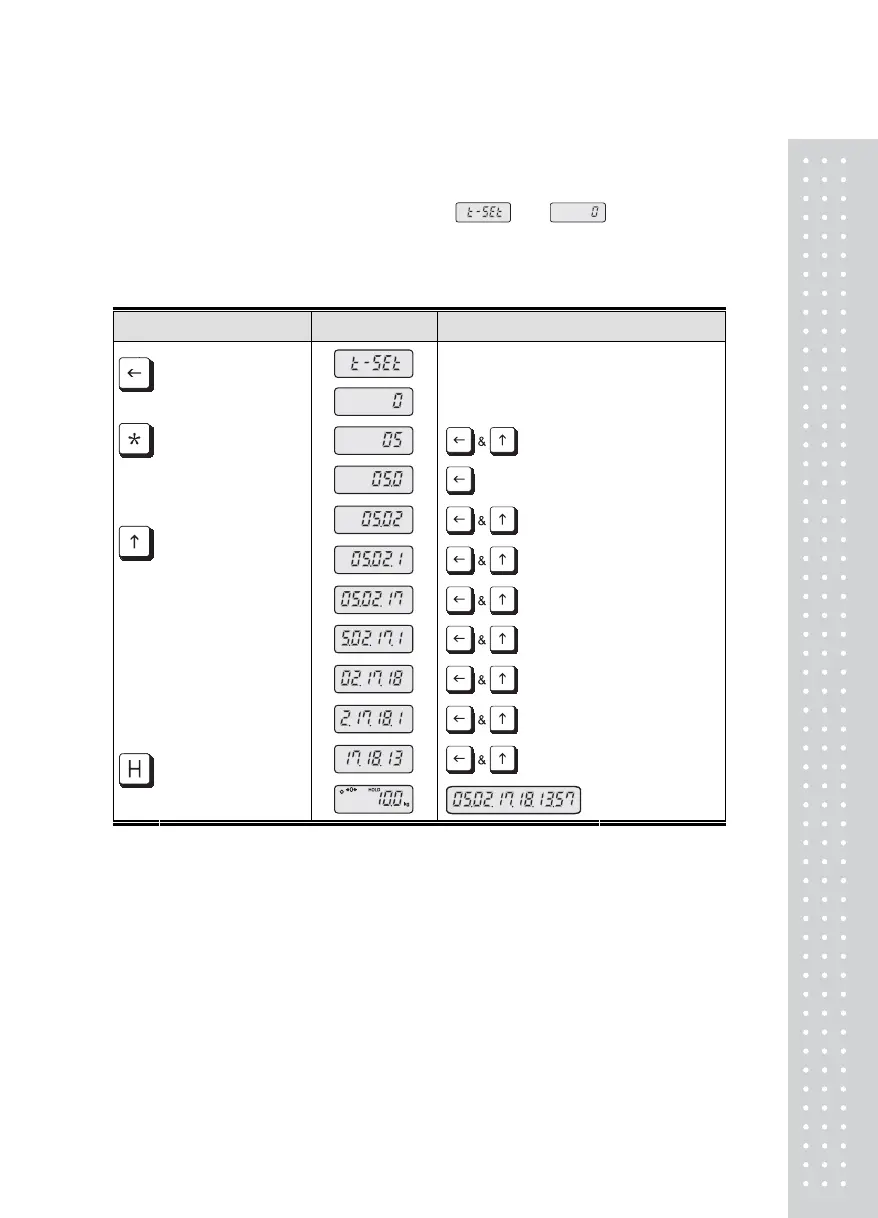
Current date & time setting method
In the normal mode,
Press the TARE Key long and can see the message and .
After this step, You can input the current date and time as follows
How to set the current date and time
KEY LCD SCREEN DESCRIPTION
Date & time setting mode
Initial value
: increase 5 [Year : 2005]
: increase 2 [Month : 02]
: increase 1
: increase 7 [Day : 17]
: increase 1
: increase 8 [Hour : 18]
: increase 1
: increase 3 [Minute]
[TARE] Key :
Shift one digit
to the left
[STAR] Key :
Shift one digit
to the right
[ZERO/MODE] Key :
Reset the input
value
[ N / G] Key :
Increase input
value
[ENTER] Key :
Exit this input mode &
Go to normal mode
2005/02/17
18:13
If you input wrong date, this scale di※ splay "out" message and doesn't save the date.



 To Next Page