EasyManua.ls Logo

Casablanca 99195 - User Manual

Casablanca 99195
2 pages
Print Icon
To Next Page IconTo Next Page
Loading...
M6027 • 01/13/17 • © 2017 Casablanca Fan Company
This device complies with part 15 of the FCC Rules. Operation is subject
to the following two conditions: (1) this device may not cause harmful
interference, and (2) this device must accept any interference received,
including interference that may cause undesired operation.
This device complies with RSS-210 of Industry Canada. Operation is
subject to the following two conditions: (1) this device may not cause
interference, and (2) this device must accept any interference, including
interference that may cause undesired operation of the device.
This equipment has been tested and found to comply with the limits for
a Class B digital device, pursuant to Part 15 of the FCC Rules. These
limits are designed to provide reasonable protection against harmful
interference in a residential installation. This equipment generates, uses
and can radiate radio frequency energy and, if not installed and used in
accordance with the instructions, may cause harmful interference to radio
communications. However there is no guarantee that interference will not
occur in a particular installation. If this equipment does cause harmful
interference to radio or television reception, which can be determined by
turning the equipment off and on, the user is encouraged to try to correct
the interference by one or more of the following measures: Reorient
or relocate the receiving antenna, Increase the separation between the
equipment and receiver, Connect the equipment into an outlet on a circuit
different from that to which the receiver is connected. Consult the dealer
or an experienced radio/TV technician for help. Note: Any changes or
modifications to the transmitter or receiver not expressly approved by
Hunter Fan Company may void ones authority to operate this remote
control.
This product conforms to UL Standard 1917.
WARNINGS
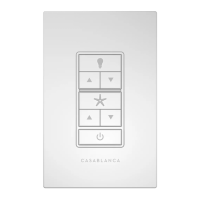
CEILING FAN REMOTE WALL CONTROL
Model 99195
CASABLANCA FAN COMPANY CONTROL LIMITED WARRANTY
This product is warranted to the original purchaser by Casablanca
Fan Company against defects in material and workmanship for
one (1) year from date of purchase. During the warranty period,
we will repair or, at our option, replace a defective product at
no charge. For information on how to obtain service, contact
Casablancas Service Department by calling our toll-free number
at 1-888-227-2178. Damage to the product caused by mishandling,
improper installation or modification is not covered by this
warranty. This warranty is given in lieu of all other warranties
expressed or implied. Some states do not allow limitations of time
on an implied warranty, therefore the above limitations may not
apply in every case. This warranty states specific legal rights which
may vary from state to state.
2
4
Installing the baery
Wiring the Wall Control
INSTALLATION
Before installation, use the pull chains to set
the fan speed to HIGH and the light to ON.
Ensure the power is OFF at the outlet box and
wall switch location before proceeding with
installation.
Turn Power
OFF
1
Turning off the power
To avoid possible electrical shock, before installing or servicing your fan, disconnect the power by
turning off the circuit breakers to the outlet box and associated wall switch location. If you cannot
lock the circuit breakers in the off position, securely fasten a prominent warning device, such as a
tag, to the service panel.
To access the baery compartment, slide the
baery door up.
Replace the used baery with two AAA baeries
when needed.
Battery
Door
READANDSAVETHESEINSTRUCTIONS
If you are installing multiple remote-controlled fans
on the same circuit breaker,
you may need to perform a few extra steps to prevent interference or faulty
operation of your remote controls.
Go to www.CasablancaFanCo.com/FAQs and click “How do I properly install multiple
remote-controlled fans?” for more information.
1. Connect the grounding wire from
the wall control to the ground
control from the switch box using
the provided wire nuts.
2. Connect the “LIVE IN” from the
switch box to the “~VAC” from the
wall control using the provided
wire nuts.
3. Connect the “LIVE OUT” from the
switch box to the “FAN” out from
the wall control using the provided
wire nuts.
4. Push all wires into the switch box.
3
Installing the Wall Plate Bracket
Snap the Wall Control into the Wall
Plate Bracket. Ensure that the lip on
the bracket is facing outward.

Question and Answer IconNeed help?

Do you have a question about the Casablanca 99195 and is the answer not in the manual?

Summary

Casablanca Fan Company Limited Warranty

Installation Instructions

Power Disconnection

Ensure power is OFF at the outlet box and wall switch before proceeding with installation.

Battery Installation

Slide the battery door up to access and replace the battery with two AAA batteries.

Wall Plate Bracket Mounting

Snap the Wall Control into the Wall Plate Bracket, ensuring the lip faces outward.

Wall Control Wiring

Connect grounding, ~VAC, and FAN wires using provided wire nuts as per instructions.

Regulatory Compliance and Warnings

FCC and Industry Canada Compliance

Device complies with FCC Rules Part 15 and Industry Canada RSS-210 for operation.

Multiple Remote Fan Installation Guidance

Refer to the website for steps to prevent interference with multiple remote fans.

Wall Control Installation and Setup

Securing the Wall Control

Install longer screws through wall control slots into switch box holes.

Attaching the Wall Plate

Push the wall plate onto the Wall Plate Bracket until it snaps into place.

Powering On and Initial Setup

Set fan speed to HIGH and light to ON via pull-chain before restoring power.

Remote Pairing Procedure

Long press Fan and Light buttons together within 3 minutes of restoring power to pair.

Remote Function Reference

Consult the remote function card for detailed information on wall control usage.

Remote Functions Guide

Light Control Functions

Control light on/off, dimming, high, low, and dimming mode.

Fan Control Functions

Control fan on/off, speed, direction, updraft, and downdraft.

Power and Pairing Functions

Control overall power and initiate the pairing function for WiFi enabled fans.

Summary

Casablanca Fan Company Limited Warranty

Installation Instructions

Power Disconnection

Ensure power is OFF at the outlet box and wall switch before proceeding with installation.

Battery Installation

Slide the battery door up to access and replace the battery with two AAA batteries.

Wall Plate Bracket Mounting

Snap the Wall Control into the Wall Plate Bracket, ensuring the lip faces outward.

Wall Control Wiring

Connect grounding, ~VAC, and FAN wires using provided wire nuts as per instructions.

Regulatory Compliance and Warnings

FCC and Industry Canada Compliance

Device complies with FCC Rules Part 15 and Industry Canada RSS-210 for operation.

Multiple Remote Fan Installation Guidance

Refer to the website for steps to prevent interference with multiple remote fans.

Wall Control Installation and Setup

Securing the Wall Control

Install longer screws through wall control slots into switch box holes.

Attaching the Wall Plate

Push the wall plate onto the Wall Plate Bracket until it snaps into place.

Powering On and Initial Setup

Set fan speed to HIGH and light to ON via pull-chain before restoring power.

Remote Pairing Procedure

Long press Fan and Light buttons together within 3 minutes of restoring power to pair.

Remote Function Reference

Consult the remote function card for detailed information on wall control usage.

Remote Functions Guide

Light Control Functions

Control light on/off, dimming, high, low, and dimming mode.

Fan Control Functions

Control fan on/off, speed, direction, updraft, and downdraft.

Power and Pairing Functions

Control overall power and initiate the pairing function for WiFi enabled fans.

Overview

This document describes the Casablanca Fan Company Ceiling Fan Remote Wall Control, Model 99195, providing installation instructions, operational features, and warranty information.

Function Description:

The Casablanca Fan Company Ceiling Fan Remote Wall Control, Model 99195, is designed to provide remote control functionality for Casablanca ceiling fans. It allows users to control various fan and light functions directly from a wall-mounted unit. The control is capable of turning the fan on/off, adjusting fan speed (high, low), reversing fan direction (updraft, downdraft), turning the light on/off, dimming the light, and activating a dimming mode. It also includes a pairing function to link with the Casablanca receiver and a reset function for WiFi-enabled fans.

Important Technical Specifications:

  • Model: 99195
  • Compliance: UL Standard 1917, FCC Part 15, Industry Canada RSS-210.
  • Power Source: Requires two AAA batteries for operation.
  • Wiring: Connects to existing switch box wiring, including grounding wire, "LIVE IN" (from switch box) to "~VAC" (wall control), and "LIVE OUT" (from switch box) to "FAN" (wall control).
  • Interference: Designed to comply with FCC and Industry Canada regulations regarding harmful interference. Users are advised on measures to correct interference if it occurs, such as reorienting antennas or increasing separation between devices. Any unauthorized changes or modifications to the transmitter or receiver may void the user's authority to operate the remote control.

Usage Features:

  • Pre-installation Setup: Before installation, the fan speed must be set to HIGH and the light to ON using the fan's pull chains. Power must be turned OFF at the outlet box and wall switch location before proceeding with installation to prevent electrical shock.
  • Battery Installation: The wall control requires two AAA batteries, accessed by sliding the battery door up.
  • Wall Plate Bracket Installation: The wall control snaps into a wall plate bracket, ensuring the lip on the bracket faces outward.
  • Wall Control Installation: The wall control is secured into the switch box using longer screws through its slots.
  • Wall Plate Installation: The wall plate snaps onto the wall plate bracket.
  • Power Restoration: After installation, the fan's pull-chain switch must be used to set the fan speed to the HIGH position before operation.
  • Pairing: To pair the remote to a Casablanca receiver, the Fan and Light buttons must be pressed and held simultaneously within three minutes of restoring power to the fan.
  • Light Functions:
    • Light On/Off: Single press of the light button.
    • Light Dimming Control: Long press of the light button.
    • Light High: Pressing the "up" arrow button.
    • Light Low: Pressing the "down" arrow button.
    • Dimming Mode On/Off: Long press of the "up" and "down" arrow buttons simultaneously.
  • Fan Functions:
    • Fan On/Off: Single press of the fan button.
    • Fan Speed Control: Pressing the "up" or "down" arrow buttons.
    • Fan High: Pressing the "up" arrow button.
    • Fan Low: Pressing the "down" arrow button.
    • Fan Reverse: Long press of the fan button.
    • Fan Updraft: Long press of the fan button and the "up" arrow button simultaneously.
    • Fan Downdraft: Long press of the fan button and the "down" arrow button simultaneously.
  • Power On/Off: Long press of the power button.
  • Reset: A reset function is available for WiFi-enabled fans.
  • Multiple Fan Installation: If installing multiple remote-controlled fans on the same circuit breaker, additional steps may be required to prevent interference. Users are directed to the Casablanca Fan Company website (www.CasablancaFanCo.com/FAQs) for more information on "How do I properly install multiple remote-controlled fans?"

Maintenance Features:

  • Battery Replacement: The wall control requires periodic replacement of two AAA batteries.
  • Warranty: The product is warranted to the original purchaser for one year from the date of purchase against defects in material and workmanship. During this period, Casablanca Fan Company will repair or replace defective products at no charge.
  • Service: To obtain service, customers should contact Casablanca's Service Department at 1-888-227-2178.
  • Warranty Exclusions: Damage caused by mishandling, improper installation, or modification is not covered under the warranty.
  • Safety: Before any installation or servicing, it is crucial to disconnect power by turning off circuit breakers to the outlet box and associated wall switch location. If circuit breakers cannot be locked in the off position, a prominent warning device (such as a tag) should be securely fastened to the service panel.

Casablanca 99195 Specifications

General IconGeneral
BrandCasablanca
Model99195
CategoryRemote Control
LanguageEnglish

Related product manuals