6
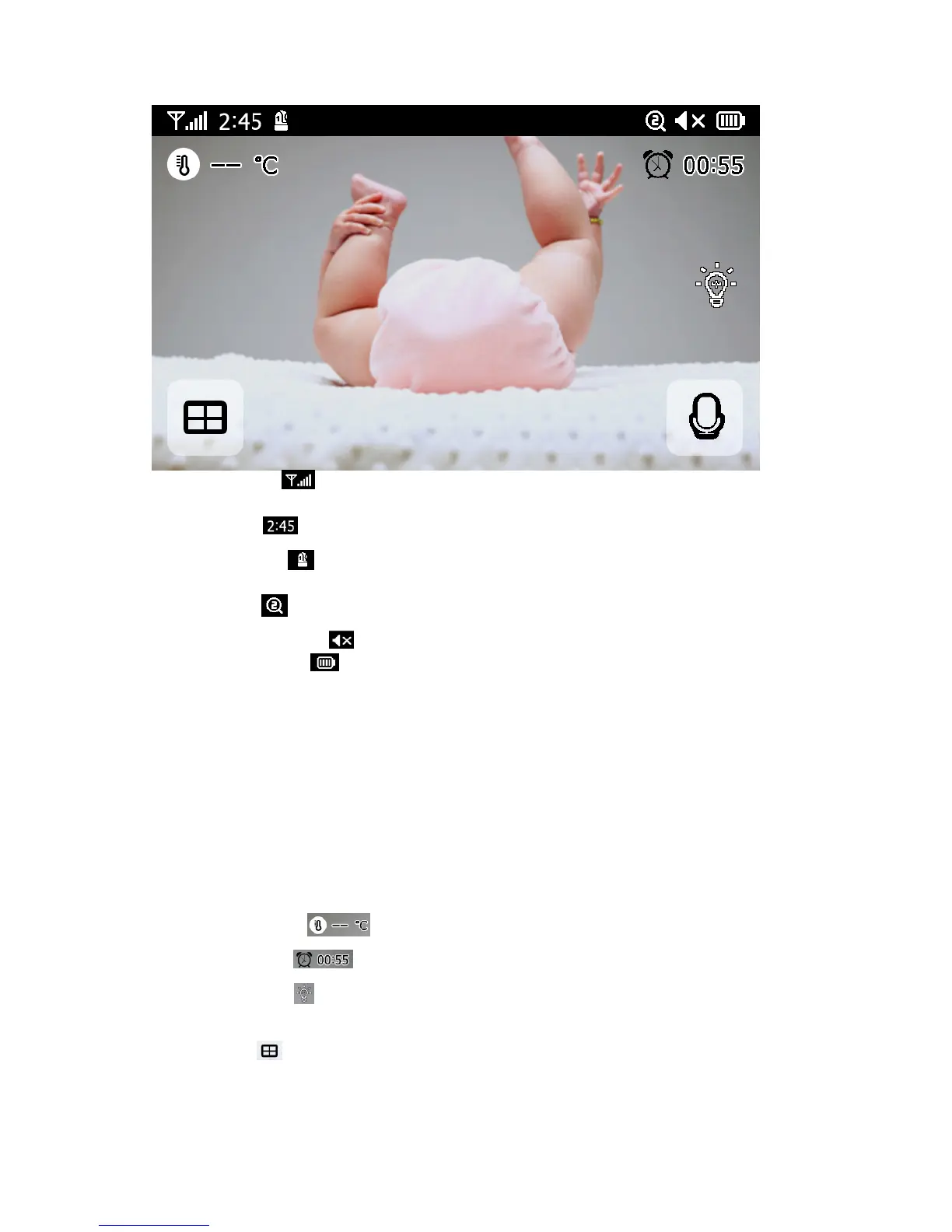
1. Signalindicator:
Showsthestrengthofthesignalbeingreceivedfromthecamera.Ifan'x'
showsuponthesignalbar,thenthesystemis"outofrange".
2. DigitalClock:
Displaysthetimethatissetonthemonitor.
3. Cameranumber:
Indicateswhichcameraisbeingdisplayedonthecurrentscreen
4. Zoommode:
IndicatesZoommode.x1/x1.5/x2
5. MonitorSpeakerMute:
Indicatesthemonitor'sspeakerismuted
6. BatteryPowerLevel:
Showsthestatusofthebattery
•BatteryStatus
AbatterychargestateindicatorwithintheLCDwillshowthelevelofchargeindicatingfivestates,
includingalert(flashingredbatteryoutline),1/4,1/2,3/4andfull.
FlashingRedBatteryFrame
¼BatteryfillRed
½BatteryfillWhite
¾
BatteryfillWhite
FullBatteryfillWhite(thepowersupplyisnotconnected)
FullBatteryfillWhiteandlightningbolticonalternately(thepowersupplyisconnected)
Whenthepowersupplyisconnectedthelightningbolticondisplayedoverthecentre.
7. TemperatureDisplay:
Showsthetemperatureoftheroom.
8. Feedtimecounter:
Acountdownclockofthefeedtime.
9. NightLightOn/Off:
Indicatesifthenightlightisonoroff.Youcancontrolthenightlighton
thecameraremotelyormanually
10. QuadMode:
Pressthisbuttontoswitchtoquadmode.Whentwocamerasarepaired,there
willbetwodisplays.Iftherearemorethantwocameraspaired,therewillbefourdisplays.Up
to4camerascanbepaired.Youcan’tlistentotheaudiofromcameras.


 To Next Page