5
GettingStarted
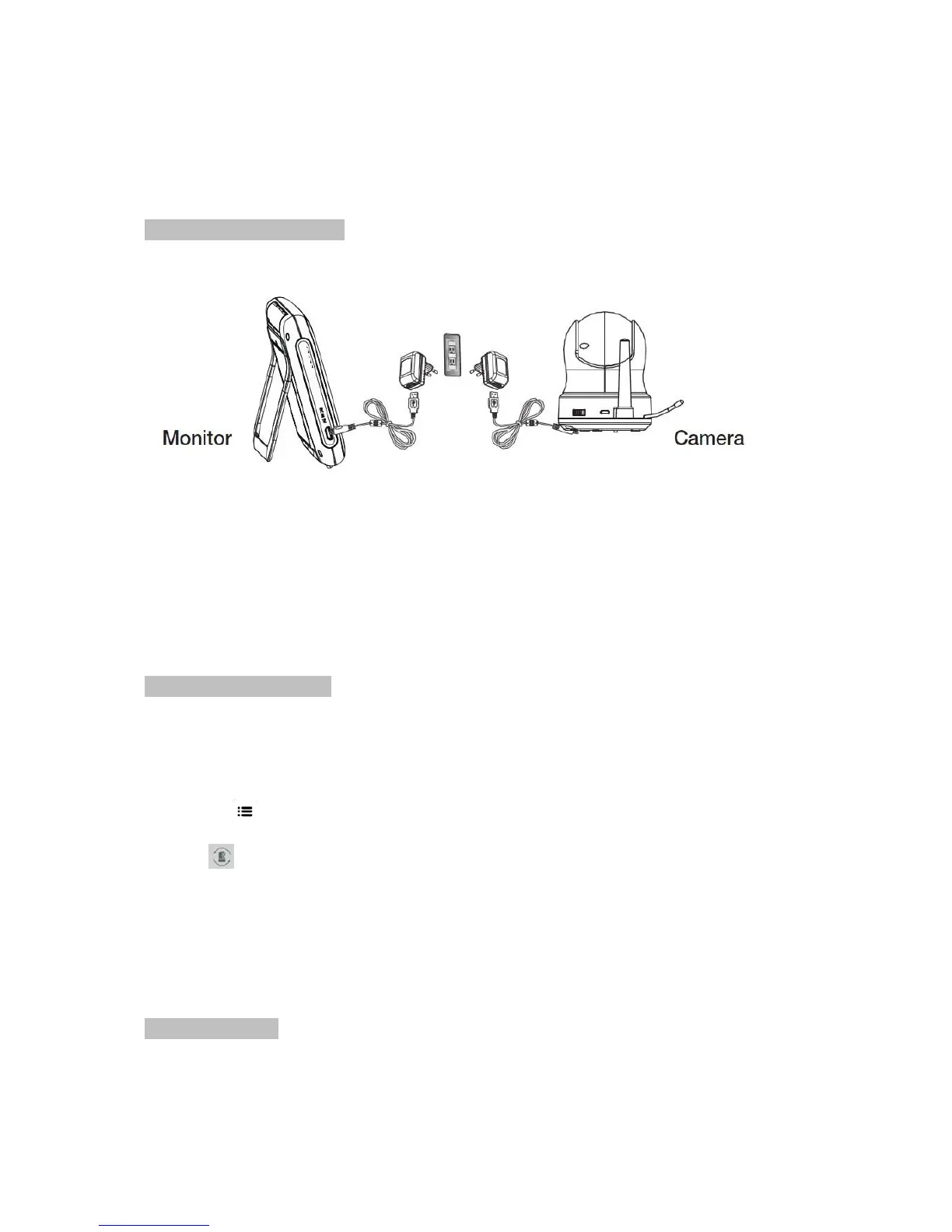
InstallingtheMonitor&Camera
1. Fullychargethemonitorviapoweradapterorchargingcradlebeforeuse.Cameramustbe
pluggedinatalltimes.
2. Placethecamerainthepreferredposition.Youcanplaceitonthetable/cabinet,ormountitona
wallviamountingframe.
3.Pressthepowerbutton
forabout4‐5secondtoturnonthemonitor.
4.Pressandholdtheon/offbuttontoswitchthecameraon.
PairingtheMonitor&Camera
Theunitsalreadycomepairedforyourconvenience.
Ifyouhaveadditionalcamera,pairyourcameraasfollow:
1.Poweronwirelessmonitorandwirelesscamera.
2.Touchtheliveviewscreenonthemonitortomakethesettingsiconappear.
3.Pressthe[
]buttononthemonitor.
4.Press[
]iconandselectcameranumber.
(Themonitorwillsearchforthecamerawhensettopairingmode.Acountdownclockwillappearat
themiddleofthescreenandwillstartcountingfrom30to0).
5.Pressthe[PAIR]buttonfoundonthebottomofthecamera.
6.
Ifthemonitorsuccessfullypairswiththecamerawithinthe30seconds,itwillautomaticallyswitch
tothecamera'scurrentview.
IndicatorDescription
LiveView


 To Next Page