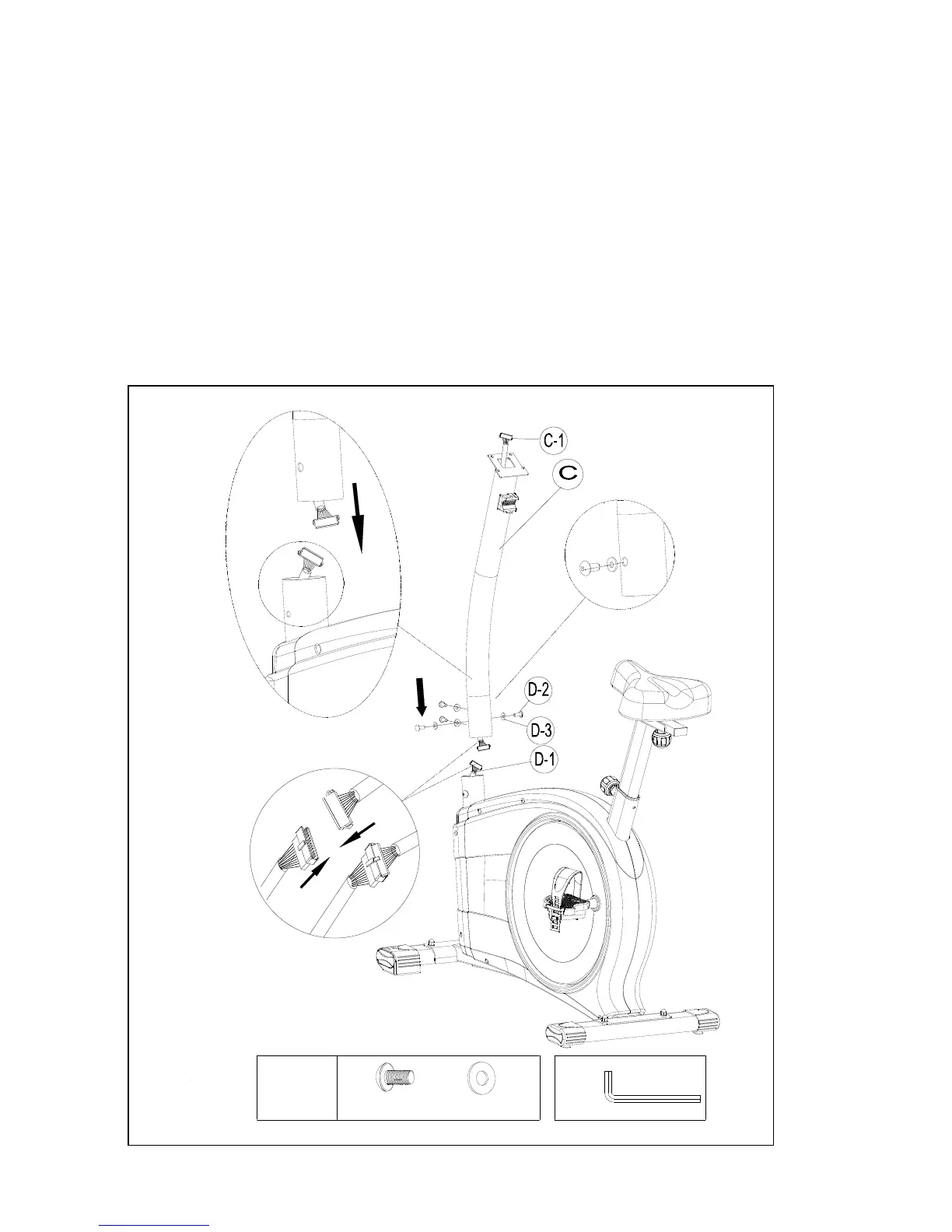
Step 4-Handlebar post Assembly
1 Please remove the M8*16L Allen bolt (pt.D-2) and Semicircle washers (pt.D-3) from the
main frame (pt.D)
2. Hold the Handlebar post (pt.C) and connect the Lower computer cable (pt.D-1) to the
Upper computer cable (pt. C-1)
3. Slide the Handlebar Post (pt.C) into the Main frame then fix it with four sets of
M8*P1.25*16L Allen screws (pt.D-2) and Semicircle washers (pt.D-3).
Remarks: Do not screw one set of the M8*16L Allen Screws and Semicircle washers too firm
at one time. It is better to fix the four sets firmly at the same time because it helps you
to change angles and to fix easily.
4*
M8*16L
Ø8*2T
1*


 To Next Page