OPERATION:
POWER ON
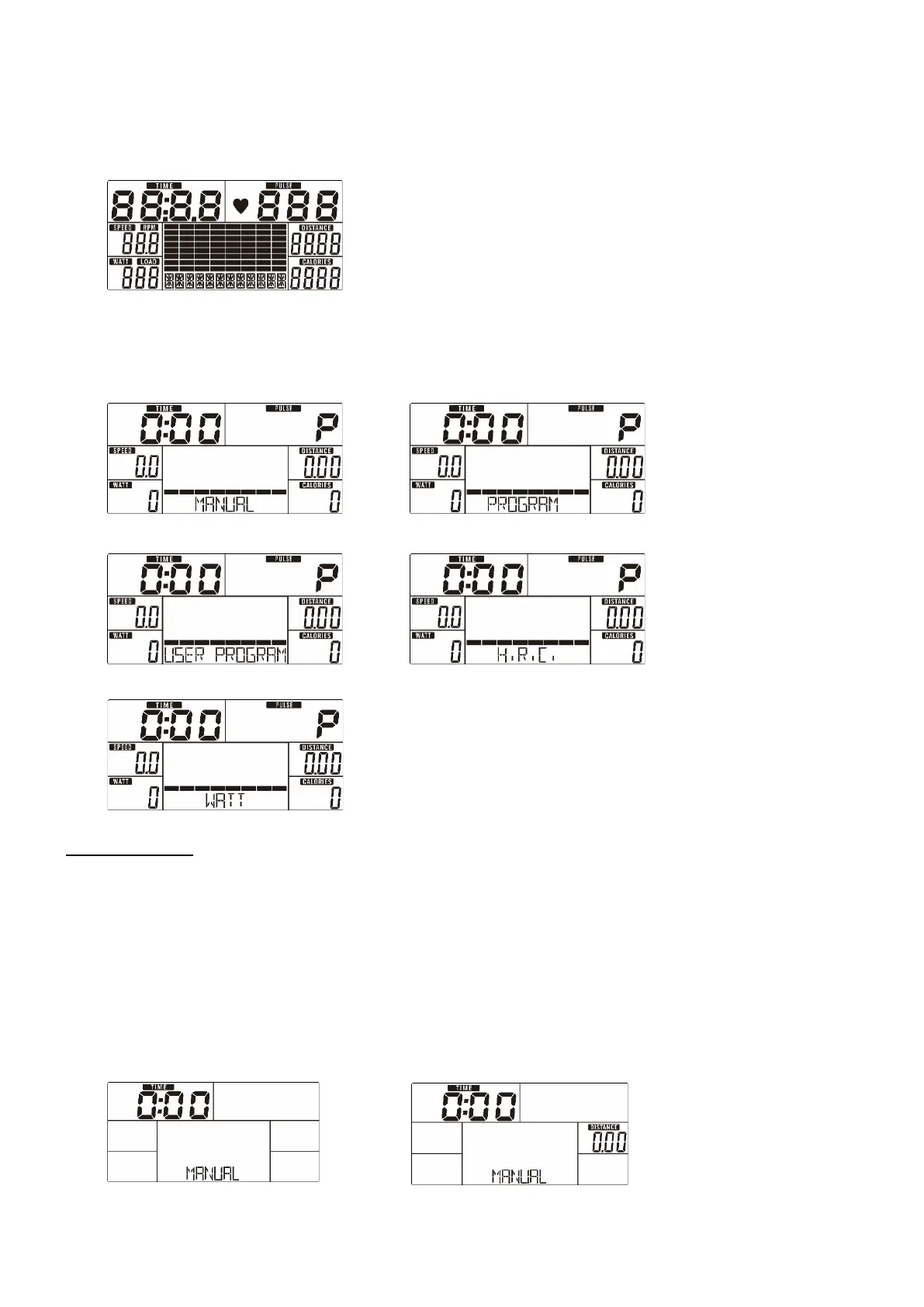
Plug in the power supply, the computer will power on and display all segments on LCD for 2
seconds (Drawing 1).
Drawing 1
WORKOUT SELECTION
Use UP or DOWN (Encoder) to select to workout manually (Drawing2)Program (Drawing 3)
User Program (Drawing 4) H.R.C. (Drawing 5) Watt(Drawing 6).
Drawing 2 Drawing 3
Drawing 4 Drawing 5
Drawing 6
Manual Mode
Press START in main menu to start workout in manual mode.
1. Use UP or DOWN (Encoder) to select workout program, choose MANUAL and press MODE
/ ENTER to get into.
2. Use UP or DOWN (Encoder) to preset TIME (Drawing 7), DISTANCE (Drawing 8),
CALORIES (Drawing 9), PULSE (Drawing 10) and press MODE / ENTER to confirm.
3. Press START/STOP to start workout. Use UP or DOWN (Encoder) to adjust the load level. If
the load level display in WATT window is not adjusted for more than 3s, it will switch to
display WATT (Drawing 11).
4. Press START/STOP to pause your workout. Press RESET to go back to the main menu.
Drawing 7 Drawing 8


 To Next Page