SECTION 2 - CONTROLS, INSTRUMENTS AND OPERATION
2ï51
Creating an operator (if applicable)
After the preferences on this screen have been
reviewed, create a new operator name or edit an
existing operator name.
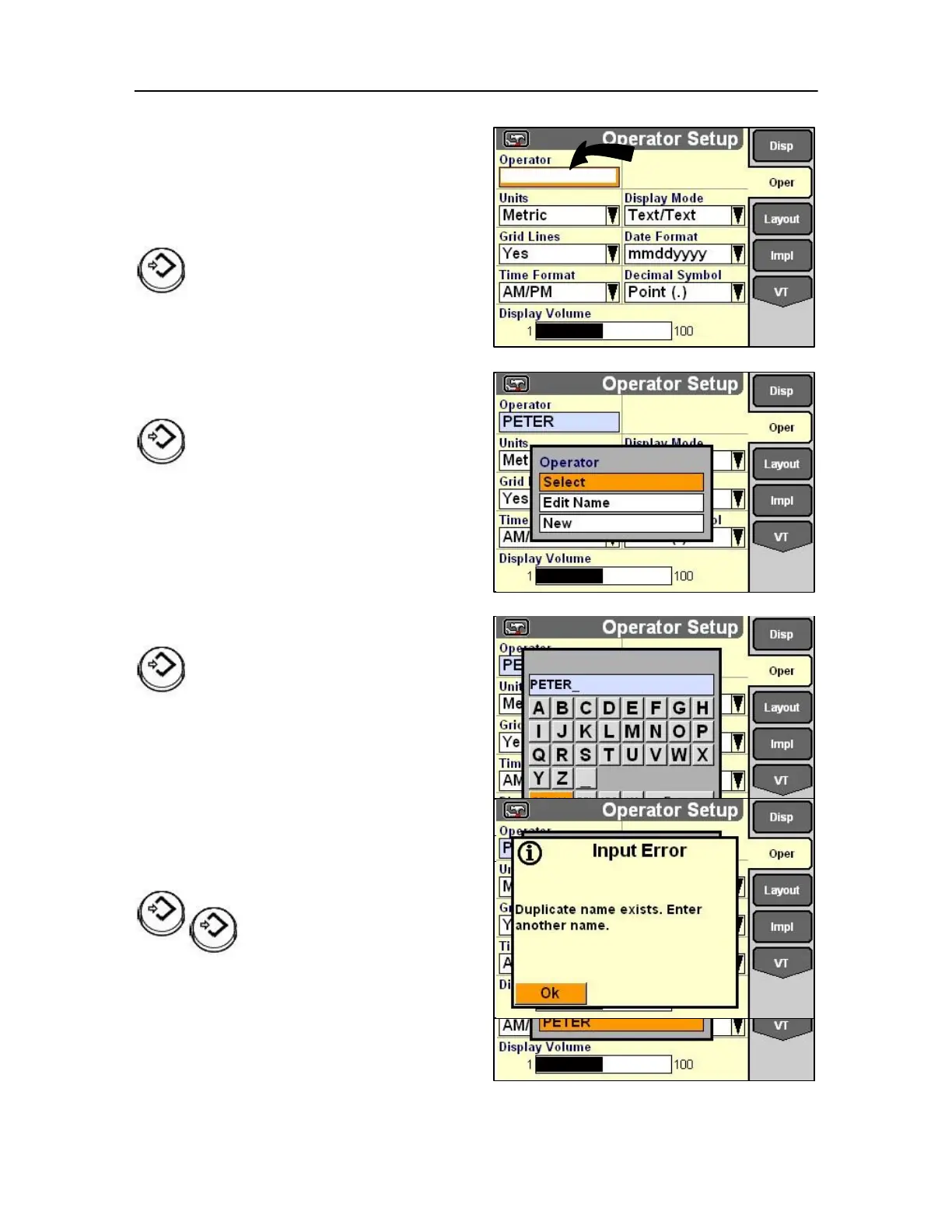
Highlight the Operator field.
Press Select or touch to display the pop-up
options list.
If operators have not been created, the only option is
New.
Press Select or touch to access the alphanumeric
keypad and enter a name for the operator.
Use the keypad to create the name.
Select Enter on the keypad to save the name and the
selected preferences to the name.
If operators have already been created, Select and Edit
Name are added to the options list in addition to
New.
Highlight New to add another operator.
Press Select or touch to access the alphanumeric
keypad and enter a name for the operator.
Select Enter on the keypad to save the name and the
selected preferences to the name.
Duplicate names are not permitted. An input error
message displays if you attempt to save a name that
already exists.
The message occurs when Enter on the keypad is
selected.
Press Select or touch to
acknowledge and clear the
message. Modify the name on the
keypad which redisplays.
Select Enter on the keypad to save the name and the 98
preferences to the name.



 To Next Page